

Best overall: an Excel pro forma invoice template for repeat export quotations. Best for shared editing: Google Sheets. Best for a fixed layout: a fillable PDF. For Ghana exporters in 2026, choose the format that keeps quantities, currency, freight and payment terms clear—not the one with the most decoration.
- An Excel pro forma invoice template is the best default for Ghana exporters preparing repeat quotations.
- Google Sheets suits shared editing; Microsoft Word suits quotations with detailed written terms.
- A pro forma invoice describes a proposed transaction; it does not replace the final commercial invoice.
- Skillspad sells business templates for Ghana businesses; choose documents around your actual export workflow.
Why this matters
A pro forma invoice sets out the proposed sale before you issue the final commercial invoice. It gives your buyer a document to review, approve or use when arranging payment. It is not proof that goods have shipped or that payment has arrived.
For a Ghana export quotation in 2026, the document needs to answer practical questions: what are you supplying, which currency applies, what does the total include, and who handles transport? A neat layout cannot compensate for an unclear delivery term.
Skillspad is for Ghana businesses seeking reusable business templates. Browse Skillspad with your document requirements in hand. Select a template for the fields and workflow it supports, not just its appearance.
What makes the best pro forma invoice template?
The best template makes the proposed transaction easy to understand and difficult to miscalculate. Judge each format against these criteria before choosing a download:
- Calculation control: Quantity, unit value and line totals should agree. A spreadsheet needs readable formulas and a clear distinction between inputs and calculations.
- Export fields: Include seller and buyer details, goods descriptions, currency, transport charges and the agreed delivery terms.
- Editable terms: You need space for payment conditions, quotation validity and product-specific notes without squeezing them into a footer.
- Buyer readability: The recipient should be able to identify the document, understand the total and distinguish it from a final commercial invoice.
- Sharing control: Choose between collaborative editing and a fixed copy. Those are different tasks, and one file does not need to perform both.
- Reuse: Keep an untouched master, create a separate file for each quotation and avoid carrying an old buyer's details into a new transaction.
There is no universal export template that settles every destination's documentation requirements. Treat the pro forma as the proposed transaction record, then confirm additional requirements with the buyer and relevant shipment advisers.
Best template formats at a glance
These recommendations rank document formats, not individual downloadable products. The format determines how you calculate, edit and share your quotation; the actual template still needs the right fields.
| Rank and format | Best for | Standout feature | Key limitation |
|---|---|---|---|
| Excel template | Repeat quotations with multiple line items | Formula-based calculations | Incorrect formulas can produce incorrect totals |
| Google Sheets template | Shared preparation and review | Collaborative spreadsheet editing | Permissions and accidental edits need control |
| Microsoft Word template | Detailed specifications and written terms | Flexible document layout | Tables do not provide spreadsheet-style calculation control |
| Google Docs template | Collaborative drafting of quotation wording | Shared text editing and comments | Line-item calculations require separate attention |
| Fillable PDF template | Fixed-layout quotations | Stable presentation with designated fields | Changing the structure is harder than in an editable source file |
For your 2026 workflow, separate preparation from delivery: calculate and review in an editable source, then send a clearly named copy in the format your buyer accepts.
1. Excel: best pro forma invoice template for repeat quotations
An Excel template uses a spreadsheet to organise products, quantities and values. Formulas can calculate line totals and combine them into a quotation total, reducing repeated manual arithmetic when you quote similar orders.
Best for: Exporters preparing recurring quotations with multiple products or changing quantities.
Choose a layout with visible input cells, separate freight entries and enough room for descriptions. Keep the currency explicit beside the amounts; a currency symbol alone can leave the buyer guessing.
Excel pros:
- Formula-based line totals suit repeated calculations.
- Separate worksheets can keep instructions away from the customer-facing document.
- You can adjust rows and descriptions to fit the order.
Excel cons:
- An overwritten formula can change the total without being obvious.
- Print settings need checking so terms and totals are not cut off.
Before sending, independently check a line calculation and the grand total. Exporting a spreadsheet to PDF does not correct its arithmetic—it only changes the presentation.
Verdict: Buy an Excel template when repeat calculations are your main task and you can inspect its formulas.
2. Google Sheets: best template for shared quotation preparation
A Google Sheets template keeps the quotation in a shared spreadsheet. It suits a workflow where one person enters product information and another checks quantities, charges or payment terms before the buyer receives the document.
Best for: Businesses that need shared editing during quotation preparation.
Assign responsibility for the final version. Collaboration helps preparation, but an external buyer should not accidentally receive access to a live working document that your team is still changing.
Google Sheets pros:
- Multiple people can work on the same spreadsheet.
- Comments support questions about individual entries.
- Formulas handle quantities and totals within the document.
Google Sheets cons:
- Sharing permissions require deliberate setup.
- Collaborative editing does not prevent incorrect inputs or formulas.
Keep the approved quotation separate from the ongoing working file. If you revise an offer, save and label the revision rather than silently changing the document the buyer already approved.
Verdict: Buy a Google Sheets template when shared preparation matters more than working in a standalone file.
3. Microsoft Word: best template for detailed quotation terms
A Microsoft Word template puts the emphasis on the written document. It suits quotations where specifications, packaging instructions or conditions need more room than a compact spreadsheet provides.
Best for: Exporters whose quotations depend on detailed descriptions and written terms.
Use a clear goods table, then place delivery and payment conditions in separate sections. Long paragraphs inside narrow table cells make a document harder to scan and increase the chance that a buyer overlooks a condition.
Microsoft Word pros:
- Flexible formatting gives detailed terms room to breathe.
- Tables and headings organise goods and conditions separately.
- You can create a PDF copy for a stable customer-facing layout.
Microsoft Word cons:
- Calculations need deliberate checking rather than reliance on spreadsheet-style formulas.
- Added text can move totals or conditions onto another page.
Check the exported document, not just the editable file. A well-arranged Word document still needs verified amounts and a final page-by-page review.
Verdict: Buy a Microsoft Word template when written specifications are the main challenge; skip it for calculation-heavy quotations.
4. Google Docs: best template for collaborative wording reviews
A Google Docs template gives several contributors a shared place to draft the quotation's wording. It is useful when sales and operations need to agree on descriptions, delivery responsibilities or conditions before approval.
Best for: Teams reviewing quotation language together.
Keep the line-item table simple. If you calculate amounts elsewhere, check that the figures copied into the document match the approved calculations and use the same currency.
Google Docs pros:
- Shared editing supports joint preparation of written terms.
- Comments keep wording questions near the relevant text.
- Document headings separate goods, payment and delivery conditions.
Google Docs cons:
- Copying totals from another file introduces a transcription risk.
- Shared access needs a clear boundary between drafting and approval.
Do not treat a resolved comment as transaction approval. The final document should contain the agreed terms itself, without relying on a comment thread for essential information.
Verdict: Buy a Google Docs template when collaborative wording is the priority; skip it as your main calculation tool.
5. Fillable PDF: best template for a fixed quotation layout
A fillable PDF provides designated fields within a fixed document layout. It suits straightforward quotations where you want the document's structure to remain consistent while entering buyer, product and transaction details.
Best for: Simple quotations that fit a stable set of fields.
Check that the PDF is genuinely fillable, not merely a static example. Also check whether longer descriptions remain visible after you save the completed file.
Fillable PDF pros:
- Fixed placement keeps headings and sections consistent.
- Designated fields guide data entry.
- The completed document retains a stable presentation.
Fillable PDF cons:
- Extra products or lengthy conditions can outgrow the available fields.
- Calculation behaviour depends on how the individual PDF was built.
A PDF is a presentation format, not a guarantee of accuracy or security. Review the saved copy and confirm that the buyer can read all entered details.
Verdict: Buy a fillable PDF template for predictable, simple quotations; skip it when every order needs structural changes.
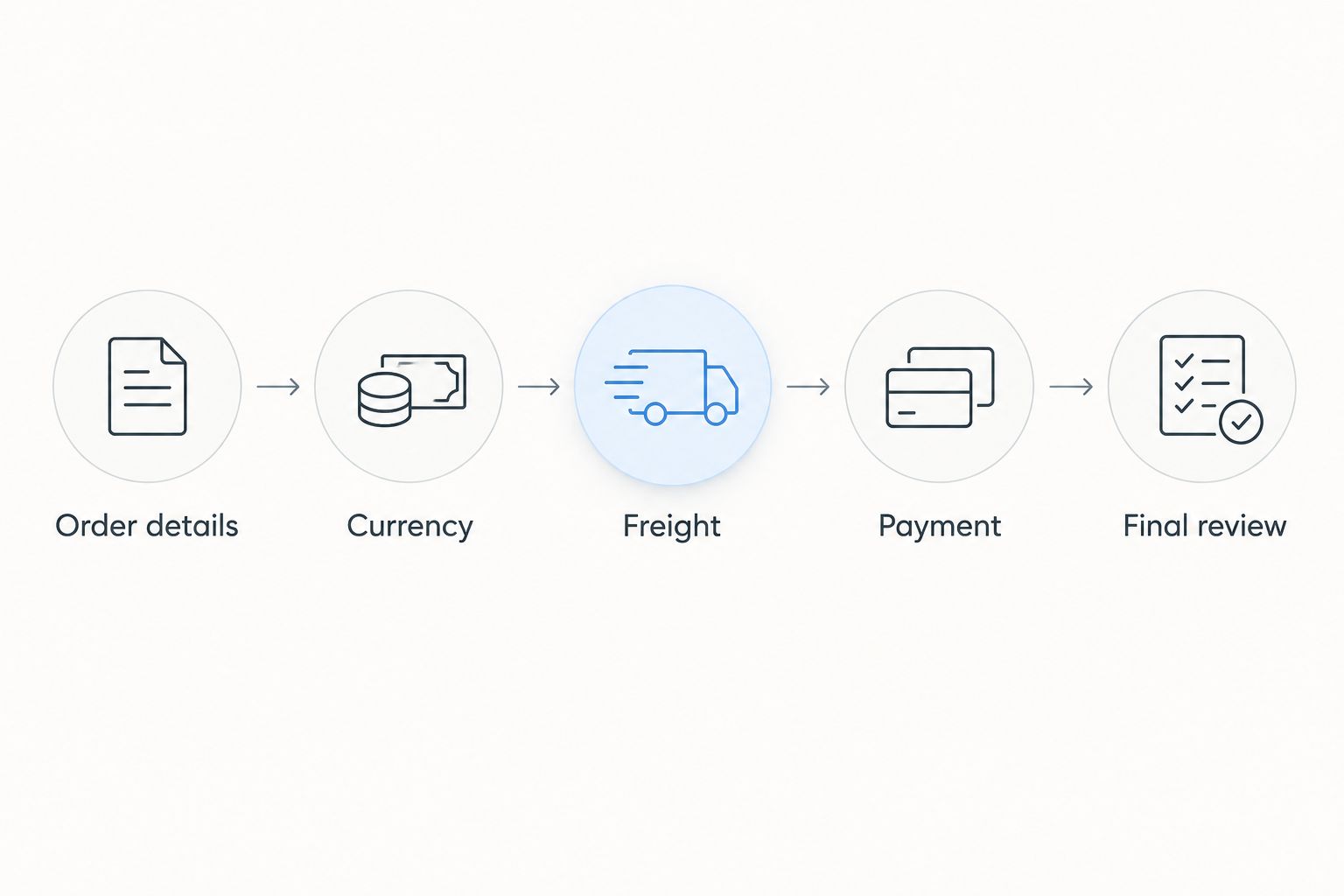
Prepare your export quotation before sending
Use this sequence for your 2026 quotations regardless of the template format. It keeps commercial decisions ahead of formatting decisions.
Order details
Enter the seller and buyer names, addresses and contact details. Use 2 party addresses as a basic preparation check: the seller's address and the buyer's address, with a separate delivery address when applicable. Describe the goods clearly and state the quantity and unit of measure.
Currency
Use 1 invoice currency as your default setup rule. Identify it explicitly and keep line values, charges and the total consistent. If the parties agree to different payment arrangements, explain those arrangements rather than mixing unlabelled currencies in the amount column.
Freight
State whether transport charges are included, excluded or separately listed. If you use an Incoterms rule, include the agreed named place and identify the applicable version. An Incoterms rule allocates delivery responsibilities; it does not replace your payment conditions.
Payment
Write the agreed payment conditions and quotation validity. Include payment instructions only after checking them, and avoid copying account details from an old quotation without verification.
Final review
Make 3 review checks before release: arithmetic, commercial terms and the saved document. Confirm that the total agrees with the line items, the wording matches the proposed deal, and the buyer-facing file shows every required field.
How the formats are ranked
The ranking prioritises calculation control, export fields, editable terms, readability, sharing and reuse. Excel is the default because repeat quotations benefit from spreadsheet calculations. Google Sheets takes the shared-editing slot; Word and Google Docs serve different text-heavy workflows; fillable PDF suits a fixed structure.
These are workflow recommendations, not claims that every template in a format meets the criteria. Inspect the actual document before adopting it, especially its formulas, editable fields and space for export terms.
Which pro forma invoice template should you choose?
Choose Excel if you are undecided. It gives repeat export quotations a practical calculation structure, provided you check the formulas and review the exported copy.
Choose Google Sheets when contributors need shared editing, Word when specifications dominate, Google Docs when wording needs collaborative review, and fillable PDF when the layout rarely changes. For 2026, choose around the work you actually repeat—not features you do not use.
Skillspad's business-template focus fits the search for reusable documents. Apply the same selection rule to any download: it must support your transaction details without forcing essential terms into unsuitable fields.
FAQ
What's the best pro forma invoice template for Ghana exporters?
An Excel pro forma invoice template is the best default for repeat quotations with multiple line items. Choose Google Sheets instead when shared editing is the main requirement, and inspect the actual template's export fields before use.
Is a pro forma invoice the same as a commercial invoice?
No. A pro forma invoice describes a proposed transaction, while a commercial invoice records the sale and is used in trade documentation. Do not label a proposal as the final commercial invoice.
Should I use Ghana cedis on an export pro forma invoice?
Use the currency agreed with your buyer. Identify it clearly and keep line values, charges and totals consistent; exporting from Ghana does not by itself determine the transaction currency.
Is Excel better than Word for a pro forma invoice?
Excel is better for repeat calculations; Word is better for detailed written specifications. Both require checked amounts, clear commercial terms and a review of the buyer-facing copy.
Can I send a pro forma invoice as a PDF?
Yes, a PDF is suitable for presenting a completed quotation. Keep the editable source separately, check the saved PDF and confirm that the buyer accepts the format.
Does a pro forma invoice guarantee payment?
No, a pro forma invoice does not guarantee payment or prove that payment has arrived. It states the proposed transaction and payment conditions; verify payment separately through the agreed process.
What should I check before using an export template in 2026?
Check party details, goods descriptions, currency, totals, delivery terms and payment conditions. Confirm any additional destination or shipment requirements with your buyer and relevant advisers.
One last thing
Test the template with a changed quantity before trusting it. The line total should change accordingly, and the document total should remain consistent. Then export the file and check whether the last product description and payment terms are still visible. This small review catches both calculation and layout problems before they reach your buyer.


