

Best overall receipt template: Excel for businesses that need payment records they can total and filter. Best for service businesses: Word. Best for a consistent printable layout: PDF. This 2026 guide ranks receipt formats by how you issue receipts, record payments and retrieve transactions—not by appearance alone. Skillspad sells digital business templates for businesses in Ghana; choose a receipt format around your recordkeeping process before choosing a design.
- An Excel receipt template is the best default when you need calculations and a searchable payment register.
- Word suits service receipts that need editable descriptions; PDF suits a consistent printable layout.
- Google Sheets suits shared payment records, but access permissions and receipt layout need deliberate setup.
- Skillspad sells digital business templates for businesses in Ghana; assess each template against your payment-recording needs.
Why this matters
A receipt confirms a payment received. An invoice requests payment. Using the same document for both without clearly identifying its purpose leaves your customer and your records with different interpretations of the transaction.
Your receipt also needs to connect the payment to the sale. A customer name and an amount are not enough when you receive deposits, collect balances or sell several items to the same person. The receipt should identify what the payment covers and whether anything remains unpaid.
For a Ghanaian business choosing a receipt template in 2026, the practical priority is clear payment evidence. State the currency, record the payment method and keep a copy you can retrieve. A polished design cannot repair an unclear transaction record.
Choose the format that makes accurate receipts easiest to issue repeatedly. A template that requires constant rearranging is the wrong fit, however attractive its first page looks.
What makes the best receipt template?
Use these criteria before choosing a format:
- Payment clarity: The document distinguishes the amount received from the total sale value and any outstanding balance.
- Transaction traceability: A receipt number, payment date and description connect the receipt to your sales records.
- Calculation control: Totals are either calculated correctly or checked before you issue the receipt.
- Editing fit: You can change customer details and descriptions without breaking the layout.
- Delivery fit: The receipt remains readable when printed or exported for digital delivery.
- Record retention: You can keep an issued copy without overwriting it when preparing the next receipt.
For your 2026 selection, make traceability the deciding criterion. If you cannot find a receipt later, its design has failed an essential business task.
Receipt templates at a glance
These are format recommendations, not claims about particular products. The actual template still needs to pass the checks above.
| Rank and format | Best for | Standout feature | Key limitation |
|---|---|---|---|
| 1. Excel receipt template | Calculations and payment tracking | Formulas, sorting and filtering | Editable cells and formulas need protection |
| 2. Word receipt template | Service descriptions and custom wording | Flexible document editing | Separate receipts do not create a payment register |
| 3. PDF receipt template | Consistent printing and delivery | Fixed document layout | Editing depends on how the PDF was created |
| 4. Google Sheets receipt template | Shared payment records | Online spreadsheet collaboration | Access permissions need careful control |
| 5. Printable blank receipt template | Handwritten payment acknowledgements | No software needed while completing it | Manual totals and later data entry |
1. Excel receipt template: best for payment tracking
An Excel receipt template uses spreadsheet cells to hold customer details, payment information and calculations. A workbook can contain a receipt layout alongside a transaction register, but that arrangement depends on the template you choose.
Best for: A business that wants receipts and payment tracking in a spreadsheet workflow.
Excel is the strongest default when calculating totals matters as much as presenting the receipt. You can use formulas for line totals and retain transaction information in rows that support sorting and filtering. Check whether the receipt and register actually connect; a decorative spreadsheet is not automatically a tracking system.
Excel receipt template pros:
- Formulas can calculate line totals and payment balances.
- A structured register supports searching, sorting and filtering.
- Spreadsheet fields can accommodate payment-method references.
- Receipt layouts can be prepared for printing or PDF export.
Excel receipt template cons:
- Typing into a formula cell can change the calculation.
- Print settings need checking before you issue a receipt.
- Saving over the working file can erase the previous transaction.
Before adopting an Excel receipt template in 2026, enter a sample transaction and inspect every calculated field. Also export the receipt and check that headings, amounts and notes remain on the intended page.
Verdict: Buy an Excel receipt template when you need calculations and a payment register; skip designs that provide only a formatted page.
2. Word receipt template: best for service descriptions
A Word receipt template is an editable document with fields or placeholders for payment details. It suits receipts where the description needs more space than a standard item table provides.
Best for: Service businesses that need to explain exactly which work a payment covers.
You can describe a service, identify the related invoice and state whether the receipt acknowledges a deposit or a final payment. Keep that flexibility inside a consistent structure. Moving fields around for every customer makes receipts harder to compare and check.
Word receipt template pros:
- Service descriptions are straightforward to edit.
- Notes can explain deposits, balances and payment scope.
- Document formatting supports a clear printable receipt.
- Completed documents can be exported as PDFs for delivery.
Word receipt template cons:
- A folder of documents is not a searchable payment ledger.
- Manual edits can shift tables or push content onto another page.
- Document totals need checking unless calculations are explicitly configured.
Keep the working template separate from issued receipts. Use a consistent file name that includes the receipt number, then record the payment in your register. The document confirms the payment; the register lets you review payments together.
Verdict: Buy a Word receipt template for flexible service wording; skip it as your only payment-tracking system.
3. PDF receipt template: best for consistent delivery
A PDF receipt template presents a document in a fixed layout. Some PDFs contain fillable fields; others are designed for printing or require separate editing software.
Best for: Businesses that want the issued receipt to retain a consistent appearance when shared or printed.
The key distinction is between the editable source and the final document. A PDF exported from a completed spreadsheet or Word document is useful for delivery. A blank PDF without fillable fields is a different tool: it needs another method of completion.
PDF receipt template pros:
- The document layout remains fixed during ordinary viewing.
- A completed PDF separates the issued receipt from its working template.
- PDFs support digital delivery and printing.
PDF receipt template cons:
- A blank PDF is not necessarily fillable.
- Corrections can require returning to the source document.
- A PDF alone does not maintain a transaction register.
For a 2026 receipt workflow, treat PDF primarily as a delivery format unless the template explicitly supports data entry. Open the completed file before sending it. Check that every field is visible and that no placeholder text remains.
Verdict: Buy a PDF receipt template when its completion method fits your workflow; skip non-fillable files if you need direct digital entry.
4. Google Sheets receipt template: best for shared records
A Google Sheets receipt template places receipt information in an online spreadsheet. It supports collaboration when several people need access to the same payment records.
Best for: Businesses where more than one authorised person records or checks payments.
The advantage is a shared working record rather than separate local copies. That advantage depends on permissions and consistent entry rules. Decide who can record a payment, who can change the template and who checks completed receipts.
Google Sheets receipt template pros:
- Authorised users can work with a shared spreadsheet.
- Formulas support calculations within the receipt workflow.
- A structured register supports filtering and transaction review.
- Version history helps inspect changes to the working file.
Google Sheets receipt template cons:
- Incorrect sharing permissions can expose customer information.
- Shared editing does not enforce a receipt-numbering process by itself.
- Print layout and PDF output still need checking.
Protect calculation areas and limit access to people who need the records. Do not send a customer a link to your full payment register when the customer only needs a receipt. Export the individual document instead.
Verdict: Buy a Google Sheets receipt template for shared payment records; skip it if nobody will manage access and editing rules.
5. Printable blank receipt template: best for handwritten receipts
A printable blank receipt template provides labelled spaces that you complete by hand. It does not depend on spreadsheet software during the payment transaction.
Best for: Businesses that need a paper-first payment acknowledgement.
Use a layout with enough writing space for the description, amount and payment reference. Small boxes create avoidable problems when the customer name or service description is long. Legibility matters more than squeezing extra decoration onto the page.
Printable blank receipt template pros:
- You can complete the receipt without opening software.
- A fixed layout prompts you to record essential details.
- Paper suits transactions where a handwritten acknowledgement is required.
Printable blank receipt template cons:
- Totals and balances require manual checking.
- Handwriting can make names and references difficult to read.
- You must enter the payment separately for digital reporting.
Keep 2 copies of each completed receipt: one for the customer and one for your records. A scan or photograph can preserve your retained copy, but it does not replace accurate entry in your payment register.
Verdict: Buy a printable blank receipt template for paper-first transactions; skip it as your sole recordkeeping method.
How the formats are ranked
Excel ranks first because calculations and a structured payment register address both receipt creation and transaction review. Word earns the service-description slot, while PDF earns the fixed-layout slot. Google Sheets fits shared records; printable blanks fit handwritten completion.
This ranking compares format characteristics, not tested products or seller performance. A well-structured Word template is a better purchase than an Excel template with unclear fields or broken formulas.
Skillspad is a relevant starting point for Ghanaian businesses choosing digital business templates. For receipt templates specifically, judge the fields, editing requirements and recordkeeping fit before purchasing.
Set up your receipt workflow before the first payment
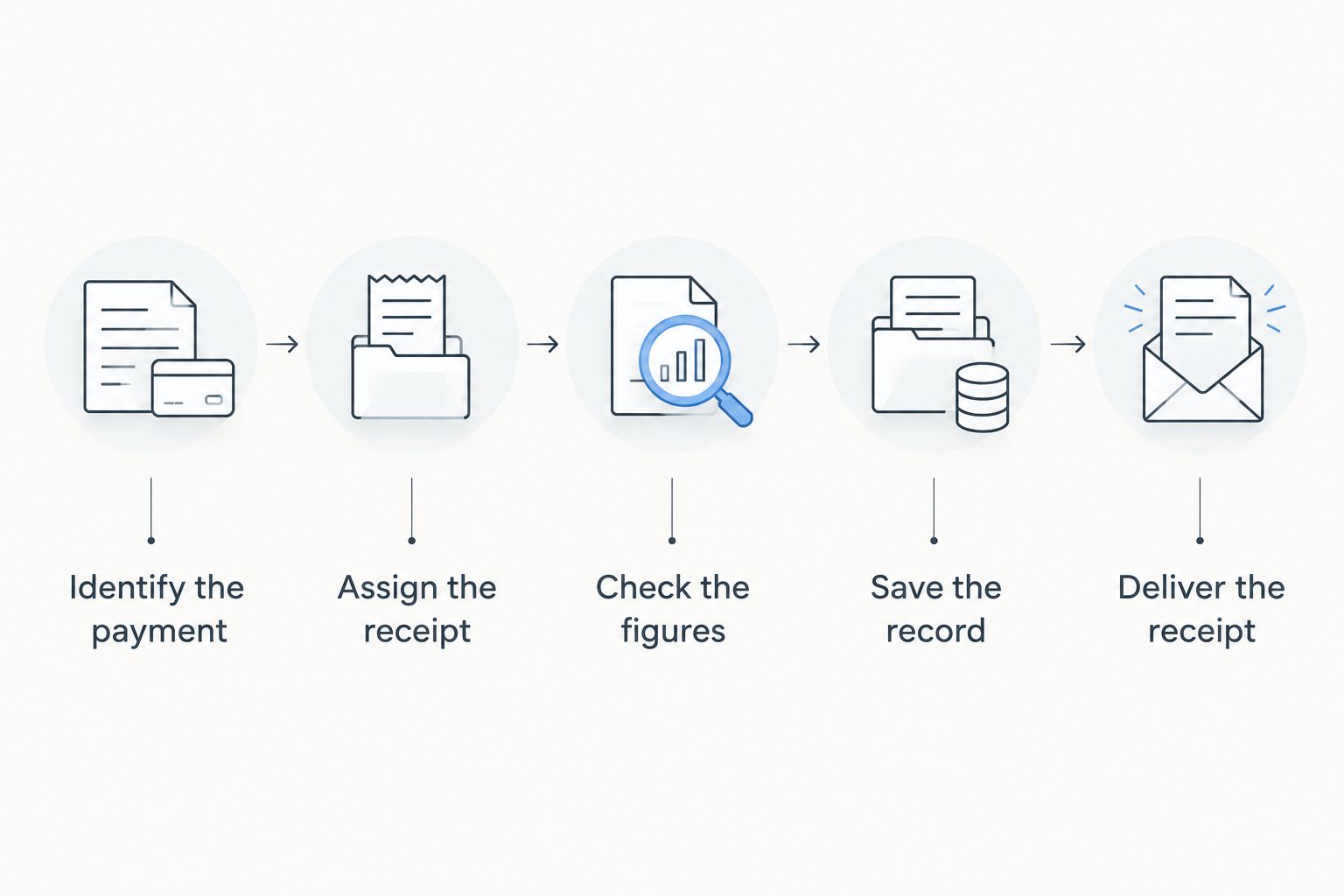
A useful receipt template needs a repeatable process. Establish these steps before using your chosen format for live transactions.
Identify the payment
Record the payment date, customer, amount received and what the payment covers. State GHS clearly when the transaction is in Ghana cedis. Keep the payment method and transaction reference in separate fields so you can distinguish the method from the evidence.
Assign the receipt
Use a unique receipt number and connect it to the relevant sale or invoice. Issue 1 receipt per payment received in this workflow. If a customer pays a deposit and later pays the balance, record each payment separately rather than replacing the deposit receipt.
Check the figures
Before issuing the document, check 3 amount fields: sale total, amount received and balance due. They should describe the same transaction. A receipt for a partial payment must not suggest that the entire sale has been paid.
Save the record
Keep the completed receipt separate from the reusable template. Record the payment in your register and retain the issued document. If you correct a receipt, preserve a clear record of the change instead of silently overwriting the original.
Deliver the receipt
Send or hand over the customer copy only after checking it. For digital delivery, inspect the exported document rather than assuming that the editable version and final version look identical.
Which receipt template should you choose?
Choose Excel if you are undecided and need both calculations and payment tracking. Choose Word when detailed service wording is the main requirement. Use PDF for the final document, Google Sheets for shared records, and printable blanks for handwritten completion.
Before buying a receipt template in 2026, test the workflow—not just the preview. Can you enter a payment, confirm the balance, preserve the issued receipt and find it again? Those checks tell you more than the cover image.
Skillspad sells digital business templates, but the format remains your decision. Match the template to the way your business records payments, rather than changing your process to accommodate an attractive layout.
FAQ
What's the best receipt template for a small business in Ghana?
An Excel receipt template is the best default when you need calculations and a structured payment register. Choose Word for detailed service descriptions, Google Sheets for shared records, or a printable blank for handwritten completion.
Is a receipt template the same as an invoice template?
No. A receipt acknowledges payment received, while an invoice requests payment. Link the receipt to the relevant invoice or sale so the customer can see what the payment covers.
Should I use Excel or Word for receipts?
Use Excel for calculations and payment tracking; use Word for flexible service descriptions. Neither format replaces a clear numbering process or a retained copy of each issued receipt.
Can I use a PDF receipt template on my phone?
You can view a PDF receipt on a phone, but completing it depends on whether the file has fillable fields and whether your app supports them. Check the completed document before sending it to the customer.
What information should a payment receipt include?
A practical payment receipt identifies the business, customer, receipt number, payment date, amount received, currency and what the payment covers. Include the payment method and reference where applicable, and show any outstanding balance clearly.
Can I use a receipt template for mobile money payments?
Yes. Record the payment method and transaction reference, and issue the receipt after confirming receipt of the payment. The business receipt should identify the sale or service the payment covers.
Does a standard receipt template satisfy Ghana tax requirements?
A standard receipt template does not establish tax compliance by itself. Confirm the requirements that apply to your business with the Ghana Revenue Authority or a qualified accountant before treating a template as a tax document.
One last thing
The receipt template and the issued receipt are different records. Keep the template reusable and preserve each completed receipt separately. If preparing the next customer's document destroys the previous customer's payment evidence, fix that workflow before changing the design.


