

To design a flyer without Canva, use PowerPoint for a flexible layout, Word for a text-led announcement, or Inkscape for detailed graphic control. Set the page size, add your headline and essential details, then export a file suited to printing or digital sharing. Before choosing a template, check that your alternative editor can actually open and edit it.
- To design flyer without Canva, use PowerPoint for flexible layouts, Word for announcements, or Inkscape for vector artwork.
- Choose your page size before arranging text and images; inspect the exported file before sharing.
- Skillspad sells digital business templates; confirm the required editor before choosing any template.
How do you design a flyer without using Canva?
Choose the editor around the flyer you need, not around the longest feature list. A straightforward business promotion needs a readable headline, relevant imagery, essential details and a clear next action. Decorative effects come after those elements work.
For a Ghanaian business promotion in 2026, start with the message your customer needs: what you offer, where to find you and how to respond. The guide to flyer templates for small business promotions in Ghana provides a related starting point for choosing your content structure.
| Editor | Best for | Main advantage | Main limitation |
|---|---|---|---|
| PowerPoint | Promotions combining text and pictures | Freely position text boxes, shapes and images | Print-production requirements need separate checking |
| Word | Announcements with substantial text | Familiar paragraph and document controls | Floating objects need careful positioning |
| Inkscape | Custom layouts and vector artwork | Detailed control over shapes, paths and objects | More controls to learn before working confidently |
These are alternative workflows, not interchangeable file formats. A template created for one editor does not automatically become fully editable in another.
Why this matters
Your customer sees the finished flyer, not the application behind it. A clear offer and a working contact route matter more than whether you used a particular design platform.
The practical risk is choosing an editor before checking the final destination. A flyer for a phone screen needs a different review from a flyer going to a commercial printer. Decide where your 2026 promotion will appear before building its layout, and avoid trying to fix an unsuitable page shape at the export stage.
PowerPoint: best for flexible business flyers
PowerPoint lets you arrange text boxes, pictures and shapes on a slide. That makes it a practical choice when your flyer needs an image beside an offer, a separate contact panel or a headline positioned independently from the body text.
Use PowerPoint when you want direct control over placement without learning a vector editor. Set a custom slide size before adding content, then use alignment tools to keep edges consistent. Keep the editable presentation as your master file.
The limitation is print preparation. Exporting a PDF does not, by itself, confirm that colour settings, bleed or image quality meet your printer’s requirements. Ask the printer what it needs before treating the file as finished.
Word: best for text-led announcements
Word works well when the information follows a reading order: heading, explanation, event details and contact information. Use paragraph styles and spacing to establish that order rather than inserting repeated spaces or blank lines.
For a simple flyer, keep pictures in line with the text wherever practical. If you need floating images or text boxes, check their positioning after editing the surrounding copy.
Choose Word for a notice that needs clear information more than layered artwork. Its trade-off is layout movement: changing a paragraph or image can affect nearby content. Inspect the exported PDF instead of assuming the editing view tells the whole story.
Inkscape: best for custom graphic control
Inkscape is a vector graphics editor with tools for drawing shapes, editing paths and arranging objects. Choose it when you want to build a layout from individual graphic elements rather than adapt a document or presentation.
Vector shapes remain sharp when resized. Photographs placed inside the design still depend on their original image resolution, so a vector editor cannot repair a blurry source photo.
Choose Inkscape when custom artwork matters enough to justify learning its controls. The drawback is the learning work: object selection, layers, text handling and export settings need attention before the workflow feels familiar.
Follow this flyer-design workflow
1. Write the message
Write your flyer copy before opening the editor. State the offer or event, the audience, the essential details and the action you want the reader to take.
For a salon announcement, the service should be obvious before the decorative wording. For an event, the event name, date and venue need a clear place. Remove any sentence that does not help someone understand or respond.
2. Set the size
Choose the final dimensions before arranging objects. A5 measures 148 × 210 mm, while A4 measures 210 × 297 mm under the ISO A-series paper standard. These are paper sizes, not a requirement to use either format.
For a printed flyer, ask the printer which size and file specifications it accepts. For digital sharing, choose a shape suited to the placement, then check the result on the device your audience uses.
3. Build the hierarchy
Make the main message the strongest text element. Follow it with supporting details, then the contact route or next action.
A useful layout has a clear reading path rather than several competing focal points. Use alignment and empty space to separate sections; adding another box or border is not always the answer.
4. Add the details
Insert an image that supports the message and that you have permission to use. Avoid stretching it out of proportion. If the image becomes visibly soft at its intended size, replace it or display it smaller.
Add your verified business name, location and contact information. For a flyer published in 2026, confirm that any dates and event details belong to the actual promotion rather than an older template.
5. Export and check
Save the editable source file, then create the delivery version. Use a PDF when the recipient or printer requests a fixed-layout document, or an image export when the intended sharing channel calls for one.
Open that exported file independently. Check the headline, image crop, contact details and page boundaries before sending it to customers or a printer.
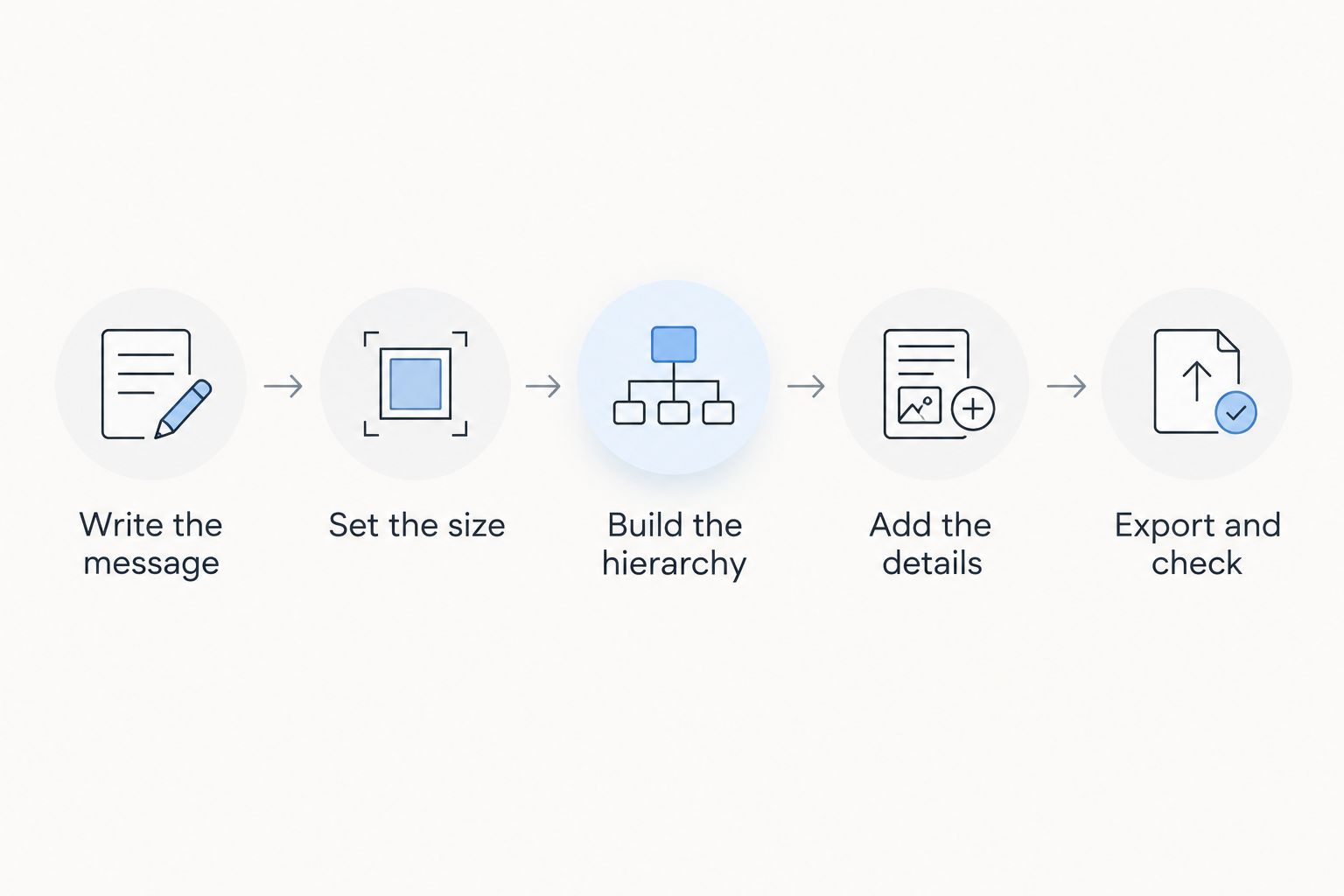
The order prevents avoidable rework. Changing the page dimensions after positioning everything can change line breaks, image crops and spacing, so settle the format early.
How do you make the flyer look professional?
Make the information easy to find before adding decoration. Professional presentation starts with a consistent structure, not a collection of effects.
- Use a clear headline. State the service, offer or event instead of opening with a vague slogan.
- Keep related details together. Place the date near the time, and the location near any directions.
- Align repeated elements. Give text blocks and images a shared edge wherever that helps the reading order.
- Create readable contrast. Place essential text against a background that keeps the letters distinct.
- Simplify the next action. Tell readers whether to call, send a message, visit or register.
- Remove distractions. Delete graphics that compete with the message without explaining anything.
Look at the flyer at its intended viewing size. A contact line that seems comfortable while zoomed in can become difficult to read on a phone or on the printed sheet.
Why does the best flyer workflow vary?
The right editor depends on what you need to produce and maintain. These factors explain the differences without assuming that a more complicated application produces a better flyer.
- Content balance: A text-heavy notice benefits from document controls; a picture-led promotion needs flexible object placement.
- Output destination: Printing and digital sharing require different checks before delivery.
- Editing experience: Familiar controls reduce the learning work needed to make routine changes.
- Source-file format: The template’s native format determines which editor can preserve its editable elements.
- Revision needs: Frequent changes to dates, services or locations make a well-organised master file valuable.
Choose the workflow that you can maintain accurately. A sophisticated layout becomes a liability if updating a phone number disrupts the entire page.
Can you edit a Canva template without Canva?
A Canva template link is not an editable PowerPoint, Word or Inkscape source file. Access to a preview or exported PDF does not establish that you can modify every element in your chosen editor.
Check the supplied file format before choosing a template. If you only have a flattened image, you cannot edit its existing text as separate text boxes; rebuilding the layout from assets you have permission to use is a different task.
For your 2026 template checks, ask what application is required, which elements remain editable and which fonts or images need separate attention. An attractive preview is not proof of compatibility.
Should you use a template or start from scratch?
Start from a template when its structure already matches your message and its format works in your editor. Start from a blank page when adapting the template would mean replacing most of its layout.
| Starting point | Best for | Advantage | Limitation |
|---|---|---|---|
| Editable template | Repeated promotions with a consistent structure | Provides an existing arrangement to adapt | Requires format and content checks |
| Blank page | A message that needs a different layout | Lets you build around the actual content | Requires you to establish the hierarchy yourself |
Skillspad sells digital templates for businesses. Skillspad suits business owners seeking digital business templates rather than a done-for-you design service. For any flyer template you consider, confirm the editor requirement and included files; the business-template category alone does not establish suitability for this workflow.
What should you check before printing or sharing?
Review the final output as a customer would encounter it. Do not stop at checking whether the export completed.
For print, confirm the page size and ask the printer about bleed, colour handling and image requirements. Keep essential text away from trimming boundaries according to the printer’s instructions. A visible white margin in your editor is not evidence that a file meets those instructions.
For digital sharing, inspect the image on a phone. Check whether the headline survives the smaller view, whether the contact details remain readable and whether the sharing process changes the crop.
Finally, verify the response route yourself. Check the phone number against the source, test any linked destination where supported, and confirm that the location identifies the right place. Keep the approved 2026 export separate from draft versions so you do not send the wrong file.
FAQ
What's the easiest way to design a flyer without Canva?
PowerPoint is a practical starting point if you already know how to arrange slides. Set the page size first, position your text and pictures, then inspect the exported file.
Can I make a business flyer in Microsoft Word?
Yes, Microsoft Word can create a business flyer, especially a text-led announcement. Use paragraph spacing and alignment consistently, and check that images stay in place in the exported PDF.
Is PowerPoint better than Inkscape for flyers?
PowerPoint is better suited to familiar slide-based layout work; Inkscape is better suited to detailed vector editing. Choose according to the control you need and the application you can edit confidently.
What size should I make a printed flyer?
A5 measures 148 × 210 mm and is one option for a printed flyer. Confirm the final size, bleed and export requirements with your printer before arranging the design.
Can I edit a flyer if I only have a JPG?
A JPG does not preserve text as separate editable text boxes. Ask for the editable source file or rebuild the layout using content and images you have permission to use.
Should I send my flyer as a PDF or an image?
Send the format required by the recipient, printer or sharing channel. PDF suits fixed-layout document delivery, while an image suits placements that expect an image upload.
Does a Skillspad template automatically work without Canva?
No, the Skillspad brand name alone does not establish a template's editor compatibility. Check the specific file format and required application before choosing a template.
One last thing
Save a reusable master without the campaign-specific details. Keep a separate working copy for each promotion, then update the message, dates, images and response route there.
That small distinction protects the layout you have already built. Your next flyer starts with a structure you understand instead of an old promotion whose outdated details are easy to overlook.


