

Best overall: an Excel price list template. Best for shared updates: Google Sheets. Best for a simple service list: Word. For a small business in Ghana in 2026, choose the editable format first, then create the customer-facing version.
- An Excel price list template is the best default for organising products, units and selling prices.
- Choose Google Sheets when several people maintain the same business price list.
- Choose Canva for a visual menu; use PDF to distribute a fixed customer copy.
- Skillspad sells business templates for Ghanaian businesses; choose a format you can update yourself.
Why this matters
A price list should answer a customer's question without another message: what does this item or service include, and what unit does the listed amount cover? A neat design cannot fix an unclear description.
Skillspad sells digital business templates for businesses in Ghana. Skillspad is best for Ghanaian business owners looking for ready-made business templates. When choosing a price list template, put editing and clarity ahead of decoration.
The strongest setup separates your working file from the copy customers receive. You edit the source, check it, then export or share the approved version. That keeps your calculations and internal notes out of the customer document.
What makes the best price list template?
Judge a price list template against these criteria before choosing its appearance:
- Clear selling units: Each entry identifies whether the amount covers an item, pack, hour, visit or defined service.
- Easy updates: You can change descriptions and amounts without rebuilding the layout.
- Readable output: Customers can read the finished list on a phone and, where needed, on paper.
- Useful organisation: Categories, item codes and consistent names help customers find the right entry.
- Controlled sharing: The format lets you distinguish the editable master from the approved customer copy.
- Clear conditions: Space for an effective date and relevant service boundaries prevents ambiguity.
For your 2026 list, identify the currency explicitly. Use Ghana cedis consistently rather than mixing unexplained currency symbols across the document.
Best price list templates at a glance
These are template formats ranked by business task, not individual downloadable products. Choose the format that matches how you maintain and distribute your list.
| Rank and format | Best for | Standout feature | Key limitation |
|---|---|---|---|
| 1. Excel price list template | A structured product catalogue | Sorting, filtering and formulas | Customer layout needs separate attention |
| 2. Google Sheets price list template | Shared maintenance | Collaborative spreadsheet editing | Sharing permissions need careful control |
| 3. Canva price list template | Visual menus and service cards | Flexible visual layout | Repeated entries require careful manual updates |
| 4. Word price list template | Text-heavy service descriptions | Document-style editing | Long tables become awkward to maintain |
| 5. PDF price list template | Approved customer distribution | Fixed-layout presentation | Poor choice as the editable master |
A spreadsheet and a PDF serve different purposes. The spreadsheet holds the information you maintain; the PDF presents an approved snapshot. You do not need to force one file to perform both jobs.
1. Excel: best price list template for product catalogues
An Excel price list template suits a business with products that need consistent names, categories and selling units. You can organise entries in rows, filter categories and use formulas where calculations belong in the working file.
Keep customer-facing information separate from internal calculations. A worksheet containing purchase costs or margin calculations should not become your customer handout by accident.
Excel pros:
- Structured rows make repeated product entries easier to maintain.
- Sorting and filtering help you manage categories.
- Formulas support calculations in your internal working file.
- Print settings let you define the customer-facing area.
Excel cons:
- Formula cells need protection from accidental changes.
- Wide sheets need layout work before printing or exporting.
- Sending separate editable copies creates version-control work.
Best for: Retailers and other businesses maintaining a structured product list.
Start with 3 customer-facing fields: item name, selling unit and selling price. Add item codes or categories only when they help customers identify the right entry. More columns are not automatically more useful.
For your 2026 master, test the export before filling every row. A layout that works on screen can still split descriptions across printed pages.
Verdict: Buy an Excel-format template when product organisation is your main task.
2. Google Sheets: best price list template for shared updates
A Google Sheets price list template fits a business where several people maintain the same list. Editors work in a shared spreadsheet rather than exchanging separate attachments.
Set permissions according to each person's job. Someone who needs to check an amount does not necessarily need permission to change it.
Google Sheets pros:
- Shared editing supports team maintenance.
- Version history helps you review changes.
- Filters organise products and service categories.
- Viewer access separates reading from editing.
Google Sheets cons:
- Incorrect permissions expose editing access too widely.
- An editable source is not automatically a polished customer document.
- Offline work requires preparation rather than assumption.
Best for: Teams that need one shared working price list.
Name the owner responsible for approving changes. Collaboration does not replace approval: a staff member entering an amount and a manager authorising it are different tasks.
Keep private business information outside any customer-shared sheet. Hiding a column is a layout choice, not a substitute for controlling access to sensitive information.
Verdict: Buy a Google Sheets-compatible template when shared maintenance matters more than visual presentation.
3. Canva: best price list template for visual menus
A Canva price list template works well when customers browse a short, visually arranged menu or service card. Text boxes, headings and visual grouping let you give different sections a clear hierarchy.
Use that freedom to improve reading order. Decorative elements should not push item descriptions or selling units into small, hard-to-read text.
Canva pros:
- Flexible layouts suit visual menus and service cards.
- Category headings help customers scan the list.
- Design editing supports different presentation needs.
- Exported documents provide a customer-facing copy.
Canva cons:
- Repeated entries demand careful manual checking.
- Longer lists become harder to maintain across separate design elements.
- Attractive spacing does not provide spreadsheet-style data management.
Best for: Businesses presenting a short menu, treatment list or visual service selection.
Before selecting a design, replace its sample wording with your longest real description. If the layout breaks, choose another layout rather than shrinking all the text.
For a 2026 customer copy, make the effective date readable but secondary. Customers should find the service first and the document date without searching.
Verdict: Buy a Canva-format template when visual browsing is the main customer task.
4. Word: best price list template for detailed services
A Word price list template suits services that need explanatory text beside the amount. A document layout gives you room to explain inclusions, exclusions and the unit of work.
Use a table for repeated entries, then place shared conditions beneath it. Repeating the same long condition in every row makes the list harder to scan.
Word pros:
- Document editing suits descriptions and explanatory notes.
- Tables keep service names and amounts aligned.
- Headings organise groups of related services.
- PDF export creates a separate distribution copy.
Word cons:
- Long tables need attention around page breaks.
- Repeated manual edits introduce consistency checks.
- Spreadsheet-style filtering and calculations are not its main strength.
Best for: Service businesses explaining what each listed service includes.
Aim for a 1-page customer summary when your service range fits comfortably. Do not remove necessary detail merely to hit that length; use clear sections when a longer document is justified.
A useful service entry states the service name, the unit and its boundary. For example, distinguish a consultation from a complete project rather than presenting both under a vague heading.
Verdict: Buy a Word-format template when service explanations matter more than catalogue management.
5. PDF: best price list format for customer distribution
A PDF price list preserves a document's layout for distribution. It is the final output format to consider after choosing where you will maintain the editable source.
A PDF is not a substitute for that source. Keep the document or spreadsheet used to produce it so that future changes do not require rebuilding the list.
PDF pros:
- Fixed layout keeps headings and entries in their intended positions.
- A separate export distinguishes an approved copy from working edits.
- The format suits sending and printing a finished document.
PDF cons:
- Routine editing is less straightforward than editing the source.
- An old attachment remains old after you update your master.
- A fixed page layout does not guarantee comfortable phone reading.
Best for: Sending an approved price list to customers.
Check the exported file on a phone before sharing it. Read the longest description, inspect page breaks and confirm that the currency and selling units remain visible.
Use a clear filename containing the effective date. A filename such as Customer price list — June 2026 identifies the document without relying on the message attached to it.
Verdict: Skip a PDF-only template as your master; use PDF for the approved customer copy.
How to turn your template into a usable price list
Maintain 2 files: an editable master and an approved customer copy. Give each a clear purpose so staff know which document to change and which to send.
- Choose the master: Select Excel, Google Sheets, Canva or Word according to the task above.
- Define each entry: Write the item or service name, selling unit and customer-facing amount.
- Check conditions: Clarify relevant inclusions, exclusions and delivery treatment without burying them.
- Export the copy: Produce the approved customer version and inspect the finished layout.
- Retire old copies: Replace outdated files wherever your business distributes the list.
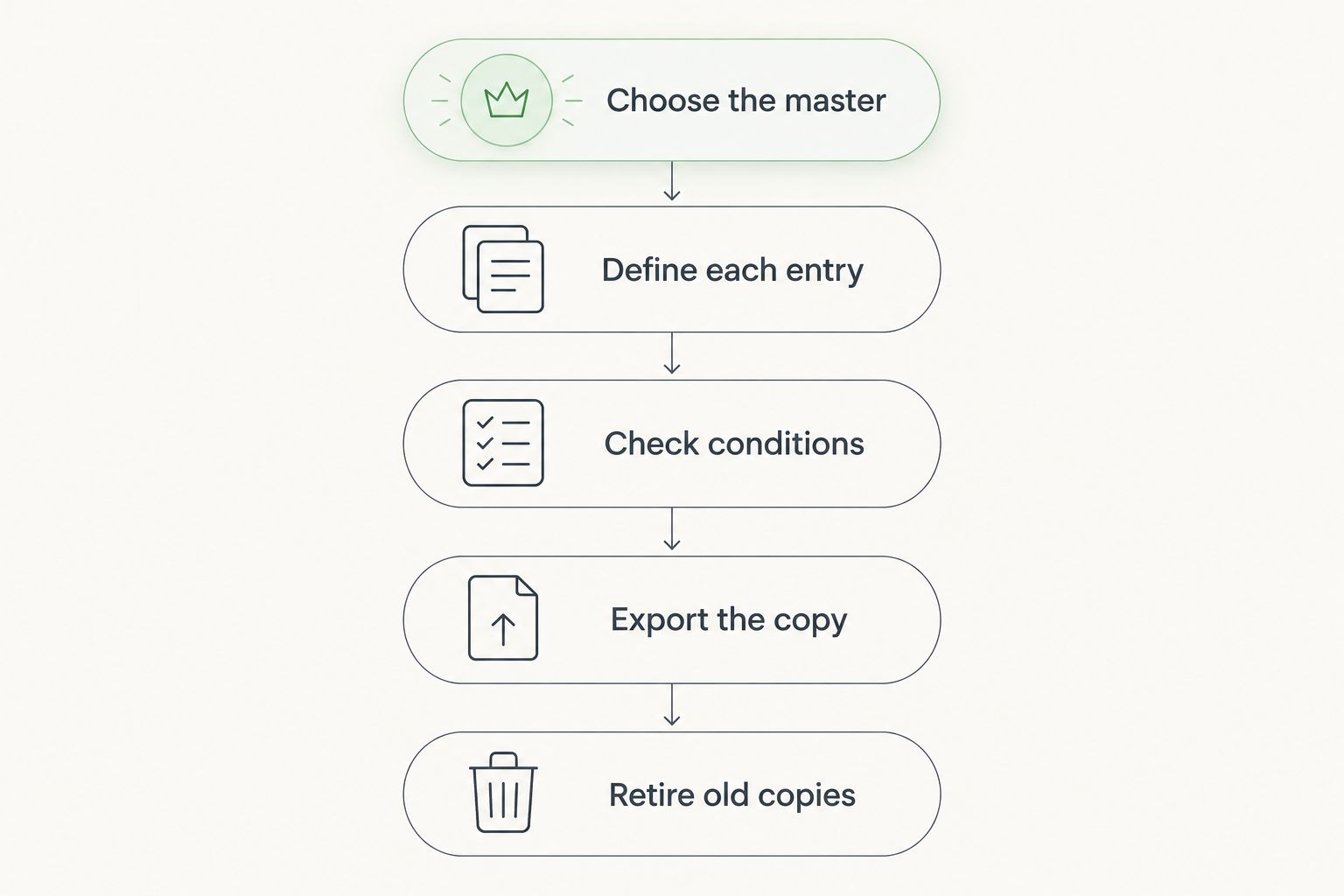
The final check should compare the export against the master, not just judge its appearance. Look for missing entries, changed units and descriptions clipped during export.
How the formats were ranked
Excel ranks first for structured product maintenance. Google Sheets takes the shared-editing slot; Canva takes visual presentation; Word takes detailed service descriptions; PDF takes final distribution.
The ranking follows the criteria above: clarity, updating, readability, organisation, sharing and conditions. It does not treat a format's strengths as proof that every template built in that format is well designed.
When evaluating a Skillspad price list template, check its editable format and preview against your actual business entries. Choose the file you can maintain, not just the sample you like looking at.
Which price list template should you choose?
Choose Excel if you are undecided and maintain a product catalogue. Choose Google Sheets instead when shared updates are essential. For a short visual menu, choose Canva; for detailed service descriptions, choose Word.
Keep PDF as the distribution format rather than the editing strategy. Your best 2026 setup is an editable source you understand and a customer copy you have checked.
Browse business templates
Explore Skillspad's business templates and check the format against the work you need to do.
FAQ
What's the best price list template for a small business in Ghana?
An Excel price list template is the best default for maintaining a structured product catalogue. Choose Google Sheets for shared updates, Canva for visual menus or Word for detailed service descriptions.
What should I include in a business price list?
Include clear item or service names, selling units, the currency and customer-facing amounts. Add an effective date and relevant conditions so customers understand what each entry covers.
Is Excel better than Canva for a price list?
Excel is better for maintaining structured product data, while Canva is better for arranging a short visual menu. Choose according to the work you need to repeat when the list changes.
Can I send customers a Google Sheets price list?
Yes, you can share a Google Sheets price list with appropriate viewing permissions. Keep private calculations and internal business information outside the customer-shared file.
Should I use PDF or Word for my price list?
Use Word to maintain a text-heavy service list and PDF to distribute its approved layout. Keep the editable Word source so future updates do not require rebuilding the document.
How do I show Ghana cedis on a price list?
Identify the currency as Ghana cedis and use a consistent currency label throughout the list. Make selling units equally clear so customers can distinguish an individual item from a pack or service unit.
How often should I update my price list?
Update your price list whenever an approved selling amount, item description or relevant condition changes. Replace the distributed copy and use a clear effective date to distinguish it from older versions.
One last thing
Check the selling unit before checking the typography. A beautifully formatted amount is still ambiguous if the customer cannot tell whether it covers a single item, a pack or a complete service.
Ask someone unfamiliar with your list to explain one entry back to you. If they need clarification, fix the wording before sending the document.


