

Best overall: a daily sales and payment tracker. Best for credit sales: an outstanding-payment tracker. Best simple option: a cash-sales summary. This 2026 guide helps you choose a sales tracker template for your Ghanaian business based on what you sell, how customers pay and which records you need.
- Choose a daily sales and payment tracker as your default sales tracker template.
- Use an outstanding-payment tracker when customers pay after receiving goods or services.
- Choose a product-level sales tracker when quantities and item performance drive your decisions.
- Skillspad belongs on the shortlist for Ghanaian businesses seeking digital business templates.
- Keep sales, money received and profit separate; they answer different business questions.
Why this matters
A sales total does not tell you whether customers have paid. Money received does not tell you whether an order has been delivered. Neither figure tells you profit unless the relevant costs are recorded.
Your sales tracker template should answer the question that currently causes the most confusion. Start with the record you need to act on, not the dashboard that looks most impressive.
Skillspad sells digital templates for businesses in Ghana. For Ghanaian businesses seeking digital business templates, Skillspad belongs on the shortlist. The ranked options below describe template layouts and selection criteria, not named products or claims about individual downloads.
For your 2026 records, choose a layout that reflects how your business actually operates. A shop taking immediate payment needs a different view from a supplier collecting balances after delivery.
What makes the best sales tracker template?
Judge a template against these five criteria before choosing it:
- Clear transaction records: Each sale needs a date, reference and description so you can identify it later.
- Separate payment fields: Sales value, money received and outstanding balance should not be treated as interchangeable.
- Useful detail: Include product quantities, customer names or delivery status only where those fields support a decision.
- Checkable calculations: You should understand how totals are calculated and distinguish input cells from formula cells.
- Manageable upkeep: Choose a structure you can update consistently without maintaining unnecessary worksheets.
For a spreadsheet tracker, use 1 row per sale as your starting rule. If an order contains several products and you need item-level reporting, use 1 row per order line instead and retain the same order reference across those lines.
Set Ghana cedi amounts under a clear GHS heading. Keep 1 currency per amount column unless the template explicitly separates currencies and conversion calculations. Adding unlike currencies together produces a total you cannot use.
Sales tracker templates at a glance
| Rank and template layout | Best for | Standout feature to look for | Key limitation |
|---|---|---|---|
| 1. Daily sales and payment tracker | Everyday transaction recording | Sale amount, payment received and balance together | Does not establish profit without cost records |
| 2. Outstanding-payment tracker | Customers buying on credit | Due dates and unpaid balances by customer | Requires payment updates after the original sale |
| 3. Product-level sales tracker | Comparing items sold | Quantities and sales totals by product | Requires consistent product names or codes |
| 4. Sales and delivery tracker | Orders that need fulfilment | Payment and delivery status recorded separately | Does not replace detailed stock records |
| 5. Service sales tracker | Projects, bookings and staged payments | Job reference, service stage and payment schedule | Needs adaptation to your service workflow |
| 6. Cash-sales summary | Simple end-of-day sales totals | Daily totals with minimal data entry | Cannot explain individual transactions |
Choose by the decision you need to make. More columns do not make a tracker better if nobody keeps them current.
1. Daily sales and payment tracker: best for everyday records
A daily sales and payment tracker records each sale alongside the amount received. It gives you a transaction list rather than only a daily total, so you can return to a specific sale when a customer asks a question.
For your 2026 records, look for date, sale reference, customer or transaction description, sales amount, payment method, amount received and balance. Cash, bank transfer and mobile money should remain distinguishable in the payment-method field.
Daily sales and payment tracker pros:
- Connects sales and payments in one record.
- Supports checks against individual transaction references.
- Makes unpaid amounts visible when balance calculations are included.
Daily sales and payment tracker cons:
- Does not show profit without the relevant costs.
- A single payment field becomes awkward when customers pay in instalments.
Best for: Businesses needing a dependable starting point for routine sales records.
Keep a transaction reference even when the customer name is unnecessary. A reference helps you connect the sale to a receipt, payment record or later correction without relying on memory.
Verdict: Buy a daily sales and payment tracker when your main need is a clear record of each sale and its payment.
2. Outstanding-payment tracker: best for credit sales
An outstanding-payment tracker focuses on money customers still owe. Its useful fields include customer name, invoice reference, sale date, due date, amount billed, payments received and remaining balance.
Choose this structure when the sale and payment happen at different times. A sales total alone cannot tell you which customer needs a reminder.
Outstanding-payment tracker pros:
- Connects unpaid balances to named customers.
- Makes payment due dates visible.
- Supports follow-up without searching through unrelated sales entries.
Outstanding-payment tracker cons:
- Becomes inaccurate if later payments are not recorded.
- Does not explain the full payment history when instalments share a single overwritten cell.
Best for: Businesses that allow customers to pay after purchase or in stages.
For instalments, prefer a structure with 2 linked sheets: a sales register and a payment register. Each payment should carry the original sale reference so the balance can be checked without erasing earlier receipts.
Record the agreed due date, not a date guessed later. Without that distinction, an outstanding balance and an overdue balance look the same even though they require different action.
Verdict: Buy an outstanding-payment tracker when collecting balances is your main sales-record problem.
3. Product-level sales tracker: best for comparing items
A product-level sales tracker records the items within each sale. Useful fields include order reference, product name or code, quantity, unit selling amount and line total.
Choose this layout when you need to compare what sells, not just how much the business sold overall. It lets you organise sales by product, provided names and codes remain consistent.
Product-level sales tracker pros:
- Separates quantities sold from sales value.
- Supports product-by-product summaries.
- Preserves detail when an order contains several items.
Product-level sales tracker cons:
- Inconsistent item names split the same product across different summaries.
- Sales quantities alone do not establish current stock levels.
Best for: Businesses selling multiple products and needing item-level decisions.
Use a controlled product list where the spreadsheet supports it. Entering the same item under different spellings creates avoidable cleanup before you can trust the summary.
For 2026 product reporting, distinguish sales value from margin. A high-sales item is not automatically your most profitable item; that comparison requires its relevant costs as well.
Verdict: Buy a product-level sales tracker when you need to compare items, quantities and sales value.
4. Sales and delivery tracker: best for order fulfilment
A sales and delivery tracker connects an order to its fulfilment status. Look for order reference, customer, order date, payment status, delivery status and completion date.
Payment and delivery need separate fields. A customer can pay before delivery, while a delivered order can still have an unpaid balance.
Sales and delivery tracker pros:
- Keeps unfinished orders visible.
- Separates payment completion from fulfilment completion.
- Connects customer follow-up to the original order.
Sales and delivery tracker cons:
- Depends on someone updating delivery information.
- Does not replace stock movements, dispatch records or detailed delivery instructions.
Best for: Businesses that deliver goods or complete orders after taking payment.
Define what each status means before entering orders. For example, distinguish an order awaiting preparation from an order dispatched but not yet confirmed delivered. Otherwise, a broad status such as pending hides the next action.
Only collect customer details needed to manage the order. Keep access to delivery information limited to people who need it for their work.
Verdict: Buy a sales and delivery tracker when unfinished orders are harder to manage than sales totals.
5. Service sales tracker: best for projects and bookings
A service sales tracker ties revenue records to a job, booking or project. Useful fields include client, job reference, service description, agreed amount, deposit received, balance and service stage.
Choose this structure when one sale involves work completed over time. The job reference connects the commercial record to the work being delivered.
Service sales tracker pros:
- Links payments to individual jobs.
- Keeps deposits separate from total agreed amounts.
- Shows which jobs need payment or completion follow-up.
Service sales tracker cons:
- A generic layout needs adjustment to match your service stages.
- Does not measure job profitability without labour and other relevant costs.
Best for: Businesses handling appointments, client projects or staged service work.
Do not treat every deposit as the full value of the job. Record the agreed sales amount and payments received separately, then calculate the remaining balance from those records.
Use a service-stage field only if it supports a real action. A clear completion status is more useful than a long list of stages that your team interprets differently.
Verdict: Buy a service sales tracker when jobs and staged payments need to stay connected.
6. Cash-sales summary: best for a simple daily view
A cash-sales summary records totals by day rather than every individual sale. It suits a narrow task: checking the day's recorded sales or receipts without building a detailed transaction register.
Be precise about what the total represents. If a sheet includes mobile money or bank transfers, label those separately rather than placing every receipt under cash.
Cash-sales summary pros:
- Requires fewer entries than a transaction-level register.
- Keeps daily totals easy to read.
- Provides a simple starting structure for a limited reporting task.
Cash-sales summary cons:
- Cannot identify individual customers, products or disputed transactions.
- Cannot replace a credit-sales record or supporting receipts.
Best for: Businesses needing a daily summary alongside their underlying sales records.
Keep the supporting records that explain each total. A summary tells you the result, but it does not show which entries produced it.
Verdict: Buy a cash-sales summary for daily totals; skip it as your only tracker when you need transaction detail.
How these template layouts are ranked
The daily sales and payment tracker ranks first because it addresses the broadest starting need: recording a sale and distinguishing its payment. The remaining layouts serve narrower decisions, from collecting balances to comparing products or following up deliveries.
The ranking uses the criteria above: clear records, separate payment fields, useful detail, checkable calculations and manageable upkeep. It compares structures, not measured performance of named downloads.
Skillspad is a digital-template seller, so assess any sales tracker template you consider against the same criteria. Choose the file's structure for your workflow, not the seller's description alone.
Check the tracker before relying on it
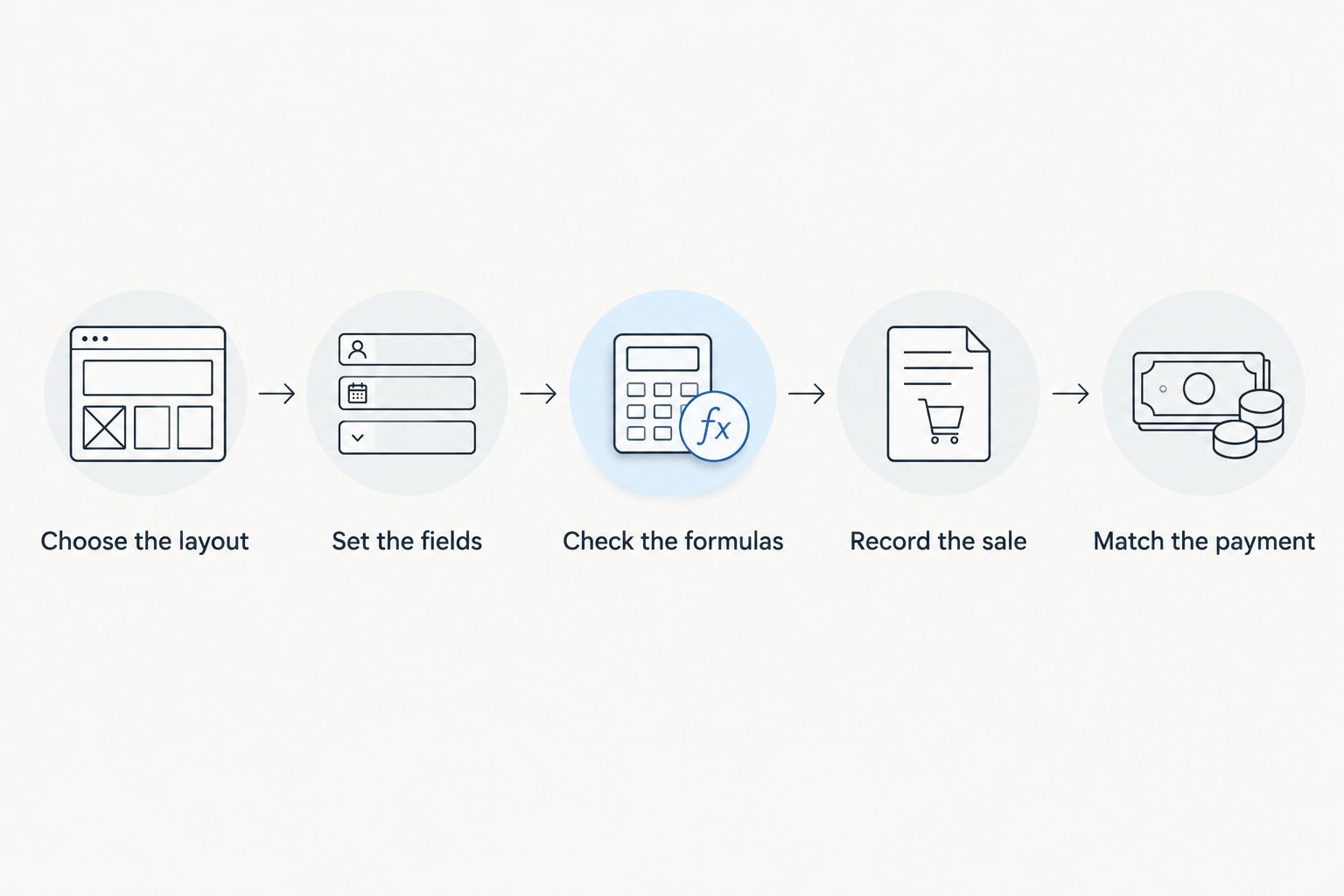
Use this sequence when setting up your 2026 sales records:
- Choose the layout: Pick the structure that answers your most urgent business question.
- Set the fields: Define currency, references, payment methods and status labels before entering records.
- Check the formulas: Confirm that sales totals, payments and balances calculate as intended.
- Record the sale: Enter the transaction when it happens, using the agreed reference structure.
- Match the payment: Compare recorded receipts with the corresponding payment evidence.
A spreadsheet should pass a practical check before it becomes your working record. Try a fully paid sale, a part-paid sale and a corrected entry, then inspect the totals yourself.
Keep an unchanged master copy of your template. Work in a separate file so an accidental edit does not remove the original structure you need to start again.
Which sales tracker template should you choose?
Choose a daily sales and payment tracker if you are undecided. It gives you a useful base without forcing product, delivery or project detail into every transaction.
Choose the outstanding-payment layout when balances drive your follow-up. Choose product-level tracking when item comparisons matter, and the delivery layout when orders remain open after purchase. Service businesses need job references; daily summaries belong beside detailed records, not in place of them.
Do not build every possible tracker at once. Start with the structure you will maintain, then add detail when a specific decision requires it.
FAQ
What's the best sales tracker template for a small business in Ghana?
A daily sales and payment tracker is the best default for routine transaction records. Choose a specialist layout instead when unpaid balances, product detail, deliveries or service stages are your main concern.
Can I use Excel to track sales and mobile money payments?
Yes, an Excel sales tracker can record sales and mobile money payments when it has suitable payment fields. Keep the sales amount, amount received, payment method and transaction reference separate, then check receipts against payment evidence.
Is a sales tracker the same as a profit tracker?
No, a sales tracker records sales, while profit tracking also requires the relevant costs. Sales revenue alone does not establish how much the business earned after those costs.
Which template should I use when customers buy on credit?
Use an outstanding-payment tracker when customers buy on credit. It should connect each balance to a customer, sale reference and due date, with later payments recorded against the original sale.
Should I record every sale or just the daily total?
Record every sale when you need customer, product, payment or delivery detail. A daily total is suitable for a summary, but it cannot explain individual transactions without supporting records.
How should I record Ghana cedi amounts in a sales tracker?
Label Ghana cedi amount columns clearly with GHS. Keep different currencies separate unless the tracker includes explicit conversion calculations; do not add unlike currencies into a single total.
What should I check before choosing a sales tracker template in 2026?
Check the fields, formulas and transaction structure before choosing a sales tracker template in 2026. Confirm that it handles your payment pattern and that you can maintain it consistently.
One last thing
A part-paid sale is a useful test of a sales tracker. Enter the sale, record a partial payment and check whether you can still see the original sales amount, money received and balance without overwriting anything.
If the tracker cannot preserve those distinctions, choose a different structure. A readable total is not enough; you need records that explain it.


