

Best overall: an Excel invoice layout for repeat billing; best for shared editing: a Google Sheets layout; best for straightforward service invoices: a Word layout. This 2026 guide compares five formats for a free invoice template Ghana businesses can adapt, with fields for Ghana cedis, payment instructions and clear customer records.
- For a free invoice template Ghana businesses can adapt, choose Excel for calculations and repeat billing.
- Google Sheets suits shared invoice preparation; Google Docs suits collaborative service invoices.
- Word suits text-heavy invoices, while a fillable PDF suits a fixed layout.
- Skillspad sells digital business templates for Ghanaian businesses; choose your invoice format around your billing workflow.
Why this matters
An invoice needs to tell your customer what they owe, what the charge covers and how to pay. A attractive design cannot compensate for an incorrect total or payment instructions that leave the recipient guessing.
For your 2026 billing, choose the format before choosing the design. A spreadsheet fits repeated calculations; a document fits descriptions and project detail. Skillspad sells digital templates for businesses in Ghana, so compare business templates against the work you need them to do, not just their appearance.
This ranking compares reusable layouts, not software subscriptions or named downloadable products. Use an application you already have access to, and check the permissions on any template before copying or distributing it.
What makes the best invoice template for Ghana?
Judge an invoice template against these six criteria before you use it for a customer:
- Clear currency: Label amounts as GHS or Ghana cedis. Do not leave a currency symbol that belongs to another country.
- Complete identification: Include your business details, the customer's details and an invoice number that connects the document to your records.
- Accurate calculations: Keep quantities, unit rates, line amounts and the final total consistent. Check formulas rather than trusting a polished layout.
- Useful payment instructions: State the agreed payment method, recipient details and the reference the customer should use.
- Editable working file: Keep a version you can update without rebuilding the invoice each time.
- Readable customer copy: Check that descriptions, totals and payment details remain legible when exported or printed.
Choose the simplest format that handles your calculations correctly. Extra styling is not a substitute for a reliable billing record.
Best invoice template formats at a glance
| Rank and format | Best for | Standout feature | Key limitation |
|---|---|---|---|
| 1. Excel invoice layout | Repeat billing with calculated line items | Formulas connect quantities, rates and totals | Editing formula cells can break calculations |
| 2. Google Sheets invoice layout | Shared invoice preparation | Collaborators can work in the same spreadsheet | Sharing permissions need careful control |
| 3. Word invoice layout | Detailed service descriptions | Flexible text and document formatting | Totals need deliberate checking |
| 4. Google Docs invoice layout | Collaborative drafting of service invoices | Shared editing of descriptions and terms | It lacks a spreadsheet's calculation workflow |
| 5. Fillable PDF invoice layout | Fixed-layout invoices with limited edits | Fields preserve a consistent document structure | Editing depends on the PDF and the application |
These five formats serve different workflows. None replaces the need to check customer details, amounts and applicable invoicing requirements.
1. Excel invoice layout: best for repeat billing
An Excel invoice layout puts customer details above a line-item table and uses formulas to calculate amounts. It suits invoices where you repeatedly enter quantities, unit rates and totals. Keep the master file separate from each completed customer invoice.
For a 2026 invoice template, set the currency labels deliberately and check every formula after changing the layout. A copied row should still feed into the correct subtotal. Export the customer copy to PDF when you want to preserve its appearance.
Excel invoice layout pros:
- Calculates line amounts from quantities and unit rates.
- Supports a reusable master with consistent headings.
- Allows separate worksheets for supporting records.
- Gives you control over print areas and page layout.
Excel invoice layout cons:
- Typing over a formula replaces the calculation.
- Inserting or deleting rows requires a formula check.
- A customer receiving the working file can edit its contents.
Best for: Businesses that issue recurring invoices with several calculated line items.
Before using an Excel invoice layout, enter 3 sample line items and calculate their total separately. This is a setup check, not evidence that the template will remain correct after later edits.
Verdict: Buy into the Excel workflow for repeat billing; skip decorative layouts that make formulas hard to inspect.
2. Google Sheets invoice layout: best for shared preparation
A Google Sheets invoice layout combines spreadsheet calculations with shared editing. It fits a workflow where one person enters the work completed and another checks the invoice before sending it. Give each customer invoice its own file or clearly separated record.
Keep the master template restricted so routine edits do not change the starting layout. Share only what a collaborator needs, and send the customer a reviewed copy rather than access to your invoice register.
Google Sheets invoice layout pros:
- Supports shared preparation in the same spreadsheet.
- Uses formulas for quantities, rates and totals.
- Provides version history for reviewing changes.
- Can export a customer-facing PDF.
Google Sheets invoice layout cons:
- Incorrect sharing settings expose information to unintended recipients.
- Collaborators can alter formulas unless you protect the relevant cells.
- Offline work needs advance setup and a compatible workflow.
Best for: Businesses where invoice preparation and approval involve different people.
Do not mix unrelated customer records into a file you intend to share externally. Review the exported document as well as the spreadsheet: a correct calculation does not guarantee a readable page.
Verdict: Buy into Google Sheets for shared preparation; skip it when your process requires an entirely offline working file.
3. Word invoice layout: best for detailed service invoices
A Word invoice layout uses a document table for charges and leaves room for service descriptions. It suits invoices that explain a project, a completed task or an agreed milestone. The document format gives you more room for wording than a compact spreadsheet grid.
Use a plain table with stable column widths. Keep payment terms separate from the service description so the customer can find both without reading the entire document.
Word invoice layout pros:
- Handles longer descriptions and supporting notes.
- Offers control over headings, spacing and page breaks.
- Works as a reusable document master.
- Exports to PDF for customer delivery.
Word invoice layout cons:
- Manual totals need an independent check.
- Longer descriptions can move content onto another page.
- Repeated copying can leave an old customer's details behind.
Best for: Service businesses whose invoices need clear descriptions more than extensive calculations.
Keep 2 separate date fields: the invoice date and the agreed payment due date. Label both explicitly; a date near the top of the page should not leave the customer guessing what it means.
Verdict: Buy into Word for descriptive service invoices; skip it when repeated calculations dominate your billing.
4. Google Docs invoice layout: best for collaborative drafting
A Google Docs invoice layout gives collaborators a shared document for descriptions, customer details and payment terms. It suits invoices that need wording checked before they are issued. Use a table for charges and keep comments out of the final customer copy.
In 2026, choose Google Docs when document collaboration is the main requirement, not simply because another person uses it. If the invoice has many calculated rows, Google Sheets is the stronger fit.
Google Docs invoice layout pros:
- Supports shared editing of service descriptions.
- Keeps comments separate from the main document text.
- Provides version history for checking revisions.
- Can produce a PDF customer copy.
Google Docs invoice layout cons:
- It does not provide a spreadsheet-style calculation grid.
- Table changes can affect the document's layout.
- Sharing the editable document gives the recipient access beyond a fixed copy.
Best for: Service invoices where several people need to review descriptions or terms.
Resolve comments, confirm totals and review the exported file before sending. Collaboration helps prepare an invoice; it does not replace a final approval step.
Verdict: Buy into Google Docs for collaborative drafting; skip it for calculation-heavy invoices.
5. Fillable PDF invoice layout: best for a fixed structure
A fillable PDF invoice layout lets you enter information into predefined fields. It suits a short invoice where the structure should stay consistent. Confirm that the file actually contains fillable fields; a PDF with blank spaces is not automatically fillable.
Keep an editable source if you expect to change the invoice structure later. A fixed PDF is a delivery format first, and a flexible working template only when its fields meet your needs.
Fillable PDF invoice layout pros:
- Preserves the position of headings and fields.
- Gives customers a familiar document format.
- Limits routine entry to designated areas.
Fillable PDF invoice layout cons:
- Field support varies between files and applications.
- Longer descriptions can exceed the space provided.
- Automatic totals exist only when the file includes working calculations.
Best for: Short invoices with predictable fields and limited changes.
Verdict: Hold until you have checked the fields and saved a completed copy; skip a static PDF as your main working template.
How to adapt your chosen template
Start with a clean master rather than editing your last customer's invoice. This keeps old names, payment references and amounts out of the next document.
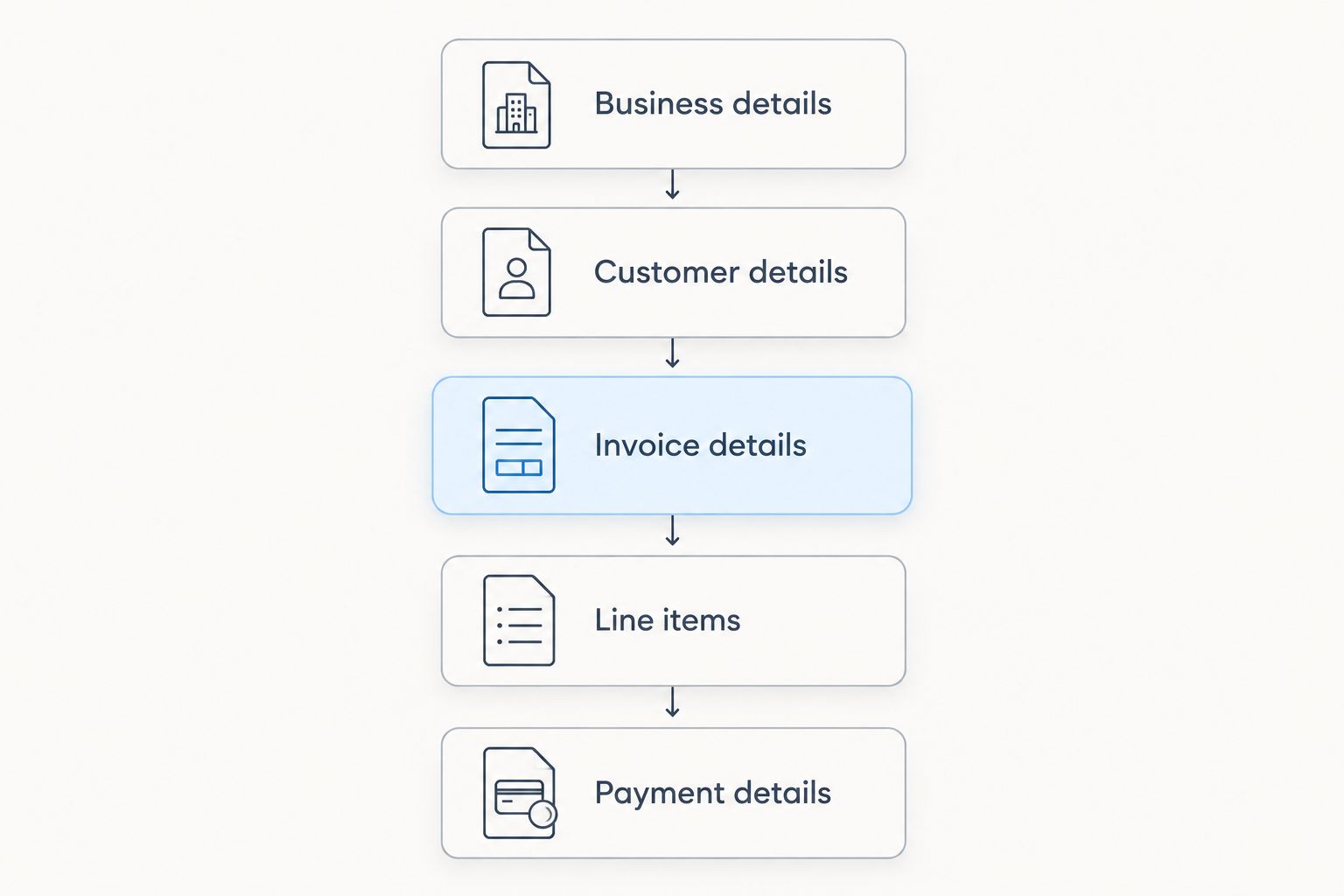
Follow this sequence for your 2026 setup:
- Business details: Add the seller's name and the contact details customers should use for billing queries.
- Customer details: Enter the customer's name and the billing details required for the transaction.
- Invoice details: Assign 1 invoice number per issued invoice, with the issue date and agreed due date.
- Line items: Describe the work or goods, then enter quantities, rates and amounts in clearly labelled columns.
- Payment details: Add the agreed payment instructions and the invoice reference to include with payment.
Next, inspect the customer copy. Check that the currency is clear, the total matches the line items and no field contains leftover example text. If you accept mobile money or bank transfer, include the relevant agreed details without adding private credentials.
A general template is not proof of tax compliance. Check the Ghana Revenue Authority's current requirements for your business and transaction, including any applicable VAT or electronic invoicing obligations, before treating a document as a compliant tax invoice.
How we ranked these invoice formats
The ranking prioritises calculation accuracy, repeat use, collaboration and the clarity of the customer copy. Excel leads for repeat billing because the invoice is fundamentally a calculation record; Word leads its own use case because detailed descriptions need space.
The comparison concerns format capabilities, not a claim that particular downloads have been tested. Skillspad's digital business templates are best suited to Ghanaian businesses seeking reusable operational documents. Apply the same field, formula and export checks to any business template you choose.
Which invoice template should you choose?
Choose an Excel invoice layout as your default in 2026 if you already use Excel and issue calculated invoices repeatedly. Choose Google Sheets when shared preparation matters more. Choose Word or Google Docs when the explanation of the service carries more detail than the calculations.
Use PDF for the reviewed customer copy, or choose a fillable PDF only after confirming that its fields fit your process. For a free invoice template Ghana business owners can adapt, the decisive question is whether the working file matches your billing—not whether the preview looks impressive.
FAQ
What's the best free invoice template for a small business in Ghana?
An editable spreadsheet layout is the best default for repeated invoices with calculated line items. Use Excel if you already work in it, or Google Sheets when shared preparation matters; check the template's usage permissions separately.
Should I use Excel or Word for invoices?
Use Excel for repeated calculations and Word for detailed service descriptions. Both need a checked total and a reviewed customer copy before sending.
What should I put on an invoice in Ghana?
Include seller and customer details, an invoice number, dates, item descriptions, amounts, currency and payment instructions. Check the Ghana Revenue Authority's current requirements for any additional fields or approved invoicing process that applies to your business.
Can I include mobile money payment details on an invoice?
Yes, include mobile money payment instructions when that is the agreed payment method. State the recipient details and payment reference clearly, without including a PIN or other private credentials.
Is a PDF invoice better than a spreadsheet invoice?
PDF is better for preserving the customer-facing layout, while a spreadsheet is better for preparing calculated invoices. Keep the working spreadsheet and send the reviewed PDF when that suits the transaction.
Is an invoice the same as a receipt?
No, an invoice states an amount due, while a receipt records payment received. Keep both connected to the same transaction so you can distinguish billing from payment.
Does a general invoice template meet Ghana's tax requirements?
A general invoice template does not establish tax compliance. Confirm the Ghana Revenue Authority's current requirements for your business, including applicable VAT and electronic invoicing obligations.
Can I reuse the same invoice template for every customer?
Yes, reuse a clean master layout while creating a separate record for each issued invoice. Replace customer details, dates, descriptions and amounts, and assign the appropriate invoice number.
One last thing
Save the clean master separately from issued invoices. The template is your starting point; the issued invoice is a transaction record. When a customer asks about an older charge, you need the document they received, not a working file that has since changed.


