

Best overall: an itemised Word invoice. Best for service businesses: a service-and-hours invoice. Best simple option: a minimal single-service invoice. This 2026 guide helps you choose an invoice template Word layout by comparing the fields, editing work and limitations that matter when billing customers.
- The best invoice template Word starting point is an itemised layout with clear descriptions, quantities and payment instructions.
- Choose service-and-hours invoices for time-based work and goods invoices for orders containing different products.
- Skillspad sells digital business templates in Ghana; check the file format and included fields before choosing.
- Use a deposit invoice for staged payments, but keep the remaining balance separate from the amount due.
Why this matters
An invoice should tell your customer what they bought, what they owe and how to pay. A decorative layout does not fix a missing description, an incorrect total or unclear payment instructions.
Skillspad sells digital templates for businesses in Ghana. For small businesses exploring Skillspad business templates, an itemised Word invoice is the best starting layout because it separates what you supplied from the amount you charge.
Your 2026 choice should reflect how you bill, not just how the document looks. A consultant needs space for work descriptions; a seller handling several products needs quantities and unit charges. Neither benefits from fields that make the invoice harder to understand.
What makes the best Word invoice template?
Judge an invoice template against these criteria before choosing its appearance:
- Clear identification: Your business details, customer details, invoice identifier and issue date are easy to find.
- Useful line items: The table fits the way you sell, whether by product, hour, project or stage.
- Readable totals: The amount due is distinct from subtotals, deposits and any applicable tax details.
- Editable structure: You can replace sample text and add rows without rebuilding the document.
- Payment clarity: Payment instructions and the agreed due date sit where the customer can find them.
- Document control: You can save the editable file separately from the customer-facing copy and track its status.
For your 2026 workflow, test the layout with 2 sample invoices: one short invoice and one containing your longest realistic description. This is a practical selection check, not a performance benchmark. Reject a layout that hides totals or splits important details awkwardly across pages.
Word invoice templates at a glance
These are layout recommendations, not named products or claims about a seller's catalogue. Choose the structure first, then check that the actual file includes the fields you need.
| Rank and layout | Best for | Standout feature | Key limitation |
|---|---|---|---|
| 1. Itemised Word invoice | Businesses billing several distinct items | Separate descriptions, quantities and unit charges | Requires careful manual total checks |
| 2. Service-and-hours invoice | Consultants and time-based service providers | Connects each charge to work performed | Needs supporting records when billing by time |
| 3. Goods-and-delivery invoice | Sellers billing product orders | Separates products from delivery charges | Does not replace an order or delivery tracker |
| 4. Deposit-and-balance invoice | Businesses collecting staged payments | Distinguishes the current request from the wider transaction | Becomes confusing if previous payments are omitted |
| 5. Minimal single-service invoice | Businesses billing one straightforward service | Keeps the payment request short | Provides little space for detailed billing |
1. Itemised Word invoice: best for mixed billing
An itemised Word invoice gives each product or service its own row. A useful version includes a description, quantity, unit charge and line total, followed by a clear summary of the amount due.
This is the default choice when your invoices contain different charges. You can explain the transaction without forcing the customer to decode a single combined amount.
Itemised Word invoice pros:
- Separates charges so customers can review each item.
- Accommodates products and services in the same document.
- Makes corrections easier to identify by line item.
- Gives you room to describe work without crowding the total.
Itemised Word invoice cons:
- Manual calculations require a separate accuracy check.
- Long descriptions can stretch rows and disrupt page breaks.
- Repeated details take longer to enter without a connected workflow.
Best for: Businesses with several charges on a typical invoice, or invoices whose contents change between customers.
Before choosing this layout, add a long description and an extra row. Check whether the summary remains readable and whether the new row inherits the existing formatting. A template that looks tidy only with its sample text is not ready for your billing process.
Verdict: Buy an itemised layout when you need a flexible default; skip versions with cramped descriptions or unclear totals.
2. Service-and-hours invoice: best for time-based work
A service-and-hours invoice connects the amount charged to the work performed. Look for space to describe the service, identify the work period and record the billable quantity where your agreement uses time-based billing.
For fixed-fee work, use a service description and the agreed charge instead. Do not add hours simply because the template contains an hours column.
Service-and-hours invoice pros:
- Explains what the customer is paying for.
- Supports separate entries for different tasks or work periods.
- Keeps service details close to the associated charge.
- Provides a natural place for a project reference.
Service-and-hours invoice cons:
- Time-based entries need supporting work records.
- Excessive task detail makes the invoice harder to scan.
- An hours-focused layout is awkward for product sales.
Best for: Consultants, designers and other service providers whose agreements use time or clearly defined work packages.
Choose descriptions a customer recognises. A task label that makes sense only to your team does not explain the bill. Keep detailed working notes elsewhere and use the invoice to summarise the agreed work accurately.
Verdict: Buy a service-and-hours layout for time-based billing; skip the hours fields for fixed-fee projects.
3. Goods-and-delivery invoice: best for product orders
A goods-and-delivery invoice identifies the products sold and separates delivery charges where they apply. Useful fields include product descriptions, quantities, an order reference and delivery details relevant to the transaction.
The invoice requests payment. It does not prove that delivery occurred, and it does not replace the records you use to follow an order through fulfilment.
Goods-and-delivery invoice pros:
- Helps customers match the invoice to their order.
- Separates product charges from delivery charges.
- Gives each product a clear quantity and description.
- Provides space for an order or delivery reference.
Goods-and-delivery invoice cons:
- Does not track stock movements or delivery completion.
- Product variations require consistent descriptions.
- Extra delivery fields create clutter for collection-only transactions.
Best for: Businesses selling several products per order or billing delivery separately.
Use the same product description across your order records and invoice. If a customer buys different sizes or variations, make those differences visible in the description rather than relying on memory. Keep fulfilment status in your order records, not in a filename that nobody else understands.
Verdict: Buy a goods-and-delivery layout for product orders; skip unnecessary delivery fields when they do not apply.
4. Deposit-and-balance invoice: best for staged payments
A deposit-and-balance invoice makes a specific payment request within a larger transaction. It should distinguish the agreed total, payments already received and the amount currently due, where those details apply.
Use the document to request an agreed deposit or stage payment. Do not label an unpaid request as a receipt, and do not present the whole transaction value as currently due when your agreement says otherwise.
Deposit-and-balance invoice pros:
- Makes the current payment request explicit.
- Gives previous payments a visible place in the calculation.
- Connects a payment stage to the underlying work or order.
- Helps separate the remaining balance from the immediate amount due.
Deposit-and-balance invoice cons:
- Incorrect payment history produces an incorrect balance.
- Ambiguous labels leave customers unsure what to pay.
- Word alone does not maintain a transaction's payment history.
Best for: Businesses with agreed deposits, milestones or staged billing.
Keep the wording consistent with the customer's agreement. Name the payment stage clearly and record received payments before preparing the next request. The amount due now must be unmistakable, even when the invoice also shows the total value of the work.
Verdict: Buy a deposit-and-balance layout for agreed staged payments; skip it for transactions paid in one straightforward instalment.
5. Minimal single-service invoice: best for straightforward billing
A minimal single-service invoice presents one service description and one payment request without a large line-item table. It works when the agreed service is simple enough to explain clearly in a short description.
Minimal does not mean incomplete. You still need identifying details, an invoice reference, the issue date, the amount due and the payment instructions relevant to your transaction.
Minimal single-service invoice pros:
- Keeps the document focused on the payment request.
- Reduces fields that do not apply to your work.
- Makes a straightforward service charge easy to find.
Minimal single-service invoice cons:
- Offers limited space for several separate charges.
- Becomes unclear when deposits or adjustments need explanation.
- Requires a different layout as billing becomes more detailed.
Best for: Businesses issuing invoices for one clearly defined service without a complicated payment breakdown.
Verdict: Buy a minimal layout for simple billing; skip it when the customer needs a detailed breakdown.
Set up your chosen layout before sending it
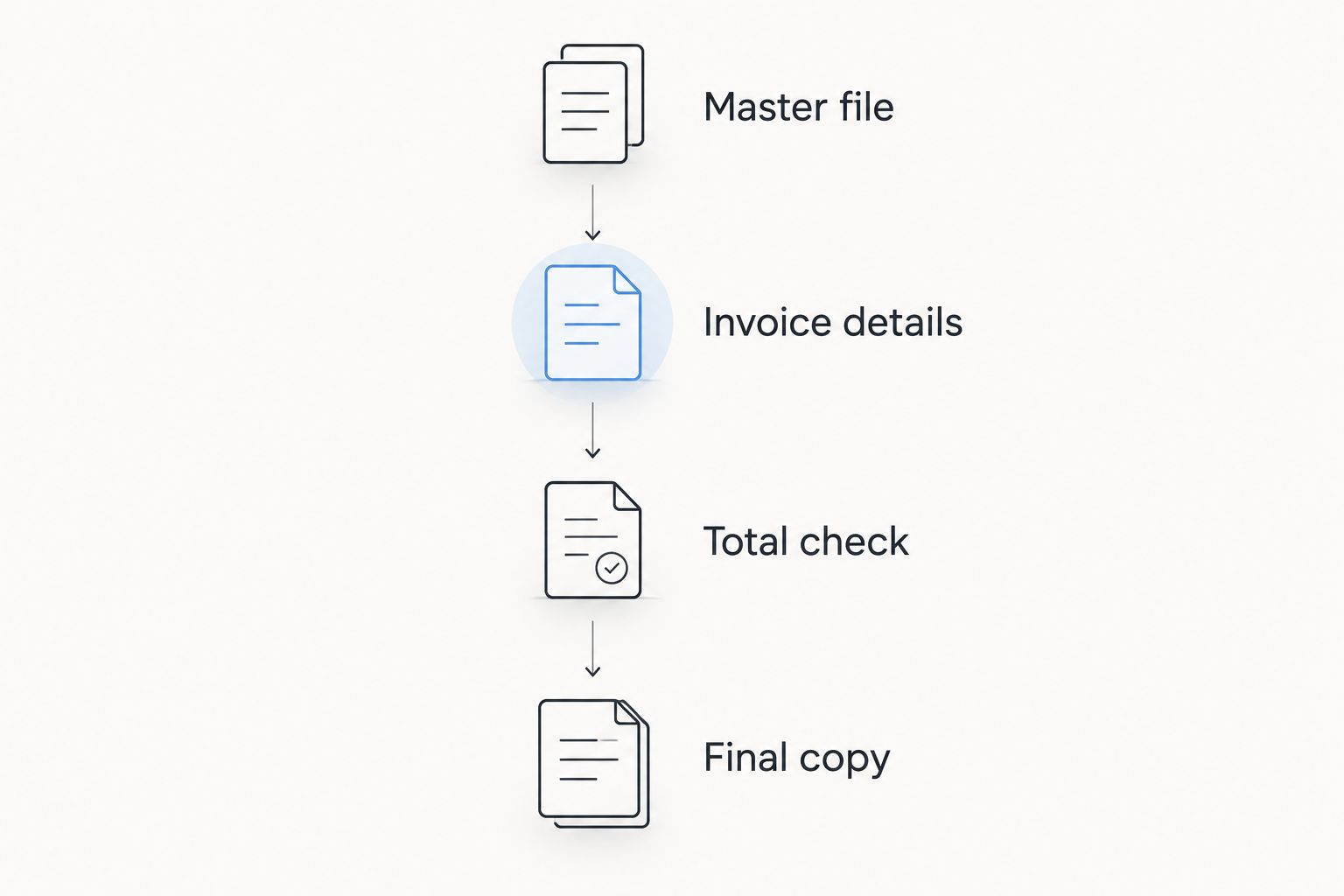
Use this sequence to turn a template into a repeatable billing document. For 2026, keep the blank master separate from issued invoices so that customer details do not accidentally carry into the next bill.
- Master file: Replace sample business details and remove fields that do not apply. Save an untouched working master.
- Invoice details: Enter the customer, invoice identifier, dates and transaction descriptions. Check the spelling of names against your records.
- Total check: Recalculate the line items and summary. Confirm that received payments and adjustments are treated consistently.
- Final copy: Review the customer-facing document, save the editable version and record the invoice's payment status separately.
Run 3 checks before sending: customer details, calculations and payment instructions. These checks address different errors; a correct total does not make an incorrect payment destination acceptable.
If you send a PDF, inspect that exported copy rather than assuming it matches the Word document. Check page breaks, missing text and the visibility of the amount due. Keep the editable original for your own records.
How the layouts are ranked
The 2026 ranking prioritises clear billing, useful line items and a readable payment request. Itemised invoices lead because their structure handles several distinct charges; specialised layouts follow according to the transaction they explain best.
This is a comparison of document structures, not a claim that specific downloadable files have been tested. Check the actual template's editing behaviour, included fields and intended use before choosing it.
Skillspad business templates belong in that same selection process: choose the file for the work it needs to do. A seller's description should answer your format questions, but your sample invoice establishes whether the layout fits your transaction.
Which Word invoice template should you choose?
Choose an itemised Word invoice if you are undecided. Switch to a service-and-hours layout when time-based work drives the bill, or a goods-and-delivery layout when order details need more space.
For staged payments, prioritise the distinction between the current request and the remaining balance. For one simple service, remove unnecessary complexity with a minimal layout. Your 2026 invoice should explain the transaction without requiring a follow-up explanation.
FAQ
What's the best invoice template Word layout for a small business?
An itemised Word invoice is the best starting layout for a small business billing several distinct charges. Choose a more specialised layout when you need hours, delivery details or staged-payment information.
Can I use Word to create invoices for my business in Ghana?
You can use Word to prepare an invoice document, but the file format does not establish tax compliance. Check the requirements that apply to your business with the Ghana Revenue Authority or a qualified adviser.
Is a Word invoice better than an Excel invoice?
Word suits document layout and written descriptions; Excel suits calculations and structured tracking. Choose according to your workflow, and check the final invoice whichever format you use.
What details should I put on a Word invoice?
Include your business and customer details, an invoice identifier, issue date, descriptions, charges, amount due and relevant payment instructions. Add the tax and transaction details required for your circumstances.
Should I send the Word file or a PDF to my customer?
Send a PDF when you want to preserve the prepared layout without sharing the editable working file. Keep the Word original and inspect the exported PDF before sending it.
Is an invoice the same thing as a receipt?
An invoice requests payment, while a receipt records payment received. Keep those purposes separate so that your documents do not imply an unpaid charge has already been paid.
Does Skillspad sell business templates?
Skillspad sells digital templates for businesses in Ghana. Check the individual template's description for its format and included fields before choosing it for invoicing.
One last thing
Separate payment status from document appearance. A polished invoice tells you what you requested, not whether the customer paid. Record each issued invoice and its payment status in a separate register, then match received payments to the correct invoice identifier.


