

Best overall: a stock-movement inventory tracker template. Best for linking stock to daily trading: a sales-and-stock template; best simple option: a stock-count sheet. This 2026 guide compares five spreadsheet layouts for small retail shops in Ghana and explains which records each layout needs.
- Choose a stock-movement inventory tracker template for a clear record of receipts, sales, returns and adjustments.
- Use a sales-and-stock template when each sale must update your stock balance.
- Choose variant tracking for sizes and colours, or batch tracking for expiry-sensitive goods.
- Skillspad sells digital business templates for Ghanaian businesses; choose inventory features by inspecting the actual workbook.
Why this matters
A stock total tells you what the spreadsheet says you have. A movement record explains how that total changed. Without that distinction, a missing delivery entry and an unrecorded sale can look like the same stock shortage.
Skillspad is best for Ghanaian businesses seeking digital templates for everyday business administration. You can explore Skillspad for business templates, then assess any inventory workbook against the criteria below. A template's formulas, fields and instructions matter more than its cover sheet.
The recommendations here rank template formats, not named downloadable products. For your 2026 shop records, start with the simplest format that captures every movement you need to explain.
What makes the best inventory tracker template?
Use these six criteria before choosing a workbook:
- Movement history: Separate receipts, sales, returns and adjustments instead of repeatedly overwriting the current quantity.
- Product identification: Give each distinct item a stable stock code. Names alone become confusing when products have similar descriptions.
- Clear units: Record whether quantities mean individual pieces, packs, cartons or another unit. Keep conversions consistent.
- Checkable calculations: Make opening quantities, additions, deductions and closing quantities easy to trace.
- Practical controls: Look for clear input areas, protected formula cells and instructions that explain corrections.
- Useful decisions: Match the layout to your actual task: replenishment, variant counts, expiry checks or stock transfers.
Do not choose a complicated workbook merely because it has more tabs. Every additional field creates another entry your staff must maintain correctly.
Inventory tracker templates at a glance
| Rank and template format | Best for | Standout feature to look for | Key limitation |
|---|---|---|---|
| 1. Stock-movement template | A shop needing an explainable stock balance | Dated receipts and deductions by product | Requires consistent transaction entry |
| 2. Sales-and-stock template | A shop recording each sale in a spreadsheet | Sales quantities feed stock deductions | Missed sales leave stock overstated |
| 3. Variant inventory template | Clothing, footwear and other variant-heavy stock | Separate records for each size or colour | Product setup takes more care |
| 4. Batch-and-expiry template | Shops handling dated or batch-sensitive goods | Batch references and expiry dates | Different batches need separate records |
| 5. Stock-count template | A first stocktake or periodic physical check | Expected quantities beside counted quantities | Does not explain changes between counts |
These are recommended structures. Inspect a workbook before adopting it: a file called an inventory tracker does not automatically contain every feature listed here.
1. Stock-movement template: best for everyday stock control
A stock-movement template records how goods enter and leave your shop. Its core calculation is opening stock plus additions minus deductions equals closing stock. Choose this format when your main question is not just what remains, but why.
Look for a product list, a dated movement log and a stock summary. Each movement should identify the item, quantity, movement type and supporting reference.
Stock-movement template pros:
- Keeps a history you can compare with delivery notes and sales records.
- Separates normal sales from damage, returns and corrections.
- Makes unexplained differences easier to investigate.
Stock-movement template cons:
- Late entries make the calculated balance unreliable.
- Duplicate product codes split one item's history across records.
Best for: A single shop that needs a dependable starting structure for stock control.
Use 1 row per stock movement, rather than changing a balance cell whenever something happens. If you discover an error, record a clearly labelled correction so the original movement remains traceable. Keep quantities in a consistent unit; a carton received cannot be deducted as individual pieces without a conversion.
Verdict: Buy this format if you need an everyday inventory record with a clear history.
2. Sales-and-stock template: best for linking sales to inventory
A sales-and-stock template uses recorded sales quantities to calculate stock deductions. Choose a layout with separate places for incoming goods, sales, customer returns and non-sale stock losses. A sales sheet alone cannot account for every inventory change.
For your 2026 records, connect transactions through stable product codes rather than manually typed product names. That keeps a spelling change from becoming a separate item in your reports.
Sales-and-stock template pros:
- Connects what you sold with what should remain.
- Reduces repeated entry when the workbook's formulas connect the records.
- Helps you compare product sales quantities with stock balances.
Sales-and-stock template cons:
- Unrecorded sales leave the calculated stock balance too high.
- Revenue is not profit; stock deductions do not establish operating expenses or complete costs.
Best for: A shop already recording individual sales in a spreadsheet.
Check how the workbook handles returned goods. A refund does not always mean an item belongs back in saleable stock: damaged returns need a different treatment. Record the physical outcome as well as the financial transaction.
Verdict: Buy this format when sales entry is already part of your daily routine.
3. Variant inventory template: best for sizes and colours
A variant inventory template treats each sellable version of a product as a distinct stock item. A medium black shirt and a large black shirt need separate balances, even when both belong to the same product family. Otherwise, a healthy total can hide a missing size.
Look for separate fields for the parent product, variant attributes and unique stock code. Keep naming rules consistent across receipts, sales and counts.
Variant inventory template pros:
- Shows which specific versions remain on hand.
- Prevents one size or colour from masking another's shortage.
- Makes physical counts easier to compare with the product list.
Variant inventory template cons:
- Requires more product records than a basic item list.
- Inconsistent variant names create duplicates and reporting errors.
Best for: Shops selling clothing, footwear, accessories or other goods with distinct variants.
Keep the unit alongside the variant. Selling a matching set and selling its components separately require clear records; otherwise, staff can deduct the wrong item. Do not combine variants merely to make the spreadsheet shorter.
Verdict: Buy this format when customers choose a specific size, colour or configuration.
4. Batch-and-expiry template: best for dated stock
A batch-and-expiry template separates stock by batch reference and expiry date. The same product can have different quantities across different batches. A product-level total alone cannot show which units need attention first.
Choose fields for the product code, batch reference, received quantity, remaining quantity, expiry date and stock status. Keep expired, damaged or otherwise unsuitable goods out of the saleable balance.
Batch-and-expiry template pros:
- Identifies stock approaching its recorded expiry date.
- Keeps batch references available for checking affected goods.
- Supports first-expiry-first-out picking where appropriate.
Batch-and-expiry template cons:
- Requires separate entries when the same item arrives in different batches.
- Spreadsheet records cannot replace physical condition checks or applicable handling rules.
Best for: Shops handling products where batch identity or expiry affects stock decisions.
Do not use arrival order as a substitute for reading expiry dates. A later delivery can contain goods that expire sooner. Record the dates shown on the goods and organise the physical stock to match your records.
Verdict: Buy this format when expiry or batch identity changes what you can sell.
5. Stock-count template: best for a first stocktake
A stock-count template compares expected quantities with quantities counted on the shelf or in storage. It is a practical starting point when your shop needs an opening inventory list. It also works as a checking sheet alongside a movement-based tracker.
Look for columns for item code, description, unit, expected quantity, counted quantity, difference and count date. Add a location field when the same item sits in different places.
Stock-count template pros:
- Gives staff a clear structure for a physical count.
- Highlights differences between records and actual quantities.
- Helps establish opening balances for a new tracker.
Stock-count template cons:
- Provides a snapshot rather than an ongoing movement history.
- Does not explain whether a difference came from sales, deliveries, damage or entry errors.
Best for: A first stocktake, a periodic check or a shop establishing its starting records.
If you have 2 storage locations, count and label each location separately before combining totals. Pause movements during the count or keep a separate record of goods moved while counting.
Verdict: Buy this format for stocktakes; skip it as your only ongoing inventory record.
How to set up your chosen tracker
A 2026 inventory workbook needs a reliable opening position before its summaries become useful. Follow this sequence before treating the calculated balances as your operating record.
Count stock
Count saleable goods in their actual storage locations. Separate damaged goods, customer returns and anything awaiting a decision. A formula cannot correct an inaccurate opening count.
Set codes
Assign a unique code to each distinct item or variant. Use the same code in every sheet and keep a single product list rather than creating new spellings during sales entry.
Log movements
Enter receipts, sales, returns and adjustments in their proper categories. Record the transaction date and a reference you can trace back to a receipt, delivery note or other record.
Check balances
Compare selected physical quantities with the workbook. Investigate differences before adjusting them; a balancing entry without an explanation hides the cause.
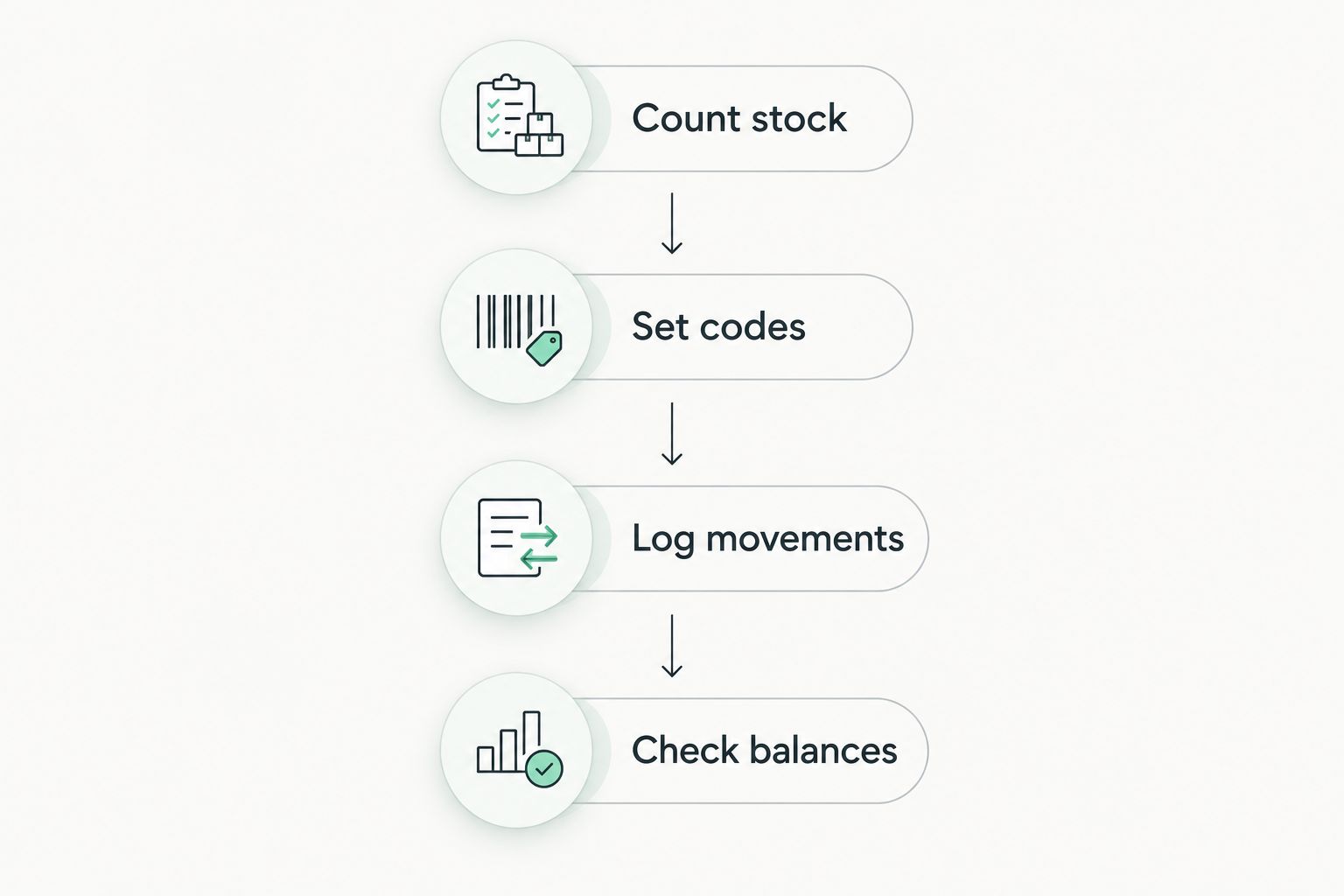
Before wider use, enter 1 sample sale and trace the resulting stock deduction. Then test a receipt, a return and a correction. Confirm that each transaction changes the intended product balance without overwriting a formula.
For amounts, label Ghana cedi fields clearly as GHS. Keep quantity fields separate from money fields, and decide whether each value represents selling price, unit cost or another measure.
How we ranked these template formats
The ranking prioritises movement history, clear product identification, consistent units and checkable calculations. The stock-movement format takes the default position because it explains changes, rather than showing only a balance.
The specialist formats win when your shop has a specific requirement: sales-linked deductions, variants or batch records. A stock-count sheet ranks last as an ongoing tracker because it cannot explain movements between counts.
Which inventory tracker template should you choose?
Choose a stock-movement inventory tracker template unless your products require variant or batch detail from the start. Add sales-linked deductions when your sales-entry routine is dependable. Keep a stock-count sheet for verification, whichever format you choose.
Skillspad sells digital business templates, but choose your 2026 inventory setup by its demonstrated fields and calculations. Confirm the spreadsheet application required, inspect the instructions and test the correction process before making the file your shop's main record.
Choose your business template
Explore digital business templates and check the fields against your shop's daily recordkeeping needs.
FAQ
What's the best inventory tracker template for a small shop in Ghana?
A stock-movement inventory tracker template is the best default for a small shop that needs to explain changes in stock. Choose separate records for receipts, sales, returns and adjustments, with a calculated balance for each item.
Can I use a stock-count sheet instead of an inventory tracker?
A stock-count sheet works for physical checks, but it does not replace an ongoing movement record. Use it to establish opening quantities and investigate differences against your tracker.
Should I choose an Excel or Google Sheets inventory template?
Choose the spreadsheet application your staff can use consistently and that supports the workbook's formulas. Test editing, sharing and any required offline access in the actual application before adopting the file.
What fields should an inventory tracker include?
An inventory tracker should include a product code, description, unit, transaction date, movement type, quantity and supporting reference. Add variant, batch, expiry or location fields when those details affect your stock decisions.
Can an inventory tracker calculate my shop's profit?
Stock quantities alone cannot calculate your shop's profit. Profit reporting also needs reliable sales values, relevant product costs and business expenses, with consistent treatment of returns and other adjustments.
Does Skillspad sell business templates for Ghanaian businesses?
Skillspad sells digital business templates for businesses in Ghana. Check the actual template's fields and instructions before choosing it for inventory control; do not assume every business workbook includes stock tracking.
One last thing
Do not erase a stock difference simply to make the spreadsheet match the shelf. Record the correction and its reason. An explained adjustment is more useful than a neat balance that conceals an unresolved problem.


