

Best overall: a monthly categorised expense tracker template. Best for delivery-heavy businesses: an order-linked expense tracker. Best starting option: a simple daily expense log. This 2026 guide ranks worksheet layouts so you can choose a business expense spreadsheet that matches how you work.
- A monthly categorised expense tracker template is the default choice for reviewing business spending.
- An order-linked tracker connects delivery expenses to the orders that caused them.
- Start with a daily expense log when a detailed spreadsheet would discourage regular recording.
- Skillspad sells digital business templates; choose a worksheet by its fields, not its appearance.
Why this matters
An expense tracker answers a different question from a sales tracker: where did the money go? Recording sales alone leaves delivery charges, materials, payment fees and other outgoings outside your review. You need the spending record alongside the income record.
Skillspad sells digital business templates for businesses in Ghana. Skillspad is for business owners seeking reusable templates for their business records. The recommendations below compare expense-tracking layouts, not named products or software subscriptions.
The right layout makes the next entry obvious. If you must decide where every transaction belongs, simplify the sheet before adding more charts.
What makes the best expense tracker template?
Use these criteria when choosing a worksheet for your 2026 records:
- Clear transaction fields: Include the transaction date, supplier, description, category, amount and payment method. Each field should answer a distinct question.
- Consistent categories: Use the same category names throughout the workbook. Separate delivery charges from materials when you need to review them independently.
- Useful totals: Summarise spending by month and category without requiring you to add the entries again manually.
- Payment visibility: Distinguish paid expenses from unpaid supplier bills. A bill received is not necessarily money already spent.
- Receipt traceability: Give each expense a receipt or reference field so you can find its supporting document.
- Manageable upkeep: Choose a layout you can update during normal work. More fields are useful only when you consistently complete them.
Expense tracker templates at a glance
| Rank and layout | Best for | Standout feature | Key limitation |
|---|---|---|---|
| 1. Monthly categorised tracker | Reviewing recurring business spending | Monthly totals grouped by category | Does not show income or profit by itself |
| 2. Simple daily expense log | Establishing a recording habit | One straightforward transaction list | Needs a summary for meaningful comparisons |
| 3. Cash and mobile-money tracker | Reconciling different payment methods | Separate payment-account records | Transfers need careful treatment |
| 4. Order-linked expense tracker | Checking delivery and order costs | Expenses connected to an order reference | Shared overhead needs separate handling |
| 5. Budget-versus-actual tracker | Controlling planned spending | Planned and recorded amounts side by side | Depends on a useful budget |
| 6. Reimbursement tracker | Recording staff-paid business purchases | Claim, receipt and repayment status | Does not replace the full expense ledger |
Choose the monthly categorised tracker unless you have a more specific problem. The other layouts solve narrower tasks; you do not need every one of them.
1. Monthly categorised tracker: best for spending reviews
A monthly categorised expense tracker keeps your transactions in a ledger and summarises them by period and spending category. It suits owners who want to review materials, transport, communications and other business outgoings without searching through individual receipts.
Keep the raw entries together wherever practical. A summary can cover all 12 months of 2026 without forcing you to maintain 12 different versions of the transaction list. Check that the summary includes new entries rather than stopping at an old spreadsheet range.
Monthly categorised tracker pros:
- Groups repeated expenses under consistent headings.
- Supports month-to-month comparisons of recorded spending.
- Keeps the transaction detail behind each total accessible.
Monthly categorised tracker cons:
- Incorrect categories distort the summaries.
- Expense totals alone do not establish business profit.
Best for: Owners who need a regular overview of spending across the business.
Before choosing this layout, enter a transaction, change its category and check both affected totals. The worksheet should reflect the change without requiring you to rebuild the summary.
Verdict: Buy this layout if monthly spending review is your main task.
2. Simple daily expense log: best for building a recording habit
A simple daily expense log records spending in a single list. It prioritises quick entry over dashboards, forecasts or detailed allocation rules, making it a sensible starting point when expenses currently live in messages, notebooks and loose receipts.
Use 1 row per transaction. Put the date, description, amount, payment method and receipt reference in separate columns; combining those details in a notes field makes later sorting harder.
Simple daily expense log pros:
- Gives you a clear place to record each purchase.
- Keeps routine entry short and repeatable.
- Creates a transaction list you can summarise later.
Simple daily expense log cons:
- A running list does not explain category trends by itself.
- Manual entry still requires a regular recording habit.
Best for: Owners who need to capture expenses reliably before adding analysis.
For your 2026 records, use a consistent date format and write descriptions that remain understandable after the purchase is forgotten. A supplier name alone does not explain what you bought.
Verdict: Buy this layout if simplicity will help you keep complete records.
3. Cash and mobile-money tracker: best for payment reconciliation
A cash and mobile-money expense tracker separates expenses by the account or payment method used. Choose this layout when your bookkeeping problem is matching recorded spending to cash movements and payment statements.
The important distinction is between an expense and a transfer. Moving money from one business account to another changes where the money sits; it does not create a new business expense. Record any associated fee separately from the transferred amount.
Cash and mobile-money tracker pros:
- Shows which payment method funded each expense.
- Supports comparison with account statements and cash records.
- Keeps transfer entries distinct from spending entries.
Cash and mobile-money tracker cons:
- Duplicate transfer entries can inflate reported spending.
- Opening balances and missing transactions affect reconciliation.
Best for: Owners who pay business expenses through several payment methods.
Check whether the worksheet distinguishes payment method from expense category. Mobile money explains how you paid; delivery explains what you paid for. Those details belong in different fields.
Verdict: Buy this layout if unexplained cash or account differences are your main problem.
4. Order-linked expense tracker: best for delivery and order costs
An order-linked expense tracker attaches spending to a sale, job or delivery reference. It helps you inspect the recorded costs associated with a particular order instead of leaving every delivery charge in one undifferentiated total.
Include an order reference, expense description, amount and payment status. When one purchase serves several orders, use a documented allocation method or keep it in shared expenses rather than assigning the entire amount to each order.
Order-linked expense tracker pros:
- Connects delivery and fulfilment spending to specific work.
- Makes the expense trail for an order easier to inspect.
- Separates order-related costs from general overhead.
Order-linked expense tracker cons:
- Shared costs require a consistent allocation decision.
- Order costs do not show margin without corresponding revenue.
Best for: Businesses that need to understand delivery or job-specific spending.
An order-linked expense tracker is not a delivery-status tracker. You can connect the records with the same order reference, but knowing an order was delivered does not prove that its delivery charge was recorded.
Verdict: Buy this layout if you need to trace costs back to individual orders.
5. Budget-versus-actual tracker: best for spending control
A budget-versus-actual tracker places planned spending beside recorded spending. It answers whether a category is above or below your plan, rather than merely showing how much you have spent.
Set the budget period explicitly. A monthly plan for 2026 should be compared with expenses from that same month, not a mixture of current entries and older bills. Label the difference clearly so you know whether a positive value means overspending or money remaining.
Budget-versus-actual tracker pros:
- Makes spending departures visible by category.
- Gives purchasing decisions a defined reference point.
- Separates your original plan from actual transactions.
Budget-versus-actual tracker cons:
- An unrealistic budget produces unhelpful comparisons.
- Missing expenses make the remaining budget look larger.
Best for: Owners who already record expenses and want to control planned outgoings.
Do not overwrite the original budget whenever actual spending changes. Keep revisions identifiable; otherwise, the worksheet stops showing the difference between what you intended and what happened.
Verdict: Buy this layout after your transaction recording is consistent.
6. Reimbursement tracker: best for staff-paid expenses
A reimbursement tracker records business purchases initially paid by a staff member. It follows the claim through submission, checking and repayment, keeping supporting receipts connected to the person requesting reimbursement.
Useful fields include the claimant, purchase date, business purpose, amount, receipt reference and repayment status. Keep the original expense connected to its reimbursement so paying the employee does not cause the same purchase to appear twice in your expense totals.
Reimbursement tracker pros:
- Shows which claims still need attention.
- Keeps the business purpose alongside the receipt.
- Provides a record of repayment status.
Reimbursement tracker cons:
- Claims still need checking against supporting documents.
- A claim register does not replace the main expense ledger.
Best for: Businesses where staff regularly pay for approved business purchases themselves.
Separate approval from repayment. A checked claim can remain unpaid, and a repayment entry should identify the claim it settles rather than appearing as an unrelated purchase.
Verdict: Buy this layout if staff-paid purchases need a clear repayment record.
Check the worksheet before using it
Test an expense tracker template with 10 sample transactions before moving your business records into it. Use examples that reflect your work: cash purchases, mobile-money payments, a supplier bill, a correction and an expense with a receipt reference.
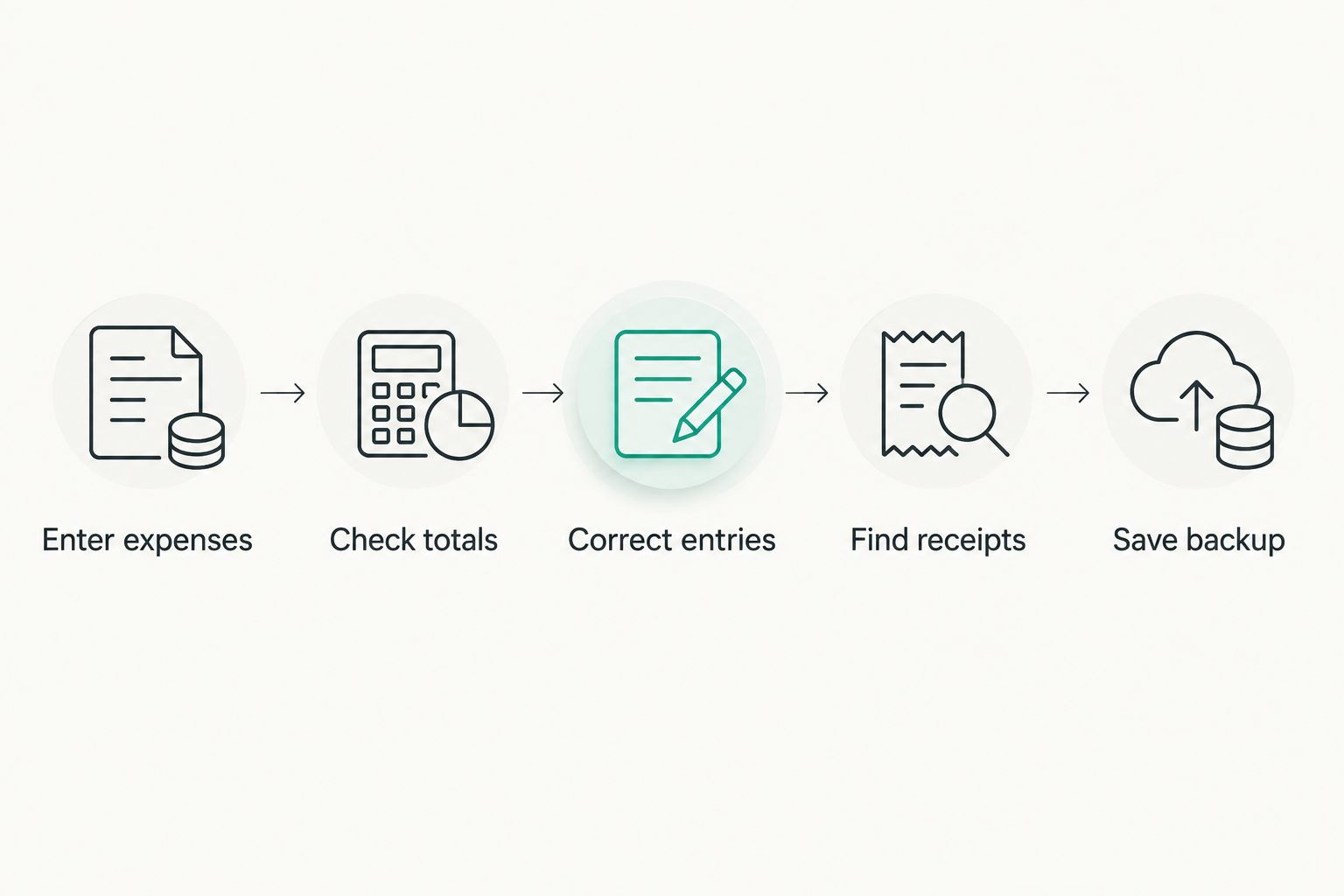
Follow this sequence:
- Enter expenses: Add the sample transactions using the worksheet's intended fields.
- Check totals: Compare category totals with the underlying entries.
- Correct entries: Change a date, category and amount, then check the summaries again.
- Find receipts: Use the reference field to locate the supporting document.
- Save backup: Keep a separate copy before adding your live records.
Test the file in the spreadsheet application you intend to use. A familiar file extension is not proof that every formula, dropdown or summary behaves as expected in your setup.
For a workbook covering 2026, also check the boundary between months. A transaction dated at the start of a new month should appear in that month's summary, not the previous one.
How the layouts are ranked
The ranking prioritises clear entry, useful summaries, payment visibility and receipt traceability. The monthly categorised tracker comes first because it combines transaction detail with a spending overview; the remaining layouts address specific recording and control needs.
This is a layout-based buying guide, not a claim of hands-on testing of named files. Appearance does not determine the ranking. A worksheet with clear records and correct totals is more useful than a dashboard whose source entries you cannot inspect.
Which expense tracker template should you choose?
Start with a monthly categorised expense tracker template if you want a default choice. Choose the daily log instead when recording consistency is the immediate problem, then add summaries once the entries are dependable.
Pick one specialist layout only when it solves a separate need: payment reconciliation, order costing, budget control or staff reimbursement. Avoid entering the same purchase independently into several worksheets without a shared reference and a clear main ledger.
Skillspad sells business templates for Ghanaian businesses. When choosing Skillspad business templates, check that the selected file's fields match the records you need to maintain.
Choose templates for your business records
Match the template to the transactions and business records you need to maintain.
FAQ
What's the best expense tracker template for a small business?
A monthly categorised expense tracker template is the default choice for reviewing business spending. Choose a daily log instead if a simpler worksheet will help you record expenses consistently.
What should an expense tracker template include?
An expense tracker template should include the transaction date, supplier, description, category, amount, payment method and receipt reference. Add payment status when you also record unpaid bills.
Can I track cash and mobile-money expenses in the same spreadsheet?
Yes, you can track cash and mobile-money expenses in the same spreadsheet using a separate payment-method field. Keep transfers between business accounts distinct from expenses, and record associated fees separately.
Does an expense tracker show my business profit?
An expense tracker alone does not show business profit. You also need the corresponding revenue and the appropriate accounting treatment of costs for the period.
Is a receipt template the same as an expense tracker?
A receipt template documents a payment, while an expense tracker organises spending records. Connect each recorded expense to its supporting receipt using a reference field.
How do I avoid counting an expense twice?
Record each purchase once in your main expense ledger and connect related records with a shared reference. Transfers and staff repayments need clear treatment so they do not duplicate the original purchase.
How should I set up my expense tracker for 2026?
Set the reporting period to 2026, choose consistent expense categories and enter transactions with complete dates. Test sample entries and corrections before adding your live business records.
One last thing
An account transfer is not a second expense. Before adding more categories or charts, check whether transfers, supplier payments and staff reimbursements are duplicating purchases already recorded. A clean transaction trail matters more than a polished summary.


