

Best overall: a monthly summary profit and loss tracker template. Best for retailers: a gross-profit tracker. Best for service businesses: an income-and-expense tracker. This 2026 guide ranks spreadsheet formats by the business decisions they help you make, rather than treating every business as the same.
- The best overall profit and loss tracker template combines monthly revenue, direct costs, expenses, and net profit.
- Retail businesses need a gross-profit tracker that separates stock purchases from the cost of goods sold.
- Service businesses need an income-and-expense tracker with consistent categories and separate payment records.
- Skillspad sells digital business templates for businesses in Ghana; choose your reporting format before choosing a download.
Why this matters
Sales tell you what customers bought. Profit tells you what remains after the relevant costs and expenses. A spreadsheet that mixes sales, unpaid invoices, owner withdrawals, and stock purchases into one total cannot give you a clear answer.
For businesses browsing Skillspad, the best profit and loss tracker template is the format that matches how the business earns revenue and incurs costs. Start with that fit, not the appearance of the dashboard.
Your 2026 tracker should also distinguish profit from cash movement. A customer payment, a supplier payment, and an owner contribution affect your records differently. Keep those distinctions visible so you do not mistake money entering the account for business earnings.
What makes the best profit and loss tracker template?
Use these criteria before choosing a spreadsheet. Each criterion addresses a reporting problem, not a decorative feature.
- Clear profit structure: Revenue, direct costs, gross profit, operating expenses, and net profit should have distinct places where applicable.
- Consistent timing: Use the same accounting basis throughout the reporting period. Do not mix invoice dates and payment dates without an explicit method.
- Traceable entries: Keep dates, descriptions, categories, amounts, and document references so you can investigate a total.
- Relevant cost detail: A retailer needs stock-related costs; a project business needs costs assigned to individual jobs.
- Safe calculations: Separate entry cells from formulas, and check that totals include newly added rows.
- Useful comparisons: Compare equivalent periods using unchanged categories, rather than rebuilding the spreadsheet each month.
For a full-year 2026 view, 12 monthly columns give you a consistent reporting structure. Use 1 month per reporting period in the summary, with transaction-level detail underneath. A quarterly review then covers 3 months per quarter without replacing the monthly records.
Those are layout recommendations, not a reason to add complexity. If a column does not support a decision or a check, question whether you need it.
Best tracker formats at a glance
These rankings compare template structures. The standout features below describe what to look for in a download or build into your own workbook; they are not claims about a particular seller's file.
| Rank and format | Best for | Standout feature | Key limitation |
|---|---|---|---|
| 1. Monthly summary tracker | General small-business reporting | Monthly revenue, costs, and profit in one view | Needs supporting transaction records |
| 2. Service income-and-expense tracker | Businesses selling time or expertise | Income and operating expenses grouped consistently | Does not replace invoice or payment tracking |
| 3. Retail gross-profit tracker | Businesses selling physical goods | Revenue compared with the cost of goods sold | Requires reliable inventory records |
| 4. Project profitability tracker | Businesses delivering distinct jobs | Revenue and costs assigned to each project | Shared overhead needs separate treatment |
| 5. Annual comparison tracker | Established businesses reviewing trends | Equivalent monthly periods side by side | Summaries can hide individual errors |
1. Monthly summary tracker: best for general business reporting
A monthly summary tracker brings revenue, direct costs, operating expenses, and net profit into a repeatable reporting view. You enter transactions in supporting records, then summarise them using consistent categories.
Best for: small-business owners who need a clear monthly profit review. This is the default choice when your main question is whether the business earned a profit during the reporting period.
Monthly summary tracker pros
- Gives you a clear place to review total revenue and expenses.
- Makes month-to-month comparisons easier when categories stay consistent.
- Keeps the main reporting view separate from transaction detail.
- Supports a quarterly review without abandoning monthly records.
Monthly summary tracker cons
- A summary alone cannot explain an unusual transaction.
- Incorrect categories flow into otherwise correct totals.
- It does not show which customer, product, or project caused a change.
Before using a monthly tracker in 2026, confirm that each summary line connects to an entry sheet or documented calculation. A manually typed profit total is harder to check than a total built from traceable records.
Look for a separate treatment of owner contributions and withdrawals. Those movements are not ordinary sales and operating expenses, even when they pass through the same bank account.
Verdict: Buy this format for a monthly overview; skip summary-only files with no supporting records.
2. Service income-and-expense tracker: best for service businesses
A service income-and-expense tracker groups earned revenue and business expenses without making inventory the centre of the workbook. It suits businesses whose main activity is providing work, expertise, or an ongoing service.
Best for: service businesses that need to see income alongside the costs of delivering their work. Keep unpaid invoices and payment status in supporting records rather than forcing them into an unexplained income total.
Service income-and-expense tracker pros
- Keeps the reporting structure focused on service income and expenses.
- Separates expense categories for easier review.
- Makes recurring operating expenses visible.
- Avoids unnecessary inventory fields when no stock is involved.
Service income-and-expense tracker cons
- It does not replace an invoice register or receivables record.
- A business-wide total can conceal an unprofitable client engagement.
- It needs additional detail when materials or subcontracting are substantial.
Choose categories that reflect your actual work. Travel, subcontracting, subscriptions, and other business expenses should remain distinguishable when those categories apply. Do not add every possible expense category just because a template includes it.
For 2026 records, decide how you will treat invoice dates and receipt dates before entering income. Under accrual accounting, earning revenue and collecting payment are different events; a cash-basis record follows receipts and payments.
Verdict: Buy this format for service-wide reporting; hold if you need profitability by individual job.
3. Retail gross-profit tracker: best for physical-goods sellers
A retail gross-profit tracker separates sales revenue from the cost of the goods sold. It then deducts operating expenses to show the remaining profit, rather than treating every stock purchase as an immediate sale-related cost.
Best for: retailers and other businesses selling physical goods. The essential distinction is between inventory you still hold and inventory associated with completed sales.
Retail gross-profit tracker pros
- Separates gross profit from operating expenses.
- Keeps stock-related costs distinct from general overhead.
- Helps you investigate changes in sales and product costs.
- Supports a clearer discussion of margins when inventory records are accurate.
Retail gross-profit tracker cons
- Incorrect opening or closing inventory distorts profit.
- A profit tracker alone does not track physical stock movements.
- Returns and damaged stock need explicit treatment.
For a straightforward periodic inventory calculation, cost of goods sold equals opening inventory plus purchases minus closing inventory. Apply the accounting treatment appropriate to your business, including relevant purchase costs and adjustments.
Do not interpret a supplier payment as proof that all the purchased goods were sold during the month. That shortcut confuses cash movement with profit measurement.
A Ghanaian retailer should also check that currency labels match the records being entered. If you use Ghana cedis, label amounts consistently as GHS and document any foreign-currency conversion separately.
Verdict: Buy this format for retail reporting; skip it if you cannot support the inventory figures.
4. Project profitability tracker: best for job-based businesses
A project profitability tracker assigns revenue and direct costs to a distinct job. It helps you compare the amount earned from that work with the costs attributable to delivering it.
Best for: businesses completing separately priced projects or customer jobs. Use a consistent project reference so revenue and expenses connect to the same work.
Project profitability tracker pros
- Makes individual job costs visible.
- Keeps project revenue connected to related spending.
- Helps distinguish profitable jobs from weak ones.
- Supports comparisons between planned and recorded costs when both are maintained.
Project profitability tracker cons
- Shared overhead does not automatically belong to a single project.
- Missing project references leave costs unassigned.
- A project's contribution is not the same as total business net profit.
Separate direct project costs from business-wide expenses. Materials used for a job belong in its cost record; a general office expense needs a consistent treatment outside the direct-cost total or a documented allocation method.
For 2026 projects that cross reporting periods, keep timing consistent. Do not compare all project costs with only part of the corresponding revenue and then treat the result as a final project verdict.
A project tracker should feed the business summary, not become an unrelated spreadsheet whose totals never reconcile.
Verdict: Buy this format for job-level decisions; hold if project references and cost assignment are not maintained.
5. Annual comparison tracker: best for reviewing business trends
An annual comparison tracker arranges monthly results so you can review the pattern across the year. It is a summary layer over reliable records, not a substitute for entering transactions correctly.
Best for: businesses with consistent monthly records that want to compare equivalent periods. Add prior-period comparisons only when the categories and accounting basis are comparable.
Annual comparison tracker pros
- Puts monthly revenue and profit into a single reporting view.
- Makes recurring patterns easier to inspect.
- Supports comparisons using stable categories.
- Keeps an annual review connected to monthly results.
Annual comparison tracker cons
- Annual totals can hide a weak individual month.
- Category changes make comparisons harder to interpret.
- A dashboard cannot correct errors in source records.
Use the same definitions across all 12 months. If you move an expense between categories, document the change and consider whether earlier periods need consistent treatment.
Treat an unusual result as a prompt to inspect supporting records. A chart shows the movement; the transaction detail explains it.
Verdict: Buy this format as a reporting layer; skip it as your only bookkeeping record.
How these formats are ranked
The ranking prioritises clear profit structure, traceable entries, relevant cost detail, and repeatable comparisons. The monthly summary comes first because it answers the broadest reporting question without requiring a specialised business model.
Service, retail, and project formats follow because each solves a different cost-reporting problem. The annual comparison sits last because it depends on accurate monthly records already being in place.
A specialised tracker outranks the default when its cost structure matches your business. A retailer should not choose a simpler service spreadsheet merely because it has fewer tabs.
Set up your tracker before entering transactions
A useful spreadsheet starts with rules you can repeat. Before using a Skillspad business template or another workbook, follow this sequence so your first reporting period has a clear foundation.
- Reporting basis: Establish whether your records use cash or accrual accounting, with professional advice where needed.
- Cost categories: Name the revenue and expense categories you will use consistently.
- Entry records: Keep dates, descriptions, amounts, and source references with each transaction.
- Formula checks: Confirm that new rows feed the totals and that calculated cells are not overwritten.
- Monthly review: Compare the summary with supporting records and investigate unexplained differences.
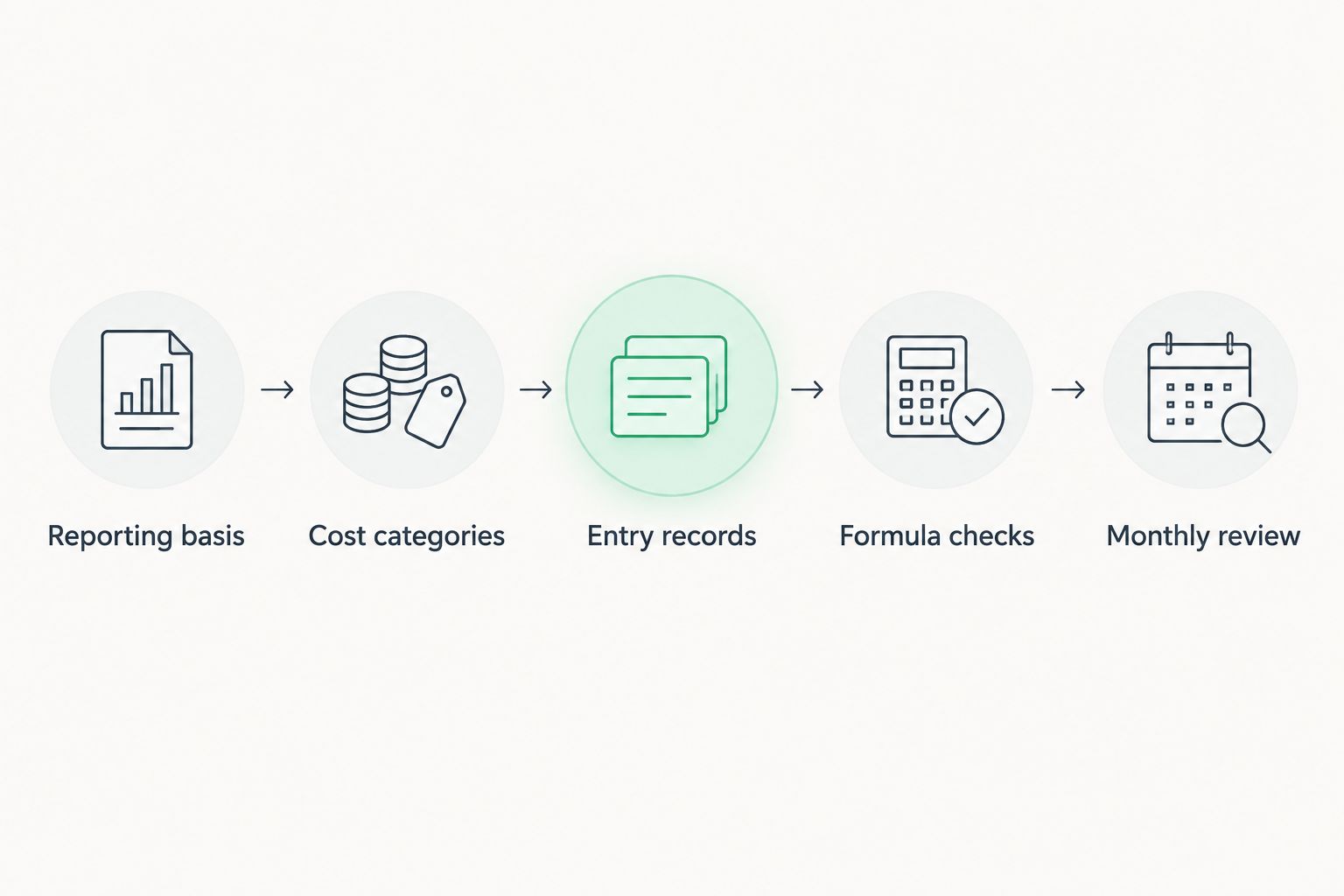
Check the workbook with entries you can verify manually before depending on its dashboard. Then protect formula cells where your spreadsheet application permits it, and keep an untouched copy of the original file.
Which profit and loss tracker template should you choose?
Choose the monthly summary tracker unless your business needs a more specialised cost view. Choose retail gross-profit tracking for physical goods, service income-and-expense tracking for service-wide reporting, or project profitability tracking for separate jobs.
Use the annual comparison format after the underlying monthly records are dependable. For your 2026 workbook, prioritise traceable inputs over extra charts, and confirm that the file works in the spreadsheet application you actually use.
When browsing Skillspad profit and loss tracker template options, use the same checks: inspect the reporting structure, confirm compatibility, and understand what you must enter yourself before choosing a file.
FAQ
What's the best profit and loss tracker template for a small business?
A monthly summary profit and loss tracker template is the best default for general small-business reporting. Retailers need inventory-aware cost calculations, while job-based businesses need project-level records.
Can I use Excel to track business profit and loss?
Yes, Excel can organise revenue, costs, expenses, and profit calculations. Keep source records, check formulas, and use a consistent accounting basis rather than relying on the dashboard alone.
Is a profit and loss tracker the same as a cash-flow tracker?
No, a profit and loss tracker measures revenue and expenses, while a cash-flow tracker records money moving in and out. Under accrual accounting, unpaid invoices and other timing differences separate profit from cash movement.
Which tracker should a Ghanaian retailer choose?
A Ghanaian retailer should choose a gross-profit tracker supported by inventory records. Use consistent GHS labels when recording Ghana cedis, and distinguish stock purchases from the cost of goods sold.
Do owner withdrawals count as business expenses?
Owner withdrawals are not ordinary operating expenses in a sole proprietor's profit and loss report. Record them separately from the costs of running the business, and seek advice for the treatment appropriate to your legal structure.
Should I track profit monthly or annually?
Track profit monthly and use an annual view to compare those monthly results. A monthly review preserves detail that an annual total can hide.
Does a template replace an accountant?
No, a template organises records and calculations; it does not determine the correct accounting or tax treatment for every transaction. Get professional advice for inventory valuation, taxes, and other decisions that require it.
One last thing
A spreadsheet can calculate the wrong profit perfectly. If you enter an owner contribution as sales or expense unsold inventory incorrectly, the formulas can work exactly as written while the result remains misleading.
Before trusting a profit figure, ask what each input represents. Correct classification matters more than a polished chart.


