

Best overall: a monthly Excel attendance register. Best for shared updates: a Google Sheets attendance register. Best for paper-based recording: a printable daily register. The best employee attendance tracker template in 2026 matches your working schedule, records exceptions clearly, and gives you a summary you can check against the original entries.
- Choose a monthly employee attendance tracker template for fixed schedules and straightforward absence reporting.
- Use Google Sheets for shared attendance recording; use a shift register when working hours vary.
- Skillspad sells business templates for businesses in Ghana; choose attendance fields around your actual working arrangements.
- Keep attendance, hours worked, and leave balances separate enough to check each calculation.
Why this matters
Attendance records answer different questions: who attended, who arrived late, who worked a scheduled shift, and whose leave was approved. A template becomes difficult to trust when it treats those questions as the same thing.
Skillspad sells digital business templates for businesses in Ghana. For attendance tracking, start with the record your business needs rather than choosing the spreadsheet with the most tabs.
A shop with changing shifts needs scheduled start and finish times. An office with fixed working days often needs a simpler monthly register. Neither format should turn every blank cell into an absence.
What makes the best employee attendance tracker template?
Use these criteria to choose your 2026 attendance workbook:
- Schedule fit: The template distinguishes scheduled workdays from rest days, holidays, and approved leave.
- Clear entries: Each attendance code has a written definition that staff and supervisors can follow.
- Checkable totals: Summary counts can be traced to dated entries rather than manually typed totals.
- Controlled editing: Input cells stay separate from formulas, and responsibility for corrections is clear.
- Useful exceptions: Late arrivals, incomplete records, and unapproved absences remain visible.
- Appropriate detail: The template collects enough information to manage attendance without becoming an unnecessary personnel file.
Choose the least complicated format that answers your attendance question accurately. Extra columns are useful only when somebody maintains and checks them.
Attendance tracker templates at a glance
These rankings compare template formats, not named downloadable products. Choose the format first, then check that any file you select contains the fields and calculations described below.
| Rank and template format | Best for | Standout design | Key limitation |
|---|---|---|---|
| Monthly Excel attendance register | Fixed schedules | Employee-by-date view with monthly totals | Attendance codes do not measure hours worked |
| Shared Google Sheets register | Distributed record-keeping | A shared record with defined editors | Uncontrolled edits can change past entries |
| Shift attendance register | Rotating schedules | Scheduled and actual times side by side | Requires maintained rota information |
| Attendance timesheet | Hour-based records | Start, finish, and break fields | Needs separate rules for payroll calculations |
| Attendance and leave register | Leave coordination | Attendance linked to approved leave dates | Leave balances need separate policy rules |
| Printable daily register | Paper-first workplaces | Sign-in and supervisor confirmation fields | Requires manual consolidation |
1. Monthly Excel register: best for fixed schedules
A monthly Excel register places employees down the rows and dates across the columns. Each daily cell contains an attendance code, while summary columns count the relevant statuses.
This is the strongest default for a business with predictable working days. You can review a person's month without opening a separate record for every date.
Monthly Excel register pros:
- Shows attendance patterns across the month.
- Keeps daily entries close to their summary totals.
- Supports a simple, documented code system.
- Can be designed for local file-based record-keeping.
Monthly Excel register cons:
- A presence code does not establish the number of hours worked.
- Copied monthly sheets need date and formula checks.
- Separate file copies create reconciliation work.
For a 2026 workbook, you can use 12 monthly tabs and an annual summary. Check the date headings and employee list before copying the layout; a neat workbook still fails if its calendar is wrong.
Best for: Small businesses with fixed working days and a supervisor responsible for attendance.
Verdict: Buy this format for a straightforward monthly attendance record.
2. Shared Google Sheets register: best for distributed updates
A shared Google Sheets register lets designated people update the same attendance record. Structure it around a single employee list, dated entries, and a summary that does not require retyping the same information.
The important choice is who edits what. A shared spreadsheet needs ownership just as much as a file held on one computer.
Shared Google Sheets register pros:
- Gives authorised contributors a common record.
- Reduces the need to combine separate submitted files.
- Supports shared review of unresolved entries.
- Allows a central attendance-code legend.
Shared Google Sheets register cons:
- Broad editing permissions expose historical records to accidental changes.
- Shared access does not establish whether an entry is accurate.
- Poorly structured sheets become difficult to review as entries accumulate.
Assign attendance entry to named roles and reserve formula changes for the workbook owner. Record why a historical entry changed instead of silently overwriting the original status.
Best for: Businesses where supervisors in different locations contribute attendance information.
Verdict: Buy this format when shared ownership is necessary and editing rules are clear.
3. Shift attendance register: best for rotating schedules
A shift attendance register records what an employee was scheduled to work alongside what happened. Include the work date, scheduled start, scheduled finish, actual arrival, actual departure, and an exception note.
That comparison matters because an arrival time alone does not establish lateness. You need the person's scheduled start time for that date.
Shift attendance register pros:
- Connects attendance to the assigned shift.
- Makes late arrivals and early departures easier to review.
- Separates rest days from missed scheduled work.
- Gives supervisors a place to explain shift changes.
Shift attendance register cons:
- Outdated schedules produce misleading exceptions.
- Overnight shifts need explicit date handling.
- More detailed entries take more administration than daily status codes.
Store full dates with times when a shift crosses midnight. Otherwise, a finish time earlier than the start time can be mistaken for an invalid entry rather than work continuing into the following day.
Best for: Shops, service teams, and other businesses with changing work schedules.
Verdict: Buy this format when attendance must be checked against a rota.
4. Attendance timesheet: best for recording hours worked
An attendance timesheet records time rather than presence alone. Its core fields are employee, work date, start time, finish time, break duration, and calculated hours.
Keep payroll decisions separate from raw time recording. A calculated duration does not, by itself, determine overtime entitlement, paid breaks, or the amount owed.
Attendance timesheet pros:
- Records the duration of work rather than a simple attendance status.
- Makes break deductions visible.
- Supports review of missing start or finish entries.
- Provides a dated basis for checking submitted hours.
Attendance timesheet cons:
- Incorrect time formats can distort calculations.
- Missing breaks or duplicate entries affect totals.
- Payroll treatment requires rules beyond the template's arithmetic.
As a worked example, a start at 09:00 and finish at 17:00 gives 8 hours elapsed. Subtract a 1-hour unpaid break, and the recorded working duration becomes 7 hours. Label the break field clearly so nobody confuses elapsed time with working time.
Best for: Businesses that need to review hours as well as attendance.
Verdict: Buy this format for time records; hold off on payroll use until its rules are checked.
5. Attendance and leave register: best for leave coordination
An attendance and leave register connects daily attendance with approved leave dates. Keep leave requests, approvals, and daily attendance statuses distinguishable, even when they sit in the same workbook.
A request is not an approval. The register should preserve that difference so a pending request does not automatically become authorised leave.
Attendance and leave register pros:
- Separates approved leave from unexplained absence.
- Helps supervisors review planned absences alongside attendance.
- Gives each leave entry a date range and approval reference.
- Reduces ambiguity when reviewing monthly exceptions.
Attendance and leave register cons:
- Leave balances require clearly defined entitlement rules.
- Half-days and non-working days need consistent treatment.
- Sensitive explanations do not belong in a widely shared attendance sheet.
For your 2026 record, define which days count against each leave category before adding balance formulas. Use a neutral status in the shared register and keep supporting personal information in an appropriately restricted record.
Best for: Businesses that need attendance reporting and visibility of approved leave.
Verdict: Buy this format for leave coordination, not as a substitute for a written leave policy.
6. Printable daily register: best for paper-first recording
A printable daily register provides spaces for the date, employee name or identifier, arrival, departure, and supervisor confirmation. Use it where a paper entry fits the working environment better than opening a spreadsheet.
Paper still needs a filing and review routine. A completed sheet is an original record, not a monthly attendance summary.
Printable daily register pros:
- Supports recording without opening a digital workbook.
- Provides a visible place for staff and supervisor entries.
- Makes the required daily fields explicit.
Printable daily register cons:
- Totals and trends require manual consolidation.
- Handwriting and missing entries complicate review.
- Sheets need secure storage and controlled access.
Leave room for corrections with initials rather than encouraging erased or unreadable changes. Decide who transfers the entries into the monthly record and who checks that transfer.
Best for: Workplaces that record attendance on paper at the point of arrival.
Verdict: Buy this format when paper fits the workflow; skip it if nobody owns consolidation.
Set up your attendance record before the first entry
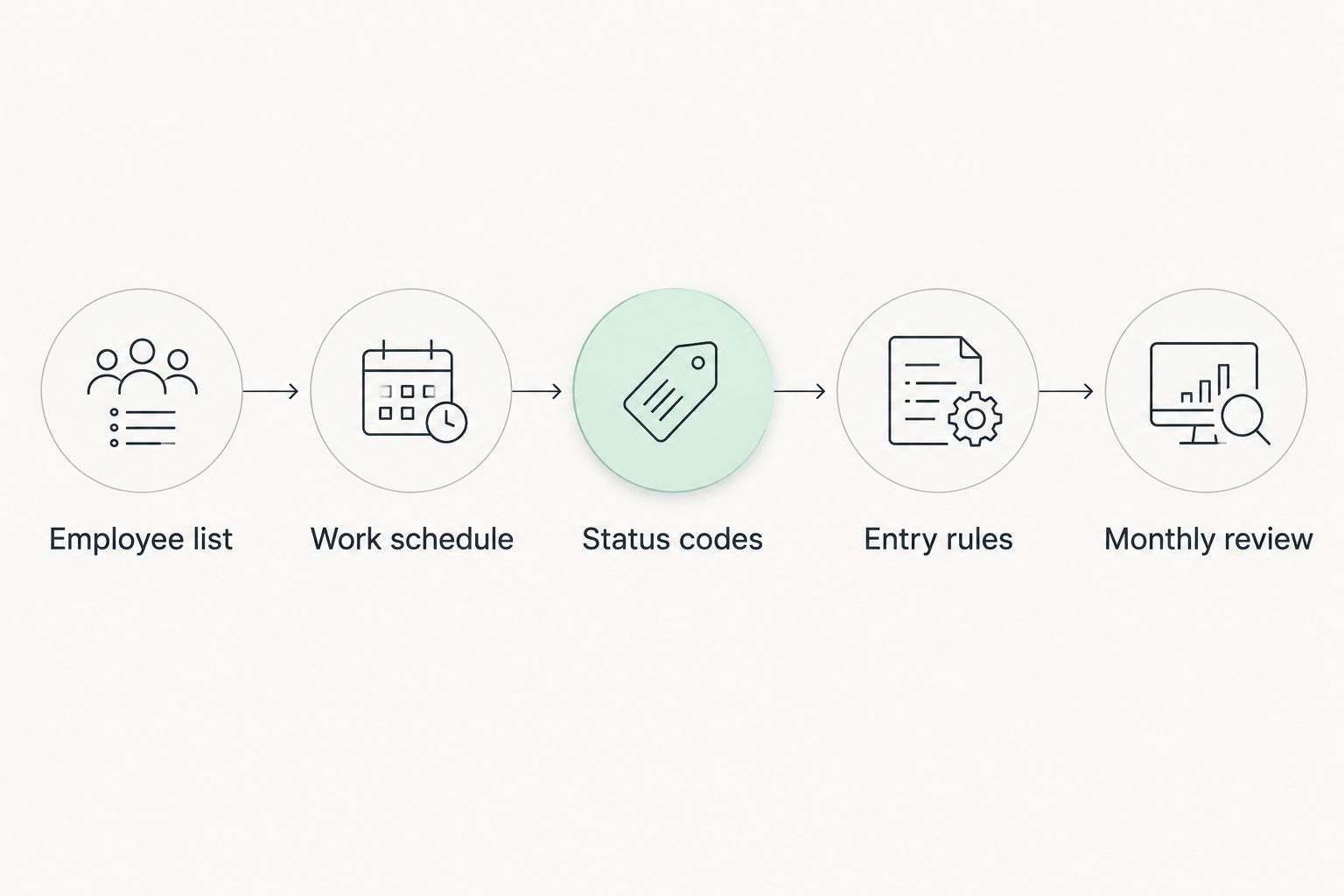
A template is ready to use when staff can record the same event consistently. Follow this sequence before collecting your 2026 attendance data.
- Employee list: Give each employee a consistent identifier and remove duplicate records.
- Work schedule: Record expected working days or assigned shifts before judging absences.
- Status codes: Define present, absent, approved leave, rest day, and pending review.
- Entry rules: Name the person responsible for daily recording and corrections.
- Monthly review: Check unresolved entries and reconcile summaries against daily records.
Keep unknown information visibly unresolved. A blank departure time should trigger a check, not an automatic assumption about when someone finished.
Test the workbook with ordinary attendance, approved leave, a rest day, and a missing entry. For shift records, also test work that ends after midnight. Check both the individual row and the summary: a correct-looking total can conceal a wrongly classified day.
How the formats were ranked
The ranking prioritises schedule fit, clear entries, checkable totals, controlled editing, useful exceptions, and appropriate detail. Monthly registers lead because they answer the basic attendance question without requiring detailed time recording.
The other formats win distinct jobs rather than competing on the same feature list. Shared registers address distributed input; shift registers address changing schedules; timesheets address duration; leave registers address approvals; printable registers address paper-based entry.
For small businesses choosing Skillspad business templates, a monthly attendance register is the best starting format for fixed schedules. Add complexity only when the simpler record cannot answer a necessary question.
Which attendance tracker template should you choose?
Choose the monthly Excel register if you need a dependable starting point for fixed schedules. Choose the shift register instead if expected working times change by employee or date.
Before adopting a file, check its fields, formulas, date handling, and editing arrangements. A template's appearance does not establish whether its attendance totals are correct.
Keep attendance separate from sales, expenses, and profit calculations. Those records support different decisions, even when the same person maintains them.
Browse business templates
Explore Skillspad's business templates and check each file against the records your business needs.
FAQ
What's the best employee attendance tracker template for a small business?
A monthly Excel attendance register is the best default for a small business with fixed working days. Choose a shift register when schedules vary, or a timesheet when you need hours worked.
Is Excel or Google Sheets better for attendance tracking?
Excel suits a locally maintained workbook, while Google Sheets suits shared attendance recording. Choose around who enters the data and how changes are controlled, not the spreadsheet name alone.
What should an employee attendance tracker template include?
An employee attendance tracker template should include employee identifiers, dates, expected workdays or shifts, attendance statuses, and checkable totals. Add start, finish, and break fields only when you need time records.
Can an attendance spreadsheet calculate payroll?
An attendance spreadsheet can calculate recorded durations, but payroll needs additional rules. Check pay rates, break treatment, overtime rules, and applicable requirements before using attendance totals to determine pay.
How do I record approved leave without marking someone absent?
Use a separate approved-leave status and retain an approval reference. Keep pending requests distinct from approved leave, and distinguish both from unexplained absence.
How should I set up an attendance tracker for 2026?
Check the 2026 calendar, employee list, work schedules, status definitions, and summary formulas before recording attendance. Test rest days, leave, missing entries, and overnight shifts where relevant.
Does Skillspad sell business templates for Ghanaian businesses?
Skillspad sells digital business templates for businesses in Ghana. Check the contents of an individual template against your attendance requirements before choosing it.
One last thing
An empty cell is not evidence of absence. It can mean an unentered record, a rest day, or an unresolved exception. Give incomplete entries their own review status so your attendance summary does not turn missing information into a decision about an employee.


