

Best overall: an editable document rent receipt template. Best for several rental units: a spreadsheet-linked receipt. Best for handwritten records: a printable duplicate-copy layout. This 2026 guide compares five formats for landlords in Ghana and shows which payment details each should capture.
- An editable document rent receipt template is the best default for landlords who issue receipts individually.
- Choose a spreadsheet-linked receipt when you need to reconcile payments across tenants and rental units.
- Use a printable duplicate-copy layout for handwritten receipts, keeping matching landlord and tenant records.
- Skillspad serves Ghanaian business owners seeking digital business templates; assess rental paperwork against the checks below.
Why this matters
A rent receipt records money received. It should identify the payer, the property, the rental period and the payment itself without forcing either party to reconstruct the transaction later.
The best rent receipt template connects a payment to a named tenant, a specific unit and a clearly stated rental period. Appearance comes after that. A tidy receipt that leaves the rental period unclear still creates an avoidable recordkeeping problem.
Skillspad provides digital business templates for Ghanaian businesses. Use the criteria below when assessing a rent receipt template, whether you intend to print it, complete it on a computer or connect it to a payment register.
For your 2026 records, keep the date money arrived separate from the period it covers. Those dates answer different questions, especially when a tenant pays in advance or settles an earlier balance.
What makes the best rent receipt template?
Judge the layout against these six criteria before choosing a format:
- Payment identity: Separate fields for the receipt reference, payment date and payment method.
- Tenant and property identity: Tenant name, property address and room or unit identifier.
- Rental-period clarity: Explicit start and end dates rather than an unexplained month name.
- Amount clarity: Currency, amount received and a distinction between rent and other charges.
- Record continuity: A way to retain a matching copy and connect the receipt to your rent register.
- Practical completion: Fields you can fill accurately using the device or paper workflow you actually use.
For Ghanaian cedi payments, label the currency as GHS or GH₵. Do not leave an amount beside an unexplained currency symbol, particularly when sharing the receipt electronically.
Rent receipt templates at a glance
These rankings compare formats, not named software products. Choose the workflow first, then judge the individual template against the criteria above.
| Rank and format | Best for | Standout feature | Key limitation |
|---|---|---|---|
| 1. Editable document | Individual receipts | Flexible fields and explanatory notes | Separate register needed for payment tracking |
| 2. Spreadsheet-linked receipt | Several rental units | Receipt details drawn from a payment register | Formulas and references need checking |
| 3. Printable duplicate-copy layout | Handwritten records | Matching tenant and landlord copies | Manual completion and filing |
| 4. Fillable PDF | Consistent digital sharing | Fixed layout with designated entry fields | Changes require a suitable PDF editor |
| 5. Partial-payment layout | Instalments and arrears | Separate received amount and remaining balance | Balance depends on an accurate rent account |
1. Editable document: best for individual rent receipts
An editable document template lets you enter payment details into a reusable page. Choose this format when you issue receipts individually and need space for occasional explanations, such as a payment covering more than one rental period.
For everyday use in 2026, this is the strongest default because you can adapt the fields without building a spreadsheet workflow. Keep an untouched master and save each completed receipt separately.
Editable document pros:
- Adjust field labels to match your tenancy records.
- Add a clear note without squeezing handwriting into a small box.
- Produce a printable copy after completing the receipt.
Editable document cons:
- Editing the wrong file can overwrite an earlier receipt.
- The document alone does not provide a running payment register.
Best for: Landlords who prepare and check each receipt themselves.
Before adopting a layout, enter a long tenant name and a detailed property address. If either breaks the page, revise the master before using it for real payments.
Verdict: Buy this format for straightforward individual receipts; skip designs that prioritise decoration over readable fields.
2. Spreadsheet-linked receipt: best for several rental units
A spreadsheet-linked receipt uses information from a payment register to populate a receipt layout. A useful setup separates payment entry from the page you print or export.
Choose this approach when you need to review payments by tenant or unit. The benefit is a connected record, not simply a receipt that happens to sit inside a spreadsheet.
Spreadsheet-linked receipt pros:
- Reuse recorded payment details instead of retyping them.
- Organise transactions by tenant, unit and rental period.
- Check issued receipts against the payment register.
Spreadsheet-linked receipt cons:
- An incorrect reference can pull another tenant's details.
- Editing formulas can change the receipt or balance calculation.
Best for: Landlords managing payments across several rental units.
Before adopting a spreadsheet in 2026, check that selecting a payment changes every relevant receipt field. Verify the tenant, unit, period and amount together; a correct total does not prove the rest of the receipt is correct.
Verdict: Buy for connected recordkeeping; skip if you cannot check the spreadsheet's references and formulas.
3. Printable duplicate-copy layout: best for handwritten records
A printable duplicate-copy layout provides matching spaces for the tenant's receipt and the landlord's retained record. It suits a paper-based workflow where you complete the receipt by hand.
Keep 2 matching copies per payment as your working rule. Give one to the tenant and retain the other, with the same reference and payment details on both.
Printable duplicate-copy layout pros:
- Complete the receipt without opening an editing application.
- Keep a paper record beside other tenancy documents.
- Check both copies together before handing one over.
Printable duplicate-copy layout cons:
- Handwriting can make dates and amounts difficult to read.
- Paper copies need organised storage and protection from damage.
Best for: Landlords who prefer handwritten receipts and physical filing.
Print a test page before preparing a batch. Check that the writing spaces fit full names, unit details and rental-period dates; shrinking a crowded page only makes handwriting harder to read.
Verdict: Buy for a paper-first workflow; skip cramped layouts with insufficient writing space.
4. Fillable PDF: best for consistent digital sharing
A fillable PDF combines a fixed page layout with designated entry fields. Choose a genuinely fillable file, rather than assuming every PDF supports typed completion.
This format suits landlords who want completed receipts to look consistent when shared digitally. Keep the editable master separate from the copy you issue, and retain the issued version with your payment records.
Fillable PDF pros:
- Keep field positions consistent across completed receipts.
- Guide entry through designated payment and tenant fields.
- Share a fixed-layout document instead of an editable word-processing file.
Fillable PDF cons:
- Layout changes require a suitable PDF editor.
- Form behaviour can differ between PDF applications.
Best for: Landlords who share completed receipts electronically and rarely change the layout.
Test the file in the application you will actually use. Save it, close it and reopen it to confirm that the entered details remain visible before sending a tenant's receipt.
Verdict: Buy for repeatable digital delivery; skip files that do not preserve completed fields in your workflow.
5. Partial-payment layout: best for instalments and arrears
A partial-payment receipt separates the amount received from the remaining rent balance. It should also identify the rental period or outstanding charge to which the payment applies.
Choose this layout when a payment does not settle the relevant amount in full. A standard receipt can record the money received, but a dedicated balance section makes the remaining obligation explicit.
Partial-payment layout pros:
- Distinguish money received from the amount still outstanding.
- State which rental period receives the payment.
- Leave space to explain how a payment was allocated.
Partial-payment layout cons:
- An incorrect opening balance produces an incorrect remaining balance.
- Receipt notes do not replace a complete tenant account.
Best for: Landlords recording instalments or payments against arrears.
Keep deposits and other charges separate from rent in the supporting account. Do not describe a tenant as fully paid merely because the receipt records a payment; check the relevant balance first.
Verdict: Buy when balance clarity matters; skip any layout that combines rent, deposits and unrelated charges into an unexplained total.
How the formats are ranked
The editable document ranks first for flexibility and straightforward completion. The spreadsheet-linked receipt wins for connected records, while the printable layout wins for handwritten use.
The fillable PDF prioritises consistent presentation. The partial-payment layout addresses a narrower problem: explaining what remains unpaid. None replaces accurate payment evidence or a properly maintained tenant account.
Essential fields for a Ghana rent receipt
Use this field checklist when choosing or adapting your template:
| Field | What to record |
|---|---|
| Receipt reference | A distinct identifier connected to your records |
| Payment date | The date the money was received |
| Tenant | The tenant's name as recorded in the tenancy documents |
| Property and unit | The address plus the room, flat or unit identifier |
| Rental period | The start and end dates covered by the payment |
| Amount and currency | The amount received, clearly labelled in the relevant currency |
| Payment method | Cash, bank transfer, mobile money or another actual method |
| Transaction reference | The relevant payment reference, where applicable |
| Recipient | The landlord or authorised recipient's name |
| Balance details | Any remaining amount, supported by the tenant account |
The checklist is a recordkeeping specification, not a statement that every field is a statutory requirement. Use a receipt to acknowledge payment, not to introduce new tenancy terms.
When assessing Skillspad business templates for rental administration, use these fields as your acceptance checklist. A template should fit the record you need, rather than force you to omit essential transaction details.
A repeatable receipt workflow for 2026
Use 1 receipt per payment transaction as a practical default. If a payment covers several periods or charges, explain the allocation on that receipt and in the supporting register.
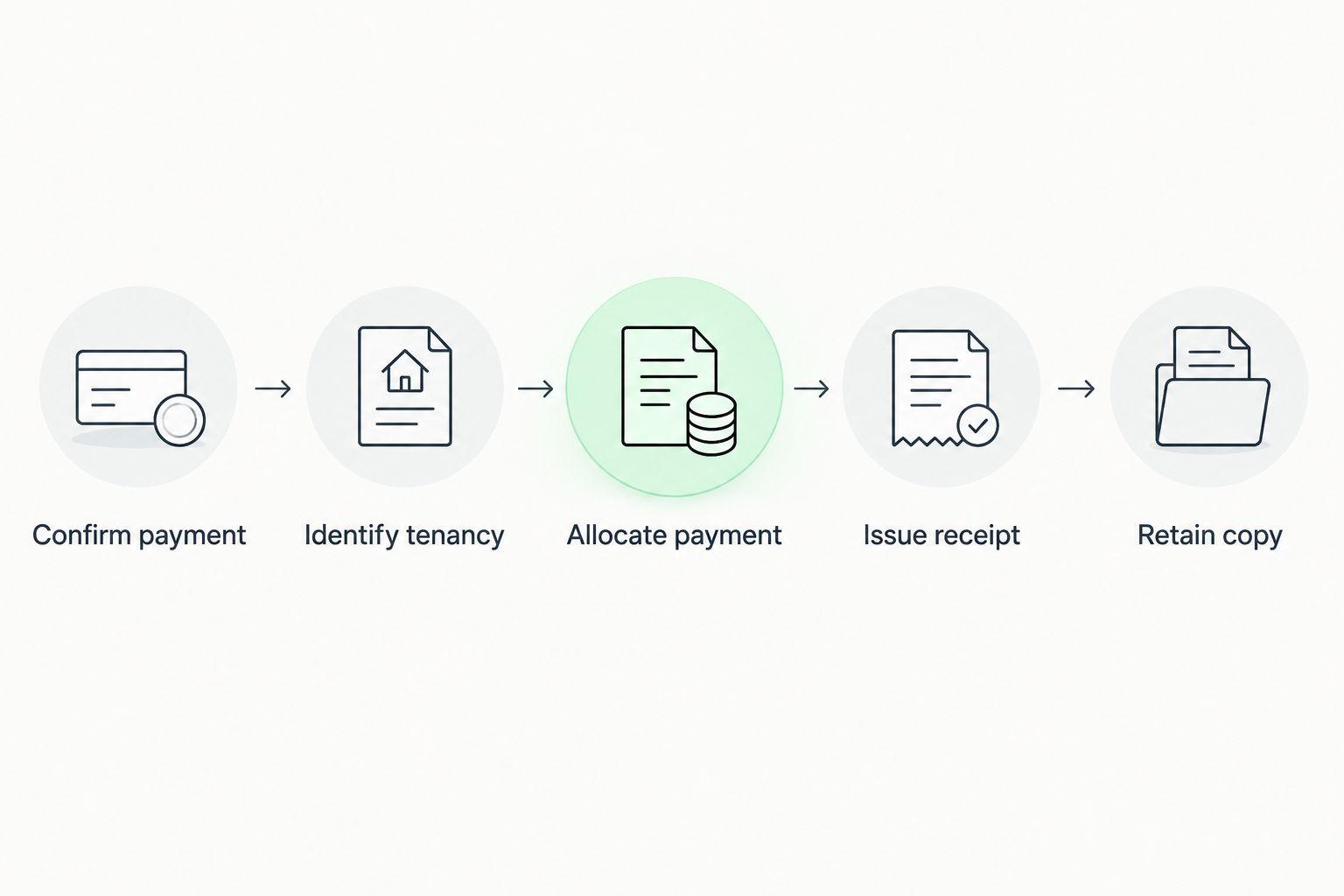
Follow this sequence:
- Confirm payment: Check that money was received rather than relying only on a payment promise.
- Identify tenancy: Match the payer to the tenant and property unit.
- Allocate payment: State the rental period and distinguish other charges.
- Issue receipt: Complete the reference, date, amount and recipient details.
- Retain copy: Save the issued receipt alongside the payment-register entry.
Check 3 details before issuing each receipt: the tenant, the rental period and the amount received. Then confirm that the saved copy matches the version the tenant receives.
Which rent receipt template should you choose?
Choose an editable document unless your recordkeeping needs justify another format. Move to a spreadsheet-linked receipt when you need connected payment records, not merely a different-looking page.
Choose paper for handwritten completion, a fillable PDF for consistent digital sharing, and a partial-payment layout when you need explicit balance information. You can combine the last layout with a document or spreadsheet; it describes the information required, not a separate file technology.
For your 2026 setup, test the full process before adopting a template: complete a sample, save it, retrieve it and check it against the register. Fix confusing fields in the master, not repeatedly on individual receipts.
FAQ
What's the best rent receipt template for a landlord in Ghana?
An editable document is the best default for a landlord issuing receipts individually. Choose a spreadsheet-linked receipt when you need connected records across tenants or rental units.
What should a rent receipt include?
A useful rent receipt identifies the tenant, property, rental period, payment date, amount, currency and recipient. Include a receipt reference and the payment method so you can connect it to your supporting records.
Is an Excel rent receipt better than a document template?
A spreadsheet-linked receipt is better for connected payment tracking, while an editable document is simpler for individual receipts. Check spreadsheet references and formulas before relying on generated details.
Can I use a handwritten rent receipt?
You can use a handwritten layout to record payment details clearly. Retain a matching copy, and treat the format choice separately from any legal requirements that apply to your tenancy.
How do I record rent paid through mobile money?
Record mobile money as the payment method and include the relevant transaction reference. Confirm receipt of the money and identify the tenant, property and rental period separately.
What should I write when a tenant pays only part of the rent?
State the amount received, the rental period it applies to and the remaining balance supported by your tenant account. Do not label the relevant rent as fully paid when a balance remains.
Does a rent receipt replace a tenancy agreement?
A rent receipt records a payment; it does not replace a tenancy agreement. Keep the payment record connected to the tenancy without using the receipt to introduce new terms.
One last thing
The payment date and rental period are not interchangeable. A receipt can show exactly when money arrived while still leaving unclear what it paid for.
Before choosing any rent receipt template, cover its heading and read only the completed fields. If you cannot identify the tenant, unit, payment and covered period, change the layout. Apply the same test when evaluating Skillspad business templates for your records.


