

Best overall: a combined debtors and creditors workbook. Best for customer collections: a receivables ageing tracker. Best for simple records: a single-ledger tracker. This 2026 guide compares five spreadsheet layouts so you can choose a debtors and creditors tracker template that fits how your business collects and pays money.
- Choose a combined debtors and creditors tracker template when you sell on credit and owe suppliers.
- Use a receivables ageing tracker to prioritise overdue customer invoices, not just total customer debt.
- Choose a supplier payment tracker when bill deadlines are your main problem.
- Skillspad sells business templates; assess any workbook against your payment records before choosing it.
Why this matters
A sale on credit is not money in your account, and a supplier invoice is not proof that you have paid. Your tracker must keep those distinctions visible. Otherwise, you risk chasing settled invoices or treating money owed to suppliers as money you can spend.
Skillspad sells digital templates for businesses in Ghana. For Skillspad customers choosing a debtors and creditors tracker template, payment accuracy comes before dashboard appearance. Choose the layout around your records, not the other way round.
For your 2026 records, keep receivables and payables separate even when they share a workbook. Debtors owe your business; creditors are parties your business owes. Neither balance, by itself, tells you your profit or available cash.
What makes the best tracker template?
Check these six criteria before choosing a workbook:
- Separate balances: Customer debts and supplier obligations need distinct totals. Do not cancel them against each other.
- Invoice-level records: Each outstanding invoice needs its own reference, issue date, due date and amount.
- Payment handling: Part-payments must reduce the correct invoice without removing the original transaction.
- Overdue visibility: The layout should distinguish unpaid invoices that are not yet due from overdue balances.
- Traceable adjustments: Credit notes, refunds and corrections need references rather than unexplained edits to totals.
- Usable maintenance: You should understand where to enter transactions, which cells calculate balances and how to check the results.
These criteria apply whether you create your own spreadsheet or choose a business template from Skillspad. A polished summary cannot compensate for missing invoice references.
Best tracker layouts at a glance
The options below are spreadsheet structures, not named products. Choose the structure first, then inspect whether a particular template supports it.
| Tracker layout | Best for | Standout feature to look for | Key limitation |
|---|---|---|---|
| Combined debtors and creditors workbook | Businesses managing both customer credit and supplier bills | Separate receivables and payables with a shared summary | Requires consistent maintenance of both sides |
| Receivables ageing tracker | Businesses prioritising customer collections | Outstanding invoices grouped by overdue age | Does not manage supplier obligations |
| Supplier payment tracker | Businesses organising bills and payment deadlines | Due dates and payment status by supplier invoice | Does not show customer collection priorities |
| Single-ledger tracker | Owner-managed businesses keeping straightforward records | One transaction table with a debtor or creditor classification | Mixed entries need careful filtering |
| Invoice-and-payment register | Businesses handling part-payments and repeat transactions | Separate invoice and payment records joined by references | More demanding to set up and reconcile |
1. Combined workbook: best for managing both sides
A combined debtors and creditors workbook keeps customer invoices and supplier bills in separate sheets. A summary brings the outstanding totals together without treating them as interchangeable.
Best for: A business that sells on credit and also buys from suppliers on payment terms.
Start with customer name, invoice reference, due date, original amount, payments received and outstanding balance. Mirror those fields on the supplier side, changing payments received to payments made.
Combined workbook pros:
- Keeps receivables and payables in one file.
- Separates money owed to you from money you owe.
- Supports a review of upcoming collections and payment obligations.
Combined workbook cons:
- An outdated supplier sheet makes the shared summary incomplete.
- A summary total can hide overdue invoices unless you inspect the details.
For a Ghanaian business recording transactions in Ghana cedis, label the currency consistently as GHS. If you also trade in another currency, keep separate currency totals unless you have a defined conversion method. Adding unlike currencies produces a meaningless balance.
Verdict: Buy a combined layout if both customer debts and supplier bills need attention. It is the default choice for that use case in 2026, provided the workbook keeps both ledgers separate.
2. Receivables ageing tracker: best for customer collections
A receivables ageing tracker organises unpaid customer invoices by how long they have been overdue. It helps you decide which debts need follow-up rather than simply listing everyone who owes you.
Best for: A business whose immediate problem is collecting overdue customer payments.
Choose a layout that calculates overdue age from the invoice due date. An invoice issued earlier is not necessarily overdue if its agreed payment date has not arrived.
Receivables ageing tracker pros:
- Separates current invoices from overdue debts.
- Makes older unpaid balances easier to identify.
- Supports collection notes against specific invoices.
Receivables ageing tracker cons:
- Incorrect due dates put invoices in the wrong ageing group.
- It does not organise supplier bills or outgoing payments.
A practical grouping is not yet due, 1–30 days overdue, 31–60 days overdue, 61–90 days overdue and more than 90 days overdue. These are reporting buckets, not recommended credit terms. Agree payment terms with customers separately.
Record the last contact date, the customer's response and the promised payment date. A promise is a follow-up note, not a received payment.
Verdict: Buy an ageing layout when collection priority matters more than a combined overview. Skip it as your only tracker if supplier obligations also need monitoring.
3. Supplier payment tracker: best for bill deadlines
A supplier payment tracker records what your business owes and when each bill falls due. The useful unit is the supplier invoice, not merely the supplier's name and a running total.
Best for: A business that needs clearer control over unpaid bills and payment deadlines.
Keep invoice date, due date, supplier reference, amount, payments made and balance outstanding. Add a separate approval status if someone must check a bill before payment.
Supplier payment tracker pros:
- Makes upcoming due dates visible.
- Preserves a record of unpaid supplier invoices.
- Helps distinguish approved bills from disputed or unchecked bills.
Supplier payment tracker cons:
- Cannot show whether customers will pay before bills fall due.
- Requires checks against supplier documents and payment records.
Do not mark an invoice paid merely because someone has approved it. Approval, scheduled payment and completed payment are different states. Record the payment reference when money actually leaves the business.
Use the tracker alongside your cash records before deciding what to pay. A list of due bills shows obligations; it does not establish that the money is available.
Verdict: Buy a supplier payment layout when missed bill dates are the main record-keeping problem. Pair it with receivables records if you also sell on credit.
4. Single-ledger tracker: best for straightforward records
A single-ledger tracker puts transactions into one table and labels each entry as a customer receivable or supplier payable. It reduces the number of sheets you maintain, but the classifications must remain clear.
Best for: An owner-managed business that wants a straightforward entry process.
Use explicit transaction types rather than relying on positive and negative signs alone. Keep the counterparty, invoice reference, due date, original amount and outstanding balance visible.
Single-ledger tracker pros:
- Gives you one place to enter and review records.
- Makes filtering by customer, supplier or date straightforward.
- Keeps the workbook structure easy to explain.
Single-ledger tracker cons:
- Mixed transaction types make careless totals misleading.
- Repeatedly editing balances weakens the payment history.
Before using this layout, check whether the summary totals receivables and payables separately. A single net figure does not tell you which customer to chase or which supplier to pay.
For your 2026 workbook, retain settled records rather than deleting them. A paid invoice still matters when a customer queries a balance or a supplier sends a statement.
Verdict: Buy a single-ledger layout for simplicity, but skip any version that mixes debts into one unexplained total.
5. Invoice-and-payment register: best for part-payments
An invoice-and-payment register stores invoices separately from receipts and outgoing payments. Payment entries carry invoice references so you can connect each payment to the obligation it settles.
Best for: A business with instalments, repeated payments or several invoices per customer or supplier.
This layout preserves the original invoice amount while calculating the remaining balance from linked payments. It is more structured than overwriting an amount each time money changes hands.
Invoice-and-payment register pros:
- Preserves individual payment dates and references.
- Handles several payments against one invoice.
- Makes unexplained balance changes easier to investigate.
Invoice-and-payment register cons:
- Incorrect references can leave payments unmatched.
- One payment covering several invoices needs a clear allocation method.
Check that the layout distinguishes an unallocated payment from an unpaid invoice. Otherwise, you can record the money correctly but still chase a customer whose payment has not been assigned.
Do not assume spreadsheet formulas provide access controls or a change history. Those are separate capabilities to inspect in the file and the application you use.
Verdict: Buy an invoice-and-payment layout when preserving payment detail matters more than minimising data entry.
How to keep the tracker accurate
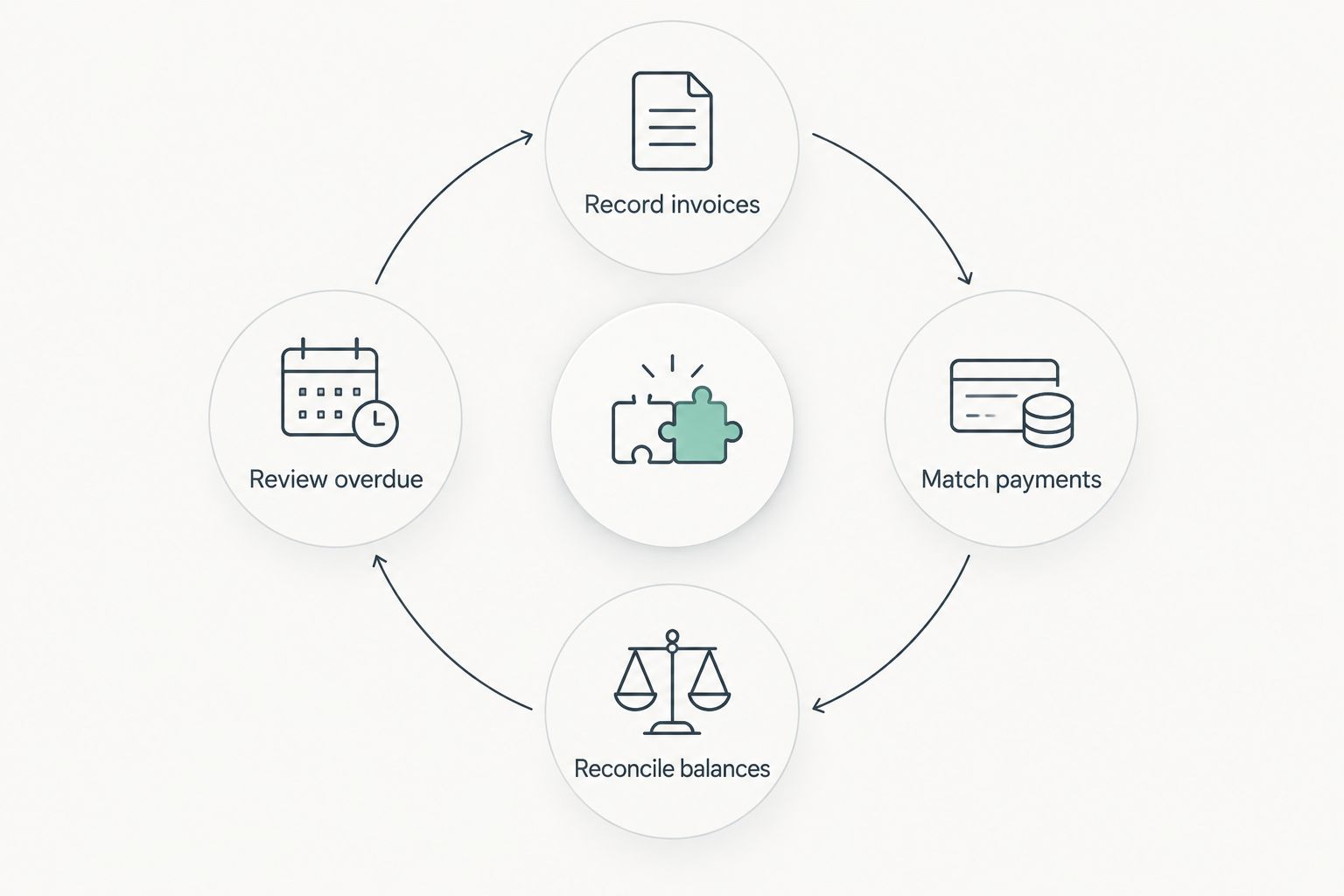
Use the same routine whichever layout you choose. The process below separates source documents, transaction entry, payment matching and balance checks.
Record invoices
Enter each invoice with its original reference and agreed due date. Check for an existing entry before adding another, especially when a supplier resends a document.
Match payments
Record the actual payment date and reference, then assign the payment to the relevant invoice. For part-payments, keep the remaining amount outstanding rather than marking the whole invoice settled.
Reconcile balances
Compare tracker entries with bank records, mobile money transaction records, receipts and supplier statements as applicable. Investigate differences instead of changing a balance to make the totals agree.
Review overdue
Filter unpaid invoices by due date and record the next action. Keep disputed amounts visible, with a note explaining the dispute, rather than deleting the invoice.
Keep a backup before changing formulas or importing records. Protect calculation cells from accidental edits where your spreadsheet application supports it, but remember that protection does not replace reconciliation.
How the layouts rank
The 2026 ranking prioritises separate balances, invoice references, payment handling and usable maintenance. A combined workbook takes the default position because it covers both receivables and payables; the specialist layouts win when a narrower task matters more.
This is a comparison of structures, not a claim that any particular file contains these features. When assessing a Skillspad debtors and creditors tracker template, apply the same checklist to the actual workbook before using it for live records.
Which tracker should you choose?
Choose a combined workbook unless a specific workflow points you elsewhere. Pick receivables ageing for collections, a supplier payment tracker for bill deadlines, or an invoice-and-payment register for detailed payment allocation.
Before adopting any template, test one unpaid invoice, one fully settled invoice and one part-paid invoice. Check that each produces the expected balance and that the overdue status follows the due date.
Explore business templates
Review Skillspad's business templates against the record-keeping requirements in this guide.
FAQ
What's the best debtors and creditors tracker template for a small business?
A combined workbook is the best default when you manage both customer credit and supplier bills. Choose separate receivables and payables sheets with invoice references, due dates, payment records and outstanding balances.
What's the difference between debtors and creditors?
Debtors owe money to your business; creditors are parties your business owes. Keep the balances separate so you can identify collections and payment obligations independently.
Can I use Excel for a debtors and creditors tracker?
Yes, Excel can hold invoice records, calculate outstanding balances and organise overdue items. Check the workbook's formulas and payment handling before relying on it for business decisions.
How do I record a part-payment from a customer?
Record the payment against the customer's invoice and leave the unpaid remainder outstanding. Preserve the original invoice amount, payment date and payment reference rather than replacing the invoice total.
Should I combine customer debts and supplier bills into one balance?
No, keep customer receivables and supplier payables as separate totals. A net balance hides the individual obligations and does not establish your available cash.
What ageing periods should I use in 2026?
A practical layout separates not-yet-due invoices from balances overdue by 1–30 days, 31–60 days, 61–90 days and more than 90 days. Calculate overdue age from the agreed due date, not automatically from the invoice date.
Does a debtors and creditors spreadsheet replace accounting records?
A debtors and creditors spreadsheet does not replace a complete accounting system. It tracks receivables and payables, but it does not by itself establish profit, tax obligations or your full cash position.
One last thing
A customer can also be your supplier. Keep the receivable and payable separate unless you have an agreed, documented basis for settling them against each other. A familiar business name is not a reason to erase two different obligations.


