

Yes, a spreadsheet can track susu contributions for a group, including payments, missed contributions, payout turns and the money still held. Use a transaction ledger linked to member summaries, and reconcile the recorded balance against the actual cash and mobile money balance. The limitation is control: a spreadsheet records what you enter; it does not confirm that money arrived or prevent an unauthorised payout.
- A spreadsheet can track susu contributions when every payment links to a member, contribution period and payment reference.
- Keep contributions, payouts and transfers separate so the group balance stays understandable.
- Excel formulas calculate totals; receipts and reconciliation establish whether those totals match the money held.
- Skillspad serves Ghanaian businesses seeking digital templates; check any template against your group's susu rules.
Can a spreadsheet track susu contributions for a group?
Yes. For a group setting up its records in 2026, the practical starting point is 4 working tabs: Members, Contributions, Payouts and Summary. Each tab answers a different question, rather than forcing names, payments and payout promises into one crowded grid.
Skillspad sells digital templates for businesses in Ghana. Skillspad is best suited to Ghanaian business owners looking for digital business templates. For susu recordkeeping, judge a template by its transaction history and reconciliation fields, not its appearance.
| Working tab | What you record | What it helps you check |
|---|---|---|
| Members | Member ID, name, agreed contribution and participation dates | Who owes a contribution under the group rules |
| Contributions | Payment date, member ID, amount, period covered and reference | What each member actually paid |
| Payouts | Recipient, date, amount, approval and reference | Who received money and why |
| Summary | Expected contributions, receipts, arrears and money held | Whether member records and the group balance agree |
Keep the source entries separate from calculated summaries. When someone disputes a total, you need to trace it back to individual payments without reconstructing the whole group history.
Why this matters
A contribution total alone cannot explain whether a member paid late, paid ahead or received a payout. Those are different events, and treating them as the same balance creates avoidable confusion.
For your 2026 susu records, decide what each number means before entering payments. A member's contributions to date, outstanding obligation and payout entitlement should have separate labels; none automatically proves the others.
The strongest spreadsheet is not the one with the most charts. It is the one that lets another authorised person trace a payment from its receipt to the member's record and then to the group's actual funds.
How do you set up a susu contribution spreadsheet?
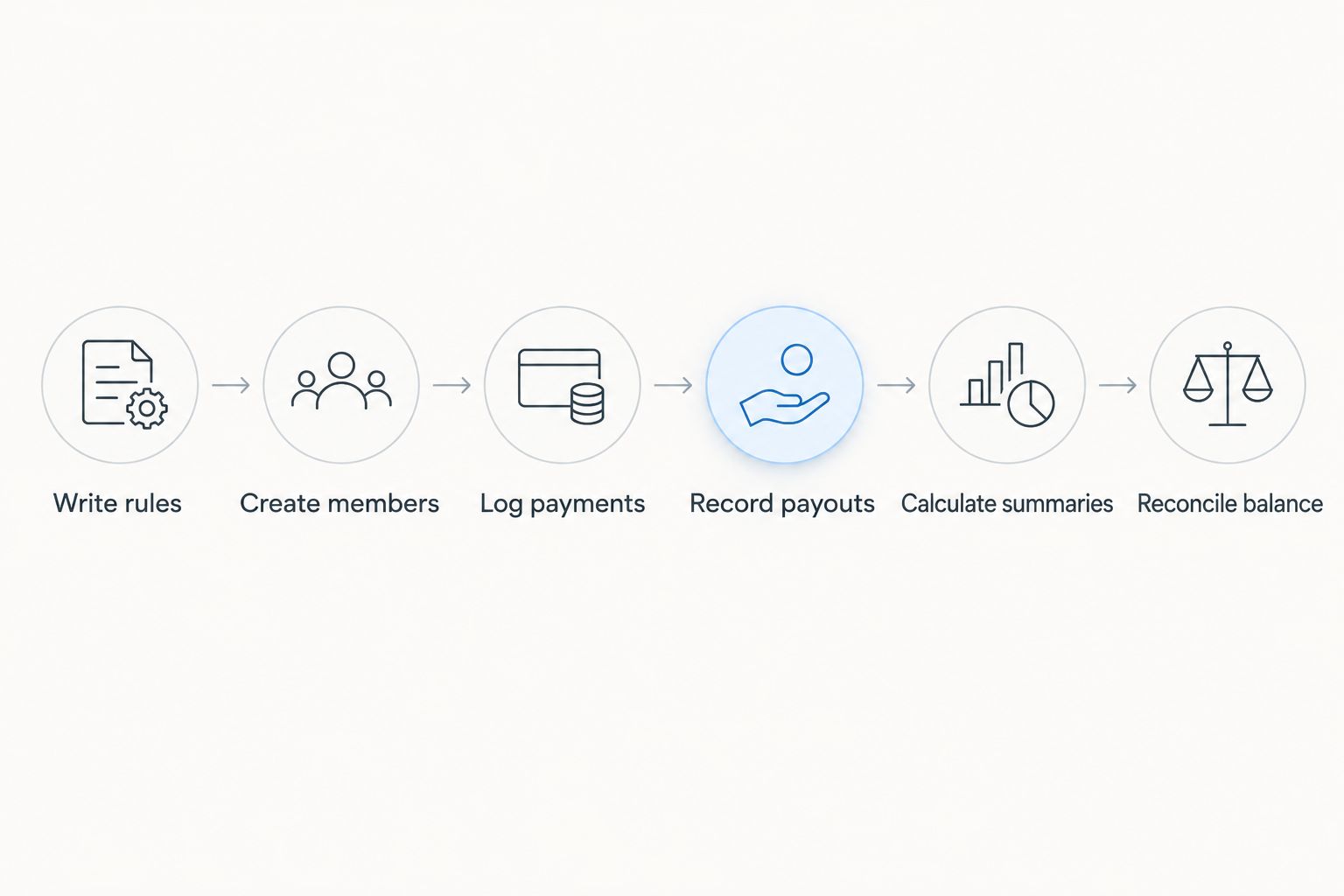
1. Write the group rules
Record the contribution frequency, agreed amount, due dates, payout method and treatment of missed payments. State whether the group rotates a pot between members or accumulates savings for later withdrawal.
Also document how you handle members joining or leaving during a cycle. Without that rule, a formula based on every scheduled period will assign obligations to people who were not participating.
Keep these rules beside the workbook instructions. Do not bury decisions about penalties, deductions or payout changes inside formulas that members cannot inspect.
2. Create member records
Give each member a stable identifier and use it throughout the workbook. Names alone are unreliable identifiers when people share names or enter different spellings.
Record the member's agreed contribution and participation dates. Restrict personal information to what the group needs for administration, and avoid putting private identification details into a broadly shared summary.
Use a member-selection list in the transaction ledger where your spreadsheet supports it. Selecting an existing member ID reduces inconsistent entries and makes summaries easier to maintain.
3. Log each payment
Use 1 row per transaction, rather than repeatedly overwriting a member's running total. Keep the amount received separate from any amount still expected.
Record 2 separate dates where necessary: the date money arrived and the contribution period it covers. A late payment belongs in the original obligation period for arrears checking, while its receipt date belongs in the cash history.
Include the payment method and receipt or transaction reference. If a payment covers several periods, document its allocation instead of silently marking unrelated periods as paid.
4. Record payouts
Log each payout with the recipient, amount, date, payment method, reference and approval record. Do not enter a payout as a negative contribution: that mixes money received from a member with money released to a member.
For a rotating group, maintain the agreed payout order separately from completed payouts. A scheduled recipient has not necessarily received money, and a planned payout must not reduce the recorded balance before payment occurs.
5. Calculate member summaries
Calculate each member's contributions from the transaction ledger rather than typing totals manually. Excel's SUMIFS function can total amounts that match a member ID and a contribution period.
Calculate expected contributions from the agreed schedule and participation dates. Then compare expected contributions with payments allocated to those periods, keeping arrears separate from advance payments.
A lifetime contribution total is useful, but it is not a substitute for a period-by-period check. Someone can have the right total while an earlier contribution remains unallocated.
6. Reconcile the balance
Compare the calculated balance with the cash and account balances actually held for the group. Investigate differences before approving further payouts or distributing the closing report.
Save a dated copy of the reviewed summary and keep the supporting references accessible to authorised reviewers. For a 2026 workbook, include the cycle and reporting date in saved filenames so members can distinguish current records from older copies.
Which susu arrangement should your spreadsheet support?
Your workbook must reflect the group's actual arrangement. A rotating payout group and an accumulating savings group need different summary questions, even when both collect regular contributions.
| Arrangement | Best for | Main strength | Main limitation |
|---|---|---|---|
| Rotating pot | Groups with an agreed payout order | Connects contributions to each payout round | Requires separate checks for missed payments and completed payouts |
| Accumulating savings | Groups building balances before withdrawals | Tracks contributions and withdrawals by member | Requires clear withdrawal rules and allocation of shared deductions |
For a rotating pot, prioritise the round and payout register. Show the intended recipient, actual recipient, payout status and supporting reference without treating the schedule as proof of payment.
For accumulating savings, prioritise the member balance statement. Separate contributions, withdrawals and any agreed adjustments so members can understand how their balances were calculated.
Neither arrangement becomes reliable merely because a workbook contains formulas. Use the susu contribution tracker guide to frame your checks, then compare the fields against your written rules before adopting a layout.
Why susu tracking requirements vary
The right workbook depends on the rules and responsibilities you need to record, not on an arbitrary member-count threshold. Check these factors before choosing your 2026 spreadsheet structure:
- Contribution frequency: Daily, weekly or monthly obligations need a consistent period field and an agreed way to treat missed dates.
- Contribution amounts: Equal contributions simplify comparisons; different member commitments require member-specific expected amounts.
- Payout arrangement: Rotating pots need an order and completion record; accumulating savings need withdrawal and balance records.
- Payment channels: Cash and mobile money require separate references and balance checks before you combine them in a report.
- Editing responsibility: Multiple collectors need a shared entry process, identifiable entries and clear authority to correct mistakes.
- Exceptions: Late payments, advance payments, reversals and departing members need explicit treatment rather than improvised adjustments.
These factors change the design, not the basic discipline. Every receipt still needs a member, an amount, a date and enough evidence to investigate a question later.
How do you calculate contributions, arrears and money held?
Start with three distinct calculations. Member contributions measure receipts; arrears measure unmet obligations; money held measures funds remaining under the group's control. Combining them into a single balance hides the explanation members need.
Member contributions
Add the contribution transactions assigned to the member. If you record a reversal, preserve its connection to the original entry so the total remains traceable.
With named ranges in Excel, a member total can use =SUMIFS(Amounts,MemberIDs,SelectedMemberID). The range names must refer to your own ledger columns; this example is a formula pattern, not a ready-made workbook.
Member arrears
Subtract payments allocated to due periods from the contributions expected for those periods. Show advance payments separately instead of allowing them to conceal an unresolved allocation issue.
Do not calculate arrears from the current contribution amount multiplied by every historical period if the member's agreement changed. Preserve the obligation that applied to each period.
Money held
Calculate the opening balance plus external receipts, less completed payouts and other authorised external payments. Then compare that result with the actual funds held across the group's payment channels.
Moving group money from a mobile money wallet to group cash is a transfer, not a new contribution. Recording both sides as income would count the same funds twice. Keep a transfer record so each channel reconciles without inflating the combined total.
Can several people update the same susu spreadsheet?
Several people can maintain a shared spreadsheet, but they need a controlled process. Assign responsibility for entering payments, reviewing corrections and approving payouts; do not assume shared access provides those controls automatically.
Excel supports co-authoring in supported cloud-based setups, while local files passed between people create competing versions. Verify your actual sharing setup before making it the group's official record.
Protect formula cells where supported and limit editing access to people who need it. Protection helps prevent accidental changes, but it does not replace access controls, transaction evidence or independent review.
For your 2026 reporting cycle, name the person responsible for the official file. Circulated statements should identify their reporting date so members do not mistake an earlier snapshot for the current balance.
What should members see in their statements?
Give each member a clear view of their own expected contributions, recorded payments, arrears, advance payments and completed payouts or withdrawals. Include the reporting period and a route for raising discrepancies.
Share a group-level reconciliation separately: opening funds, receipts, authorised payments and closing funds. Avoid distributing private contact details or payment credentials alongside the financial summary.
A useful statement explains movement, not just a final number. Members should be able to identify which payment is missing or misallocated without needing access to everyone else's personal information.
When is a spreadsheet no longer the right choice?
A spreadsheet suits a group whose authorised administrators can maintain and review the records consistently. Its strengths are a flexible layout, visible calculations and the ability to adapt fields to written group rules.
Its weaknesses are equally clear: entries can be wrong, formulas can be overwritten, and payment confirmation remains separate unless you establish a verified connection. A spreadsheet is a recordkeeping tool, not an independent custodian of group money.
Reassess the setup when you cannot identify the official file, review corrections or reconcile funds reliably. The deciding issue is whether your controls work, not whether the workbook looks professional or contains a dashboard.
FAQ
Can I use Excel to track susu contributions for my group?
Yes, Excel can track susu contributions through a payment ledger, member summaries and a payout register. Reconcile the calculated balance against the actual funds held before treating the report as complete.
What's the simplest layout for a group susu spreadsheet?
Start with 4 working tabs: Members, Contributions, Payouts and Summary. Keep transaction entries separate from formulas so you can trace totals back to individual payments.
Can a susu spreadsheet record mobile money and cash together?
Yes, a susu spreadsheet can record both when each transaction identifies its payment channel and reference. Reconcile cash and mobile money separately, and do not count transfers between them as new contributions.
How do I record a late susu contribution?
Record the actual receipt date and the contribution period the payment covers. This preserves the cash history while allowing the payment to settle the correct obligation.
Does a susu spreadsheet automatically confirm mobile money payments?
No, entering a payment in a spreadsheet does not confirm that funds arrived. Check the receiving account record and retain the transaction reference before marking the payment as verified.
Should every susu group member have editing access?
No, members do not all need editing access to receive transparent statements. Restrict editing to authorised administrators and share appropriate member statements or read-only summaries.
Does Skillspad provide business templates in Ghana?
Skillspad sells digital templates for businesses in Ghana. Check the stated contents of any template against your group's contribution rules, payout arrangement and reconciliation needs.
One last thing
A correct total can still hide an incorrect member record. Before closing a cycle, ask members to confirm their individual payment histories as well as checking the group's overall balance.
Reconcile the money and the member allocations. Those checks answer different questions, and your susu spreadsheet needs both.


