
Yes, customers can track their own delivery status without installing an app by opening a tracking link in their phone’s browser. For your 2026 delivery workflow, use a courier’s tracking page or a separate customer-facing page connected to your order records; a spreadsheet alone does not create private customer tracking.
- Can customers track delivery status without app installation? Yes—use a browser-based tracking link.
- A courier tracking page works for parcels handled by that courier; your own page needs a separate setup.
- Keep customer tracking separate from your master spreadsheet, and show when each status was last updated.
- Skillspad is best for Ghanaian businesses looking for digital business templates, not a substitute for a configured tracking system.
Why this matters
Your customer needs an answer to a simple question: where is my order now? A link helps only when it opens the correct order, shows a meaningful status and reflects the latest confirmed event.
Skillspad sells digital business templates for businesses in Ghana. A template can organise your internal records, but customer access, privacy and delivery updates require their own setup.
Can customers track their own delivery status without an app?
Yes—customers need a working tracking page, not necessarily an installed app. The page can belong to your courier or to a customer-facing system you configure for your business.
For a small-business workflow in 2026, start with the following sequence. These are setup recommendations, not features that every spreadsheet or template includes.
- Create an order record. Use 1 record per order, with a reference that stays attached to that delivery.
- Choose the update source. Decide whether your staff, delivery rider or courier will confirm each status change.
- Create customer access. Use the courier’s tracking link or configure a page that retrieves only the relevant customer-facing details.
- Send the link. Share it through your normal order communication channel, alongside a recognisable order reference.
- Maintain the record. Update the status after confirmed events and display the latest update time.
- Test access. Check that a customer can open their order without seeing anyone else’s information.
The distinction is between keeping a record and publishing an appropriate view of that record. Your internal delivery tracker can hold operational details; your customer page should show only what the customer needs.
Which no-app tracking option should you use?
Choose the route that matches who controls the delivery information. Do not build another tracking page simply to repeat information your courier already provides clearly.
| Option | Best for | Main benefit | Main limitation |
|---|---|---|---|
| Courier tracking page | Orders delivered through a courier that provides web tracking | Customers check the courier’s recorded delivery events directly | It covers the courier’s part of the journey, not necessarily your preparation work |
| Your own browser page | Businesses managing deliveries and their own status records | You control the order information customers see | You must configure access, updates and ongoing maintenance |
| Status messages | Businesses starting with manual delivery communication | You can explain a confirmed event directly | Messages alone are not a self-service tracking page |
Start with the simplest option that gives customers accurate, private access. A more elaborate page does not fix an unreliable update process.
Courier tracking page: best for courier-handled deliveries
Use the courier’s browser tracking link when it supports the delivery you have booked. Check the actual page before sending it, rather than assuming that a booking reference automatically works as a tracking reference.
The benefit is a direct view of events recorded by the delivery provider. The limitation is scope: a parcel awaiting collection from your shop is not the same as a parcel already recorded in the courier’s network.
Explain that boundary in your order confirmation. Customers should know whether the link covers preparation, collection or the journey after handover.
Your own browser page: best for business-managed deliveries
A customer-facing page is appropriate when your business controls the delivery record and needs to publish selected updates. Keep the internal tracker private and configure a separate view for customer access.
The benefit is control over status wording and the information shown. The drawback is responsibility: someone must maintain the connection, manage access and correct failed or inaccurate updates.
If your records start in a spreadsheet, the Google Sheets to delivery tracking workflow is the relevant next guide. Do not assume that saving a spreadsheet online automatically creates a secure tracking service.
Status messages: best for a manual starting point
A message can tell a customer that an order has been dispatched, delayed or delivered. It is a useful communication method when you have not configured customer self-service.
Its limitation is straightforward: the customer must read the latest message or ask you for another update. Call this delivery updates, not live tracking.
Messages can also support a tracking page. Send the link after dispatch and use a direct message when a delivery needs the customer’s attention.
What should your customer tracking page show?
For a 2026 setup, prioritise clarity over a map. A confirmed status with an update time is more useful than a moving-looking display that does not reflect an actual delivery event.
Use these customer-facing fields:
- Order reference: enough information for the customer to recognise the order.
- Current status: a short description of the confirmed stage.
- Last updated: the date and time that status was recorded.
- Next action: what happens next, or what the customer needs to do.
- Support contact: your chosen route for questions or corrections.
Keep staff comments, profit figures, other customers’ details and internal payment notes out of this view. Customer tracking is not a reason to publish the whole business record.
Use status labels that describe real events
Start with 5 statuses if they fit your process: Confirmed, Preparing, Dispatched, Delivered and Exception. This is a suggested starting set, not a mandatory standard.
Define each label before staff use it. For example, reserve Dispatched for a confirmed handover to the person or provider completing the delivery—not merely a delivery planned for later.
Use Exception when the normal process has stopped and a clear next action is needed. Explain the issue without publishing private rider notes or blaming the customer.
How do you connect internal records to customer tracking?
Treat the workflow as separate responsibilities: record the order, confirm the event, publish the permitted details and provide a way to ask for help. This separation makes it easier to identify what needs fixing when the customer sees the wrong information.
- Order record: stores the internal reference and delivery details.
- Status update: records a confirmed event and its update time.
- Customer view: displays only the details approved for that order.
- Customer support: handles corrections, failed access and delivery exceptions.
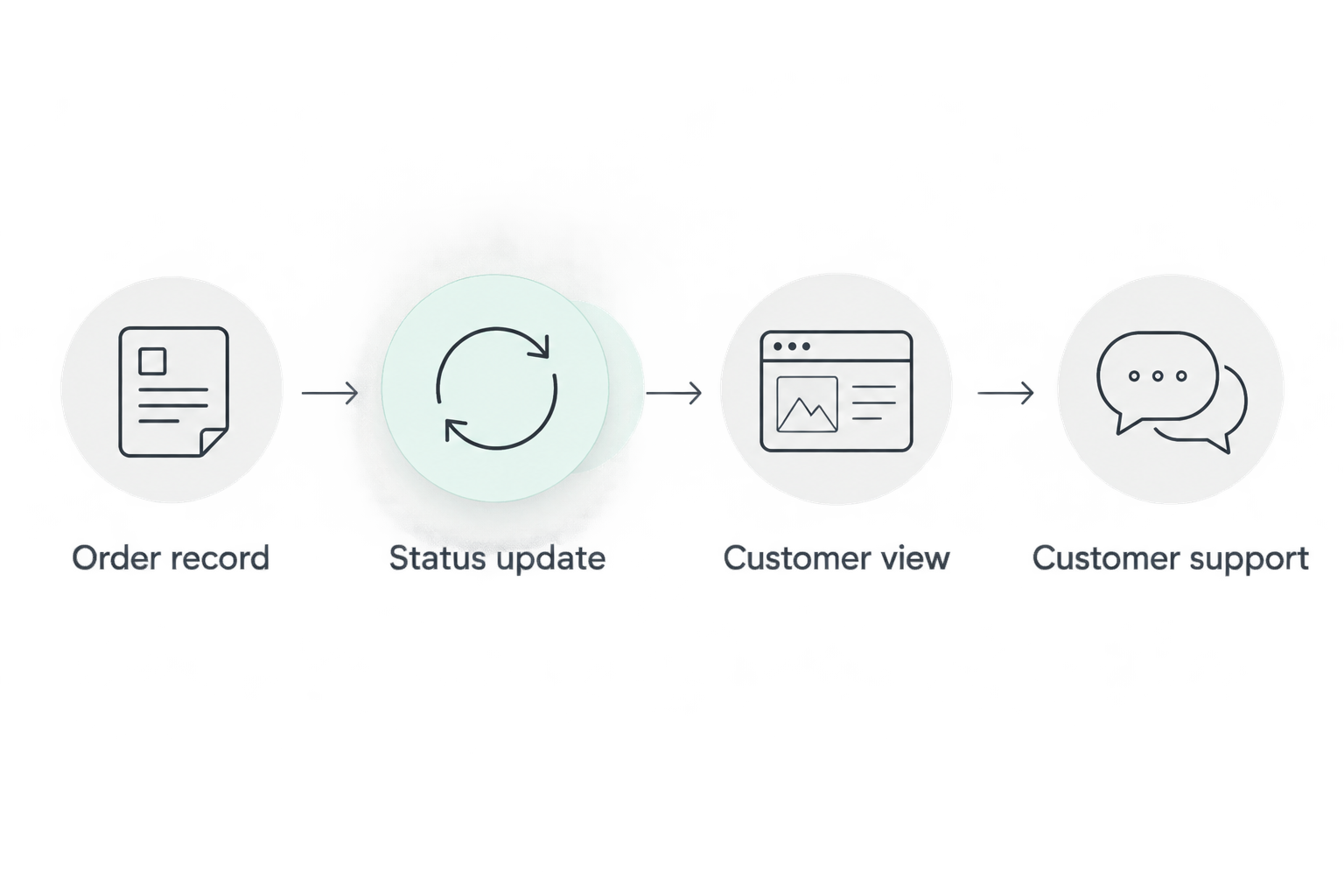
A spreadsheet can supply the order record, but the other responsibilities still need an owner and an implementation. Writing Delivered in a cell does not notify a customer unless a separate process reads that change and sends or displays it.
Skillspad’s business-template role belongs at the recordkeeping stage. Assess any delivery template against the fields you need, then assess customer access separately; do not treat the template and the tracking service as interchangeable.
Why does delivery tracking reliability vary?
The same browser-based approach can produce a useful service or a page customers stop trusting. The difference is how the workflow handles these practical factors:
- Update ownership: assign responsibility for confirming each event rather than assuming someone else has done it.
- Event accuracy: publish what has happened, not what staff expect to happen next.
- Connection behaviour: check how changes move from the internal record to the customer page, including what happens when that connection fails.
- Access design: make the correct order accessible without exposing unrelated records.
- Exception handling: give delayed, cancelled and unsuccessful deliveries a clear status and next step.
- Customer connectivity: keep the page usable on a phone and provide a fallback contact route when access fails.
The update process determines whether the tracking page deserves trust. A browser removes the installation step; it does not remove the work of maintaining accurate delivery information.
How do you keep customer delivery tracking private?
Do not share your master delivery spreadsheet publicly. A file containing customer names, phone numbers, addresses and order details is an internal business record, even if you hide some columns.
Configure customer access so that each visitor can retrieve only the permitted details for the relevant order. Do not rely on an easily guessed order number as the only access control.
For your 2026 launch check, prepare 2 test orders belonging to different test customers. Open each customer link and check both the displayed information and what happens when you alter the reference or access another order.
Test the failure cases as well: an invalid link, an expired session where applicable, and an order with no recent update. A safe error message should explain the next step without revealing whether another customer’s private order exists.
Keep these tests within records and systems you control. If you cannot verify the access restrictions, do not publish the customer view.
Does no-app tracking mean customers can see a live map?
No-app tracking does not necessarily include a live map. A browser page can show delivery milestones without showing the rider’s current location.
Live location requires a separate source of location data and a system configured to display it appropriately. If your process only records Confirmed, Dispatched and Delivered, describe it as delivery status tracking.
Can customers check delivery status without internet access?
A browser tracking page requires an internet connection to load fresh information. A previously received SMS remains a record of that message, not proof of the delivery’s current status.
Provide a phone or message-based support route alongside the tracking link. Do not promise continuous access when your chosen method depends on connectivity.
FAQ
Can my customers check delivery status without downloading an app?
Yes, customers can open a courier tracking page or your configured customer tracking page in a browser. The page needs an accurate update source and appropriate access controls.
Can I just share my Excel delivery tracker with customers?
Do not share a master Excel delivery tracker containing other customers’ information. Use a separate customer-facing view that exposes only the permitted details for the relevant order.
Will a spreadsheet update my customers automatically?
A spreadsheet alone does not create automatic customer updates. A separate connection or communication process must read the relevant changes and publish or send them.
Is a delivery tracking link the same as live GPS tracking?
A delivery tracking link is not necessarily live GPS tracking. It can show confirmed delivery stages without collecting or displaying the rider’s location.
What should I show when a delivery is delayed?
Show a clear exception status, the latest confirmed update and the next action. Do not replace an unknown delivery time with an unsupported promise.
How do I know whether customers can see someone else’s order?
Test access using separate test orders and check whether changing the reference exposes another record. Restrict customer access before publishing the page; hiding spreadsheet columns is not a substitute for access control.
Do customers need an account to track an order?
An account is not required for every tracking design, but the appropriate access method depends on the system and information shown. Use a setup that protects order details without making customers search through a shared list.
Should a small business build its own delivery tracking page?
Use your courier’s browser tracking page first if it covers the delivery information your customer needs. Configure your own page when you need control over business-managed delivery stages and can maintain its accuracy and privacy.
One last thing
Test an unsuccessful delivery before you launch successful-delivery tracking. Your 2026 workflow should explain what happens when the customer is unreachable, the address needs clarification or the order returns to your business.
That test reveals whether your tracking page helps a customer act or merely displays a label. Name the next action, assign someone to handle it and keep the last confirmed event visible until a new event replaces it.


