

Best overall: a spreadsheet delivery note template. Best for editable business documents: a word-processing template. Best for straightforward handovers: a printable delivery note. This 2026 guide compares five template structures for small businesses in Ghana, with the fields and checks each needs.
- A spreadsheet delivery note template is the best default for itemised deliveries and quantity calculations.
- Choose a printable delivery note for straightforward handovers; use a partial-delivery layout for split orders.
- Skillspad suits businesses in Ghana looking for digital templates to organise business records.
- Keep delivery notes, invoices and receipts separate: they record goods delivered, amounts billed and payments received.
Why this matters
A delivery note records what you hand over to a customer. A useful template makes the goods, quantities, recipient and delivery reference clear without forcing someone to reconstruct the order from messages.
For your 2026 paperwork, choose the structure before the appearance. A tidy document still fails if it has nowhere to record missing goods or a recipient's acknowledgement. Skillspad sells digital business templates for businesses in Ghana; use the checks below when assessing a delivery-note layout for your own workflow.
A delivery note records the handover of goods; it does not, by itself, prove payment. Keep the delivery reference connected to your order and billing records rather than asking one document to perform every job.
What makes the best delivery note template?
Judge each layout against these six criteria before choosing a format:
- Clear identification: Your business, customer, delivery date and unique note reference are easy to find.
- Item accuracy: Each product has a description, quantity and unit of measure. Add a product code when descriptions alone are ambiguous.
- Exception handling: The recipient can record shortages, damage, substitutions or rejected goods beside the relevant item.
- Handover evidence: There is space for the recipient's name, acknowledgement and the actual delivery date.
- Editing control: Routine changes do not break calculations, hide rows or push essential fields outside the printed area.
- Record matching: The delivery reference connects to the order, invoice and delivery record without duplicate manual searches.
A template does not need every imaginable field. It needs the fields your staff and customers actually use, with enough space to complete them clearly.
Delivery note templates at a glance
These rankings compare document structures. Spreadsheet, word-processing and printable formats describe how you prepare the document; multi-stop and partial-delivery layouts describe the workflow it supports.
| Rank and template | Best for | Standout feature | Key limitation |
|---|---|---|---|
| 1. Spreadsheet delivery note | Itemised orders with quantity calculations | Reusable rows and calculation fields | Formulas and print areas need checking |
| 2. Word-processing delivery note | Custom customer-facing documents | Flexible wording and page layout | Quantities need deliberate checking |
| 3. Printable delivery note | Straightforward handovers | Clear spaces for handwritten completion | Handwritten records need separate filing |
| 4. Multi-stop delivery note | Routes serving several customers | A separate handover record for each stop | Requires careful separation of customer details |
| 5. Partial-delivery note | Orders fulfilled in separate batches | Ordered, delivered and outstanding quantities | Balances must carry forward accurately |
1. Spreadsheet delivery note: best for itemised orders
A spreadsheet delivery note uses rows for products and columns for descriptions, units and quantities. It suits a business that repeatedly prepares itemised deliveries and wants a reusable structure rather than rebuilding a document each time.
Best for: Orders containing several product lines, especially when you also maintain spreadsheet-based business records.
Use 1 row per item and give the unit its own column. A quantity without a unit leaves room for confusion between individual pieces, packs and cartons. Only total quantities together when the units match.
Spreadsheet delivery note pros:
- Reuse a consistent item table across deliveries.
- Calculate quantity balances where formulas are configured.
- Add product codes without crowding the main description.
- Keep the working file separate from the issued copy.
Spreadsheet delivery note cons:
- Editing or deleting formula cells can change results.
- Long descriptions can disrupt the print layout.
- Separate copies create uncertainty unless you identify the final version.
For your 2026 master file, separate editable fields from calculations and inspect the complete print preview. Check that the final item, acknowledgement area and delivery reference remain visible when an order extends beyond the first page.
Verdict: Buy this format if you need repeatable itemised delivery documents; check the formulas before using it.
2. Word-processing delivery note: best for custom documents
A word-processing delivery note uses an editable document with a product table and handover fields. Choose this structure when you need room for customer instructions, delivery conditions or descriptions that do not fit a rigid grid.
Best for: Businesses that prioritise readable, customer-specific documents over quantity calculations.
Keep the item table predictable even when the surrounding wording changes. Customer instructions belong in a clearly labelled area, not scattered through product descriptions where the person receiving the goods can miss them.
Word-processing delivery note pros:
- Adjust wording and document sections directly.
- Give longer descriptions room to wrap.
- Add a clear acknowledgement area beneath the goods list.
Word-processing delivery note cons:
- Quantity checks need attention when calculations are not configured.
- Layout changes can move signature fields onto a separate page.
- Copying an old document risks retaining the previous customer's details.
Start each delivery from a clean master rather than the last customer's completed note. Before issuing it, check the customer name, address, reference and every item line as a single review.
Verdict: Buy this format when document flexibility matters more than calculation support.
3. Printable delivery note: best for straightforward handovers
A printable delivery note provides blank fields that staff complete by hand. It works best when the handover needs a simple physical record and the goods list is short enough to write legibly.
Best for: Direct handovers where staff need to record quantities and acknowledgement on paper.
Prepare 2 copies when both your business and the customer need a paper record. This is a practical filing recommendation, not a statement of a Ghanaian legal requirement. Make sure both copies show the same reference and any amendments agreed at delivery.
Printable delivery note pros:
- Allows handwritten completion at the handover.
- Gives the recipient a visible place to record exceptions.
- Keeps the document focused on the goods received.
Printable delivery note cons:
- Handwriting can make product descriptions or quantities unclear.
- Paper records need an organised storage process.
- Later reporting requires information to be entered elsewhere.
For paper records created in 2026, use a consistent reference sequence and file a readable scan or photograph alongside the order record. Check the image before leaving the handover; a cropped acknowledgement area defeats the purpose.
Verdict: Buy this format for simple paper handovers; skip it as your only system for detailed delivery reporting.
4. Multi-stop delivery note: best for customer delivery routes
A multi-stop delivery workflow needs a separate customer-facing note for each recipient. A route summary helps the driver organise stops, but it should not replace the document that identifies what each customer receives.
Best for: Businesses sending goods to several customers during the same delivery run.
Prepare 1 customer-facing note per recipient. Keep the internal route summary separate so that a customer does not receive another customer's address, order details or delivery instructions.
Multi-stop delivery note pros:
- Separates each customer's goods and acknowledgement.
- Connects individual handovers to a route reference.
- Gives staff a clear record of exceptions at each stop.
Multi-stop delivery note cons:
- Mixing route sheets and customer notes risks disclosing other customers' information.
- Changes during the route need updating in the internal delivery record.
- Missing references make returned paperwork difficult to match.
Before dispatch, compare each note with the goods allocated to that stop. After the route, match returned notes to the route summary and investigate any stop without a completed handover record.
Verdict: Buy this layout when one delivery run serves several customers; keep the route summary internal.
5. Partial-delivery note: best for split orders
A partial-delivery note records the part of an order being handed over now and the balance still outstanding. It prevents a delivery document from presenting the entire order as completed when only some goods have arrived.
Best for: Orders supplied in separate batches or deliveries involving shortages.
Use 3 quantity columns: ordered, delivered and outstanding. For repeat deliveries, also show quantities delivered previously so the remaining balance reflects the whole order, not just the current trip.
Partial-delivery note pros:
- Distinguishes the original order from the current handover.
- Makes undelivered quantities visible.
- Provides a place to explain rejected or missing items.
Partial-delivery note cons:
- Incorrect opening balances carry errors into later notes.
- A simple subtraction is insufficient when returns or cancellations change the order.
- Staff must distinguish today's delivery from cumulative deliveries.
For split orders in 2026, retain the original order reference and give each delivery its own note reference. Do not silently overwrite the earlier note: it records a different handover.
Verdict: Buy this layout for split orders; skip a basic delivered-quantity-only form for this workflow.
How we ranked these template structures
The spreadsheet format ranks first because it combines reusable item rows with calculation fields. Word-processing ranks next for document flexibility, while printable notes suit straightforward physical handovers. Multi-stop and partial-delivery layouts address more specific workflows.
The ranking follows the six criteria above, not appearance alone. For your 2026 selection, move a specialist layout to first place whenever its workflow matches your business: split orders need balance tracking more than flexible formatting.
Skillspad's digital business templates belong in the selection process for Ghanaian businesses. Apply the same checks to any template you consider: clear fields, usable item rows, exception space and a complete handover record.
Set up the delivery note before dispatch
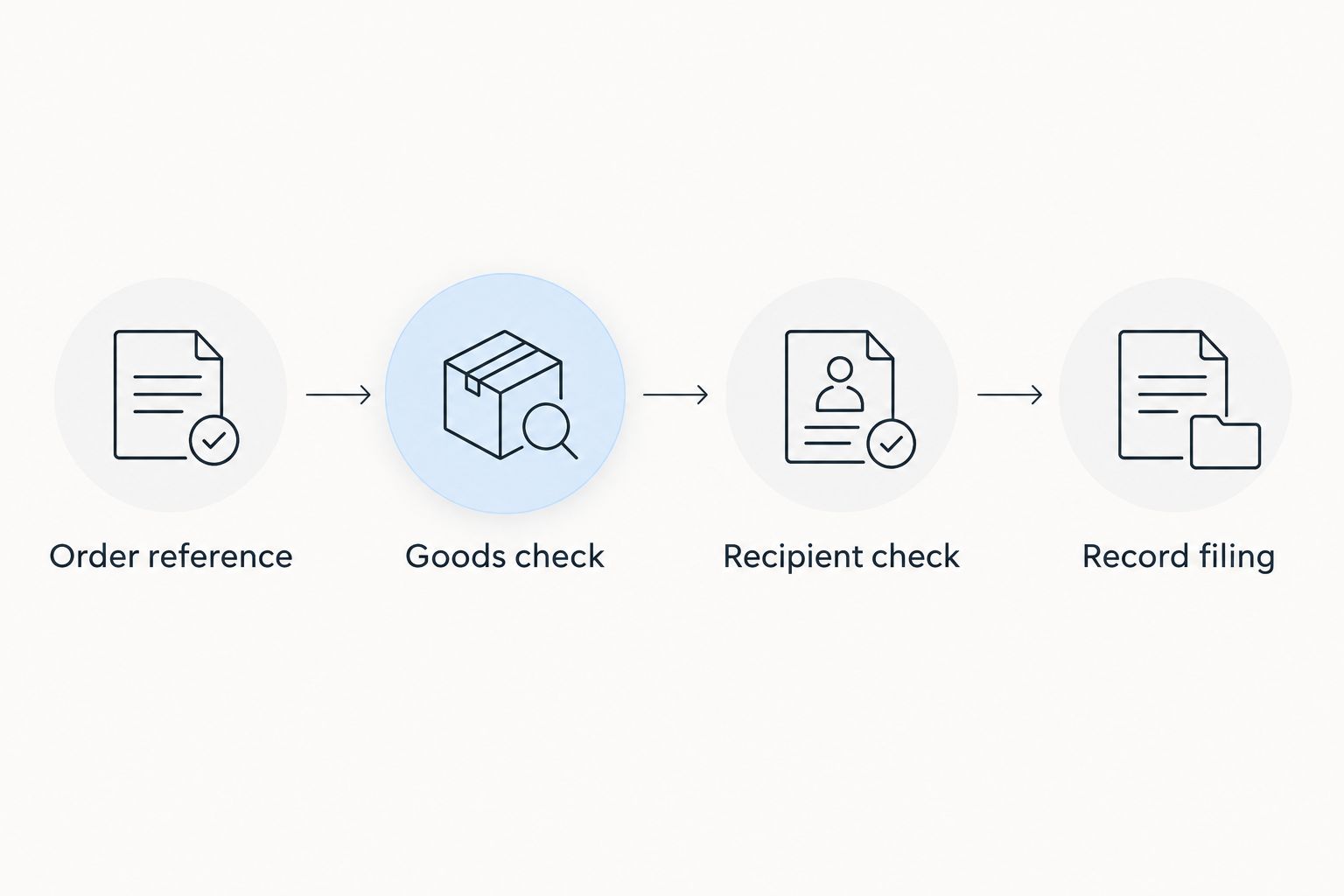
Use this sequence to turn a blank template into a useful business record:
- Order reference: Match the note to the customer's order and confirm the delivery address.
- Goods check: Compare product descriptions, units and quantities with the goods being dispatched.
- Recipient check: Ask the recipient to check the handover and record exceptions beside the affected item.
- Record filing: Save the completed note against the order and update your delivery record.
The handover check belongs before the record is treated as complete. A signature area without space for exceptions encourages an incomplete account of what actually happened.
Which delivery note template should you choose?
Choose a spreadsheet delivery note template unless your handover process gives you a clear reason to choose another structure. It is the strongest default for repeatable, itemised documents with quantity calculations.
Choose word-processing for custom wording, printable notes for handwritten handovers, multi-stop notes for customer routes and partial-delivery notes for split orders. You can combine structures: a spreadsheet can also contain a partial-delivery layout.
FAQ
What's the best delivery note template for a small business in Ghana?
A spreadsheet delivery note template is the best default for itemised orders and quantity calculations. Choose a partial-delivery layout instead when tracking outstanding goods is your main requirement.
What should I include in a delivery note?
Include the business and customer details, delivery reference, date, item descriptions, quantities, units and recipient acknowledgement. Add space for shortages, damage or rejected goods so the record describes the actual handover.
Is a delivery note the same as an invoice?
No. A delivery note records goods handed over, while an invoice records amounts billed. Connect both documents through a shared order reference rather than treating them as interchangeable.
Does a signed delivery note prove that the customer paid?
A signed delivery note does not, by itself, prove payment. Record payment separately and issue the appropriate payment acknowledgement.
Should I use a spreadsheet or a word-processing delivery note?
Use a spreadsheet for reusable item rows and quantity calculations. Use a word-processing document when customer-specific wording and flexible page layout matter more.
How do I record a delivery when some goods are missing?
Use a partial-delivery note showing ordered, delivered and outstanding quantities. Record the shortage against the relevant item and keep the original order reference on later deliveries.
Can I send a delivery note as a PDF?
Yes, a PDF is a practical format for sharing a completed delivery note. Keep the editable master separately and make sure the final record includes acknowledgement and any delivery exceptions.
One last thing
Test the exception field before you test the appearance. Complete a sample note with a missing item, a rejected item and a changed delivery quantity. If the layout cannot describe those situations clearly, choose a different structure before putting it into daily use.


