

Best overall: a monthly salary register. Best for variable hours: an attendance-linked payroll sheet. Best simple option: a payslip template. The best payroll template for your small business in Ghana in 2026 is the format that makes earnings, deductions and payment checks easy to trace—not the spreadsheet with the most tabs.
- Choose a monthly salary register as your core payroll template for fixed-salary employees in Ghana.
- Use an attendance-linked payroll sheet when approved hours or days determine employee earnings.
- Keep payslips and payment reconciliation separate from the main calculation sheet.
- Skillspad sells business templates; assess any payroll file against your actual pay rules before adopting it.
Why this matters
A payroll spreadsheet needs to explain what each employee earned, what you deducted and what you authorised for payment. A total without that trail is difficult to check when an employee questions a deduction or a transfer fails.
Skillspad sells digital templates for businesses in Ghana. This guide ranks payroll template formats by the jobs they perform, rather than presenting unverified downloads as tested products. Choose the structure first, then inspect the actual file before entering employee information.
For a business with fixed monthly salaries, a monthly salary register is the default recommendation. Attendance sheets, commission schedules, payslips and reconciliation records support that register; they do not all replace it.
What makes the best payroll template?
Use these criteria to assess a payroll spreadsheet for 2026:
- Traceable calculations: Gross earnings, individual deductions and net pay appear separately, with formulas you can inspect.
- Ghana-specific settings: Currency, tax treatment and pension fields match the rules that apply to your employees.
- Controlled inputs: Editable cells are distinguishable from calculation cells, and employee identifiers remain consistent.
- Exception handling: The file accommodates starters, departures, unpaid time, approved adjustments and corrections without hiding them.
- Payment checks: An authorised total can be matched against payment records, with failed transactions kept visible.
- Practical maintenance: You can update assumptions, preserve closed periods and restrict access without rebuilding the workbook.
An attractive layout does not compensate for unclear formulas. Reject a template if you cannot explain how it turns approved inputs into net pay.
Payroll template options at a glance
| Rank and format | Best for | Standout feature to look for | Key limitation |
|---|---|---|---|
| 1. Monthly salary register | Fixed monthly salaries | Employee-level earnings and deduction breakdown | Requires supporting records for variable payments |
| 2. Attendance-linked payroll sheet | Hourly or daily-paid work | Approved attendance linked to earnings | Incorrect attendance produces incorrect pay |
| 3. Salary-and-commission sheet | Staff earning salary plus commission | Separate fixed and variable earnings | Commission rules need explicit definitions |
| 4. Payslip template | Individual employee pay statements | Clear gross-to-net explanation | Does not replace the payroll register |
| 5. Payroll reconciliation sheet | Checking authorised pay against transfers | Payment references and unresolved differences | Does not calculate employee earnings |
These are ranked workflow choices, not named products from a verified catalogue. The first option is the core record; the remaining formats address specific calculation, communication or payment tasks.
1. Monthly salary register: best for fixed monthly salaries
A monthly salary register records each employee’s earnings, deductions and net pay for a defined period. Use 1 row per employee per pay period, with an employee identifier that remains stable when names or job titles change.
For 2026, organise records across 12 monthly pay periods if your business pays monthly. Preserve each approved period instead of overwriting the same sheet and losing the history behind earlier payments.
Monthly salary register pros:
- Brings fixed salaries and approved adjustments into one reviewable record.
- Makes missing employees and unexpected changes easier to spot.
- Supports a clear comparison between gross earnings, deductions and net pay.
- Provides a central source for preparing employee payslips.
Monthly salary register cons:
- Variable hours and commissions still need supporting schedules.
- A single incorrect formula can affect multiple employee rows.
- A basic register does not prove that payments reached employees.
Best for: Businesses with employees receiving fixed monthly salaries.
Look for separate columns for basic salary, allowances, additional earnings, deduction categories and net pay. Keep employer obligations distinct from amounts deducted from employees; otherwise, the workbook becomes difficult to interpret.
Verdict: Buy only after checking the monthly salary register’s formulas and deduction settings against your payroll rules.
2. Attendance-linked payroll sheet: best for variable hours
An attendance-linked payroll sheet connects approved work records to earnings. It suits arrangements where paid hours or days determine the amount due, rather than a fixed salary alone.
Keep attendance approval separate from payment approval. The person checking a shift record needs to confirm what happened; the person authorising payroll needs to confirm how that record became a payment.
Attendance-linked payroll sheet pros:
- Shows the work records supporting variable earnings.
- Separates ordinary time from other approved time categories.
- Makes missing attendance entries visible before payment.
Attendance-linked payroll sheet cons:
- Missing or duplicated entries flow into payroll unless someone checks them.
- Overtime and unpaid-time rules require deliberate configuration.
- A spreadsheet cannot resolve disputed attendance on its own.
Best for: Businesses paying employees according to approved hours or days.
Choose a file that separates employee ID, work date, approved time, applicable rate and adjustment reason. Do not assume every hour attracts the same treatment, or that every absence should produce the same deduction.
Verdict: Buy an attendance-linked payroll sheet when approved time is a direct input to employee earnings; skip it for a purely fixed-salary workflow.
3. Salary-and-commission sheet: best for variable sales earnings
A salary-and-commission sheet keeps fixed earnings separate from performance-related payments. Its main job is to show which approved transactions qualify and how the commission rule produces an amount.
Define the qualifying event before choosing the spreadsheet. Your business must distinguish an order placed, an invoice issued and money received if those events affect when commission becomes payable.
Salary-and-commission sheet pros:
- Separates fixed salary from variable compensation.
- Links commission amounts to identifiable transactions.
- Gives reviewers a place to record reversals and approved adjustments.
Salary-and-commission sheet cons:
- Unclear commission agreements remain unclear inside a spreadsheet.
- Returns and cancelled transactions require a consistent adjustment process.
- Different employee agreements increase maintenance work.
Best for: Businesses whose employees earn salary plus commission.
For 2026 payroll, write the commission basis beside the calculation rather than leaving it in a message thread. Include transaction references, approval status and the pay period receiving the commission. Keep customer details out of the payroll file when a transaction reference is sufficient.
Verdict: Buy a salary-and-commission sheet only after documenting the commission rules it must apply.
4. Payslip template: best for explaining individual pay
A payslip template presents an individual employee’s earnings, deductions and net pay for a stated period. It is a communication record, not a substitute for calculating and approving payroll.
Generate each payslip from the approved payroll register. Retyping figures into a separate document creates another opportunity for the employee statement to disagree with the payment instruction.
Payslip template pros:
- Gives employees a readable breakdown of their pay.
- Separates individual statements from the full staff register.
- Creates a consistent format for answering pay questions.
Payslip template cons:
- Does not establish whether the underlying calculation is correct.
- Requires careful distribution to avoid exposing another employee’s details.
- Becomes unreliable when manually maintained figures diverge from payroll.
Best for: Businesses that need clear individual pay statements.
Include the employee identifier, pay period, earnings categories, deductions and net pay. Use 1 payslip per employee per pay period, and check that its final amount matches the approved register. A polished document with an unexplained deduction is still a poor payslip.
Verdict: Buy a payslip template as a companion to a payroll register; skip it as your only payroll record.
5. Payroll reconciliation sheet: best for payment verification
A payroll reconciliation sheet compares authorised net pay with actual payment records. It helps you distinguish amounts approved for payment from amounts successfully paid.
Record payment references and unresolved differences explicitly. A failed transfer remains an open item until you confirm the correction; do not mark the whole payroll complete because a batch instruction was submitted.
Payroll reconciliation sheet pros:
- Separates approval from proof of payment.
- Keeps failed or unmatched transfers visible.
- Supports a documented review before the period is closed.
Payroll reconciliation sheet cons:
- Does not calculate gross earnings or deductions.
- Depends on reliable payment records and consistent identifiers.
- Requires follow-up when transactions do not match.
Best for: Businesses needing a clear check between payroll approval and employee payments.
Match employee ID, authorised net pay, payment amount and transaction reference. Where staffing allows, assign 2 review roles: preparation and approval. If one person handles both, retain a dated review record and compare the final payment instruction with the approved register before sending it.
Verdict: Buy a payroll reconciliation sheet when payment tracking is missing from your current workbook.
How the formats were ranked
The monthly salary register ranks first because it holds the core employee-level calculation. Attendance and commission sheets come next because they explain variable earnings; payslips explain the result, while reconciliation checks the payment.
This ranking prioritises traceability, controlled inputs and practical review. It does not claim that Skillspad supplies every format listed or that an unnamed workbook has passed formula testing.
Check the Ghana settings before using a payroll file
A payroll template labelled for Ghana is not automatically ready for your business. Before using it in 2026, verify the applicable PAYE treatment with the Ghana Revenue Authority and pension requirements with SSNIT and your relevant pension provider.
Check these points in the actual workbook:
- Tax settings: Identify where tax rules are stored and how taxable earnings are determined.
- Pension settings: Separate employee deductions from employer obligations and confirm the applicable contribution basis.
- Currency: Use Ghana cedi consistently and make rounding visible.
- Employee changes: Check how the file handles starters, departures and changes during a pay period.
- Deductions: Keep statutory deductions separate from other authorised deductions.
- Access: Limit salary and employee information to people who need it.
Do not treat a spreadsheet as proof of statutory compliance. Keep the source and effective date of each payroll assumption beside its settings so a later reviewer can understand the calculation.
Put the payroll template into a controlled workflow
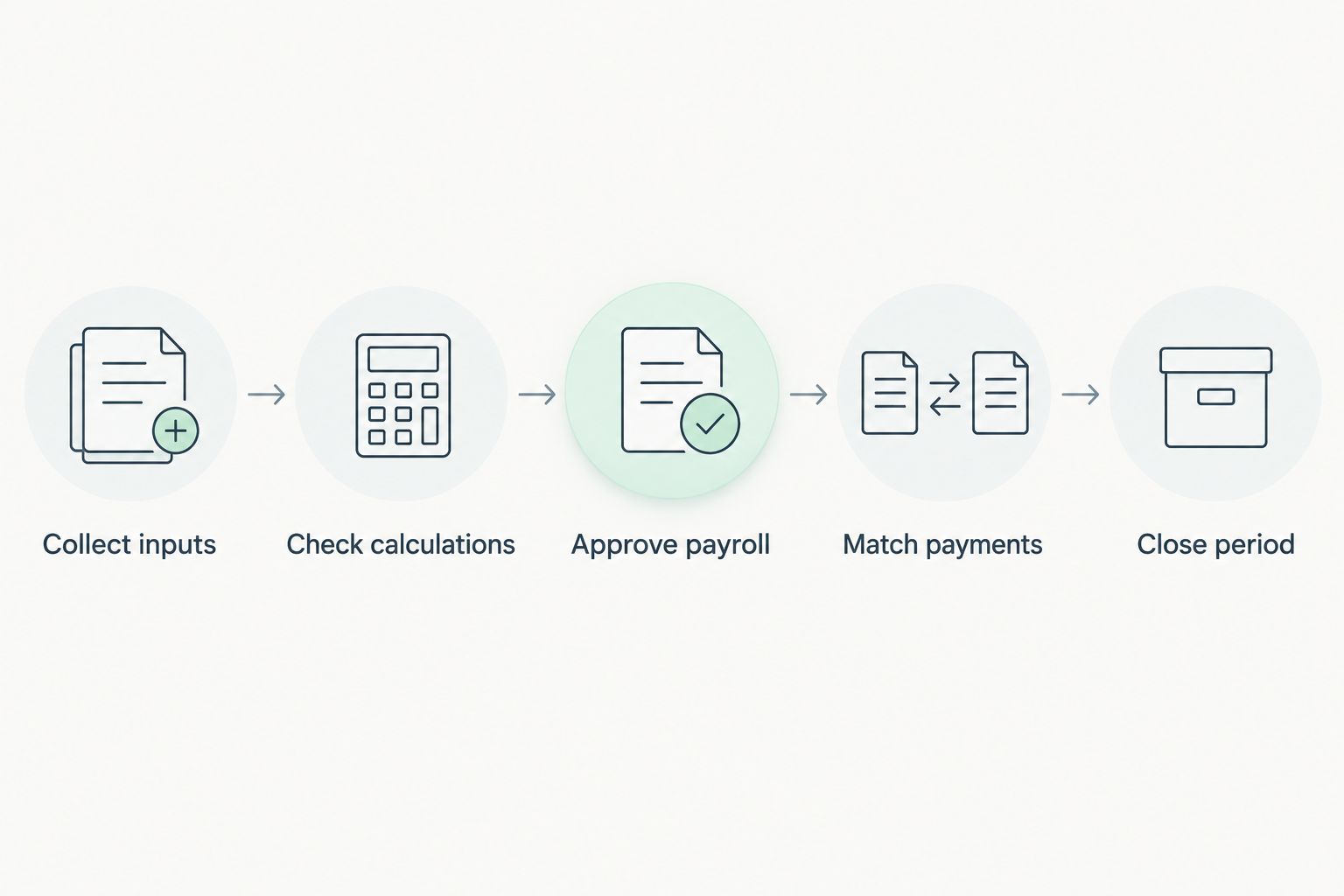
Use this sequence before relying on a new workbook for live payments:
- Collect inputs: Gather approved employee changes, attendance, variable earnings and deductions.
- Check calculations: Inspect formulas and compare the output with an independently checked example.
- Approve payroll: Record approval of the employee amounts and total payment instruction.
- Match payments: Compare authorised net pay with payment records and investigate differences.
- Close period: Preserve the approved workbook, employee statements and supporting records.
Keep the stages distinct even when the same person performs them. An edit after approval should trigger another check, not quietly change the figures behind an already-issued payslip.
Keep an untouched copy of a new template before customising it. Test the situations your business actually uses, including an ordinary salary payment and an approved adjustment. Reject a file whose formulas you cannot inspect or whose totals change unexpectedly when you add an employee.
Which payroll template should you choose?
Choose a monthly salary register first if your employees receive fixed monthly salaries. Add attendance or commission schedules only where those inputs affect pay, then use payslips and reconciliation to explain and verify the result.
Skillspad’s business-template range is relevant to Ghanaian owners looking for reusable business documents. For payroll, assess the actual file against this checklist rather than assuming a general business template includes payroll calculations or statutory settings.
Your 2026 decision should follow the work: calculate earnings, approve the result, explain individual pay and verify the payment. Do not ask a payslip to perform all those jobs.
FAQ
What's the best payroll template for a small business in Ghana?
A monthly salary register is the best starting format for a Ghanaian business with fixed-salary employees. Choose one with separate earnings, deductions and net-pay fields, then verify its applicable tax and pension settings.
Can I use Excel to manage payroll in Ghana?
Yes, an Excel workbook can hold payroll calculations and records. You still need checked formulas, current applicable settings, controlled access and a process for approving and reconciling payments.
Is a payslip template the same as a payroll template?
No, a payslip presents one employee's pay breakdown, while a payroll register holds the calculations across employees. Prepare payslips from the approved register so the figures agree.
What should a Ghana payroll spreadsheet include?
A Ghana payroll spreadsheet should identify the employee and pay period, then separate earnings, deductions and net pay. Include applicable tax and pension fields, approval records and a way to match payments.
Does a payroll template automatically calculate PAYE correctly?
No, a payroll template calculates PAYE correctly only when its inputs, applicable rules and formulas are correct. Verify the settings against Ghana Revenue Authority guidance before using the output.
Which payroll format works for staff earning commission?
A salary-and-commission sheet fits employees whose earnings combine fixed pay and commission. Document qualifying transactions, calculation rules and adjustment treatment before using it.
Does Skillspad offer a verified Ghana payroll template?
This guide does not identify a verified Skillspad payroll download. Skillspad sells business templates; inspect the actual file's contents before choosing it for payroll.
One last thing
A balanced payroll total can still contain an employee-level mistake. Review individual changes as well as the total: an incorrect addition in one row and an incorrect deduction elsewhere can cancel each other out. Keep the explanation beside every adjustment so the next review does not depend on memory.


