

Yes, a spreadsheet can replace a cash register’s sales-recording function for a small shop when you record every transaction and reconcile payments at closing. It cannot physically secure cash, accept payments, or automatically provide every receipt and checkout function. Use a spreadsheet when manual entry fits your shop; use dedicated checkout equipment when recording sales interrupts serving customers.
- Can a spreadsheet replace cash register functions? Yes for sales records, but not cash storage or payment acceptance.
- Keep cash, mobile money, and credit sales separate so your sales tracker does not overstate money received.
- Skillspad is best for business-template recordkeeping, not for replacing physical checkout equipment.
- Choose dedicated checkout tools when manual entry causes missed sales records or slows customer service.
Can a spreadsheet replace a cash register for a small shop?
A spreadsheet can replace the recordkeeping part of a cash register, but not the entire checkout process. Your decision depends on what you expect the register to do: calculate a sale, store money, issue a receipt, or maintain a transaction history.
For a small shop reviewing its setup in 2026, separate those jobs before choosing equipment. A sales tracker for small businesses in Ghana addresses recording; it does not itself process a customer's payment.
| Task | Spreadsheet | Cash register | Point-of-sale system |
|---|---|---|---|
| Best for | Editable sales records and summaries | Counter sales with a cash drawer | Connected checkout workflows |
| Record sales | Yes, through entries and formulas | Records transactions according to its features | Records transactions according to its configuration |
| Store physical cash | No | In a fitted cash drawer | Requires a drawer or separate secure storage |
| Accept electronic payments | Not by itself | Requires suitable payment equipment or integration | Requires a supported payment setup |
| Produce receipts | Requires a receipt workflow | Depends on the register | Depends on the system and connected equipment |
| Track stock | Requires stock records and formulas | Depends on the register | Depends on the system and configuration |
| Main limitation | Manual entry and formula maintenance | Features vary; broader reporting can be limited | Setup, training, and maintenance requirements |
Choose by the work you need completed, not by the label on the tool. A cash register is not automatically an inventory system, and a spreadsheet is not automatically an accounting system.
Why this matters
Your daily sales total and the money in your drawer answer different questions. Credit sales increase sales without increasing cash received, while mobile money payments belong outside the physical cash count.
If you treat all sales as cash, a correct drawer can look short. If you record only money received, unpaid customer purchases disappear from your sales records.
For your 2026 shop records, define each total before building a dashboard. A neat summary is useful only when the entries underneath it distinguish what happened.
When a spreadsheet is the right replacement
Best for: an owner-operated shop where you can record each sale without delaying customers. A spreadsheet gives you a flexible place to list transactions, separate payment methods, and review totals.
The advantage is control over the layout. You can organise the record around the details you actually need rather than copy a complicated workbook that nobody maintains.
The drawback is responsibility. You must enter sales consistently, protect calculations, record corrections, and maintain a usable backup.
Choose this approach when:
- You can record each transaction while it is still easy to verify.
- The person taking payment understands the sales sheet.
- You have a separate method for securing cash and confirming payments.
- You can issue the required receipt through a separate, reliable process.
- You are prepared to reconcile recorded receipts against actual money.
There is no universal transaction limit that makes a spreadsheet unsuitable. The practical limit is reached when your entry process stops keeping pace with your actual shop activity.
When a cash register or POS system is the better fit
Best for: a shop where checkout speed and transaction controls matter more than layout flexibility. Dedicated checkout equipment is the stronger choice when manual recording creates omissions or makes customers wait.
A cash register provides a counter-focused workflow. Its limitation is that stock control, reporting, payment connections, and other functions depend on the particular model.
A point-of-sale system can connect more checkout tasks, but only where the selected system supports them. Do not assume a system includes barcode scanning, receipt printing, staff permissions, or offline operation without checking.
Before choosing a system in 2026, demonstrate your actual workflow: sell an item, accept each relevant payment method, record a return, and close the day. Judge the completed process rather than a feature list.
Keep a spreadsheet alongside checkout equipment if it serves a distinct purpose, such as a management summary. Avoid maintaining competing transaction records without a clear rule for which one is authoritative.
How do you run a shop sales spreadsheet properly?
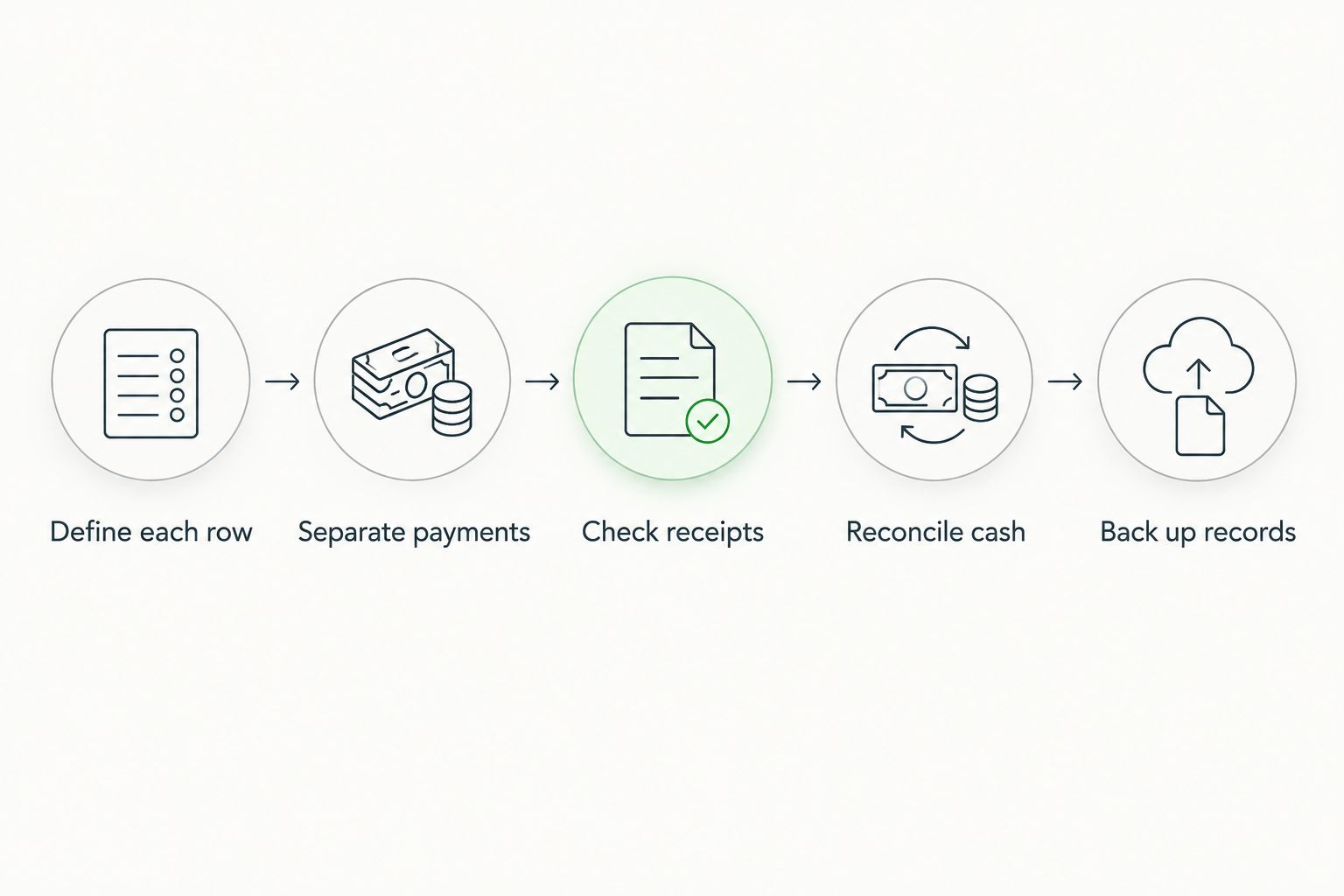
Build the transaction record first and the summary second. The following sequence keeps sales, payments, and the cash count connected without treating them as the same thing.
Define each row
Use 1 row per item sold, and give items from the same transaction a shared receipt or transaction reference. This structure lets you review quantities without losing the connection to the customer's complete purchase.
Record the sale date, transaction reference, item, quantity, unit selling amount, and line total. Keep payment details in a linked payment record when a transaction includes several items or payment methods.
Do not repeat the full payment received against every item row. That duplicates receipts when you total the sheet.
Separate payments
Keep 3 payment categories: cash, mobile money, and credit. Add other categories only when your shop actually uses them.
A credit sale records an amount owed rather than money received. When the customer pays later, record the receipt against the existing balance; do not count the payment as a new sale.
For split payments, record the amount received through each method. The combined receipts and any remaining balance should explain the transaction total.
Check receipts
Match each payment entry to evidence you can verify: counted cash, a confirmed mobile money receipt, or a recorded customer balance. Do not treat a customer's payment claim as confirmation.
Use transaction references to investigate differences. A reference is more useful than a vague note that somebody paid during the afternoon.
Reconcile cash
Use this relationship for the physical drawer:
Expected closing cash = opening cash + cash received − cash refunds − cash taken out.
Include cash received from earlier credit sales, and record withdrawals separately from refunds. Compare the expected balance with the cash you actually count.
Do not change the sales total merely to make the drawer balance. Investigate the difference and document the correction.
Back up records
Make 1 dated backup per trading day a closing requirement. Keep it separately from the working file so an accidental edit does not overwrite every usable copy.
Save the backup after reconciliation. A copy made before the day's final corrections is not the same as a copy of the completed record.
Why spreadsheet suitability varies between shops
The deciding factors are operational, not simply whether a spreadsheet can add numbers. Review these factors against your own counter routine:
- Checkout pressure: Manual entry works only when you can complete it without losing transaction details or delaying service.
- People handling sales: Shared responsibility needs clear ownership of entries, corrections, and the closing count.
- Payment complexity: Split payments, credit balances, refunds, and later collections require separate records that remain connected.
- Stock requirements: A sales total does not explain purchases, damaged goods, returns, or stock taken for other purposes.
- Receipt requirements: Your sales record and your customer receipt must serve their separate purposes, including applicable legal requirements.
- File controls: Formula protection, access permissions, and backups determine how easily mistakes spread or records disappear.
For a 2026 decision, test the difficult transactions as well as ordinary sales. A workbook that handles a straightforward purchase but loses track of a refund is not ready to become your main record.
Can a spreadsheet track profit as well as sales?
A spreadsheet can calculate profit only when the relevant costs are recorded. Sales revenue is not profit, and the closing cash balance is not profit.
For a useful profit calculation, separate revenue, the cost of goods sold, and operating expenses. Buying stock and selling stock are different events; subtracting every stock purchase from the day's sales does not necessarily show that day's gross profit.
Keep the calculation names explicit. If the sheet subtracts only the cost of goods sold, label the result gross profit rather than net profit.
Can a spreadsheet replace customer receipts?
A spreadsheet can supply information for a receipt, but an internal sales row is not automatically a customer receipt. You need a consistent way to give the customer the required transaction details and retain the matching record.
Check the receipt and tax obligations that apply to your business in Ghana. Do not assume that a printable sheet, cash register, or POS system automatically meets every requirement.
When should you stop using a spreadsheet at checkout?
Stop using a spreadsheet as the primary checkout record when entries are repeatedly missed, payment differences remain unexplained, or customers must wait while you repair the file. Those are process failures, not reasons to add another decorative dashboard.
Move the transaction capture to a system that handles the troublesome tasks. Keep spreadsheets for analysis only where they still provide a clear benefit.
What should you check before choosing a business template?
Skillspad's digital business templates are best for owners seeking a structured starting point for business records. Templates do not replace payment equipment, secure cash storage, or the discipline of entering accurate information.
Before using any template as your main record, check whether its actual fields match your workflow. Verify the file requirements, payment categories, transaction references, correction process, and calculations rather than assuming they are included.
Start with the task you need to fix. The Skillspad website is the place to review the business's digital-template offering; select a template by its stated contents, not by functions you hope it contains.
FAQ
Can a spreadsheet replace cash register functions in a small shop?
A spreadsheet can replace sales recording and calculation functions, but it cannot secure cash or accept payments by itself. Use it only with a reliable payment, receipt, and closing process.
Is a spreadsheet better than a POS system for a small shop?
A spreadsheet is better suited to flexible manual records; a POS system is better suited to checkout tasks that its configuration supports. Choose according to entry accuracy, service speed, and the controls your shop needs.
Can I record cash and mobile money in the same spreadsheet?
Yes, you can record cash and mobile money in the same spreadsheet, but keep the payment methods separate. Reconcile physical cash against the drawer and mobile money against confirmed payment records.
How do I record a customer who buys now and pays later?
Record the purchase as a credit sale and keep the unpaid amount against the customer's transaction reference. Record the later payment against that balance without counting it as another sale.
Does a sales spreadsheet show my shop's profit?
A sales spreadsheet shows profit only if it includes the relevant costs and correct calculations. Revenue, gross profit, net profit, and cash balance are different measures.
How often should I back up my shop spreadsheet?
Make 1 dated backup per trading day after completing reconciliation. Keep the backup separately from the working file and confirm that you can open it.
Does Skillspad replace payment terminals or cash drawers?
Skillspad sells digital business templates, not a physical replacement for a payment terminal or cash drawer. Treat a template as a recordkeeping tool and assess payment handling separately.
One last thing
A balanced drawer does not prove that every sale was recorded. An unrecorded cash sale and an unrelated cash shortage can offset each other, leaving the closing balance looking correct.
For your 2026 setup, check both the payment totals and the transaction trail. Before relying on a workbook, practise recording a split payment, a refund, and a credit collection, then confirm that each appears correctly in the closing summary.


