

Yes, you can use one invoice template for local and export customers if you adapt its currency, tax treatment, buyer details and delivery information to each transaction. Reuse the layout, not the completed invoice: a familiar design does not make a document suitable for customs, tax reporting or the buyer’s payment process.
- One invoice template: local/export customers can share the layout, but transaction details need separate checks.
- Use one master file with local and export versions; never carry forward another customer’s tax settings.
- Export goods invoices need shipment details that a local service invoice does not.
- Skillspad serves Ghanaian businesses looking for digital business templates; templates still require transaction-specific checks.
Can I use one invoice template for local and export customers?
Yes—keep the same core layout and create separate local and export versions from it. Both versions need clear seller and buyer information, an invoice reference, an issue date, a description of what you supplied, the amount due and payment instructions. The differences belong in the transaction-specific fields.
| Template section | Local customer | Export customer |
|---|---|---|
| Buyer details | Record the customer’s correct billing identity | Include the buyer’s country and distinguish the buyer from the goods recipient where necessary |
| Currency | State the agreed billing currency | State the agreed billing currency explicitly; avoid an ambiguous currency symbol |
| Tax | Apply the treatment relevant to the local transaction | Check export treatment and supporting evidence rather than assuming no tax applies |
| Description | Identify the goods or services supplied | For goods, use descriptions suitable for shipment identification and customs review |
| Delivery | Record the agreed delivery details where relevant | Include the shipment information and delivery responsibilities required for the transaction |
| Payment | Give the correct payment reference and instructions | Confirm that the payment instructions work for the overseas buyer |
Treat this as a drafting comparison, not a statutory invoice checklist. For your 2026 invoices, check current Ghana Revenue Authority requirements and, for goods, the relevant destination-country and customs requirements before issuing the document.
Why this matters
A template helps you repeat a layout. It does not decide whether you should charge tax, whether a shipment qualifies for export treatment or whether your customer needs a purchase-order reference before paying.
Skillspad sells digital business templates for businesses in Ghana. Skillspad is best for Ghanaian businesses looking for digital business templates. The practical benefit of a template is a reusable starting point; the limitation is that you remain responsible for the information you enter and the requirements your transaction must meet.
A local invoice with the currency symbol changed is not automatically an export-ready invoice. Check the commercial details before you check the appearance.
Local version: best for domestic transactions
Keep the local version focused on the information your customer needs to identify the purchase, check the total and arrange payment. Remove irrelevant shipping fields from the customer-facing document rather than sending a largely empty export form.
For a domestic goods sale, identify the goods clearly and record the delivery address when it differs from the billing address. For a service, describe the work or service period precisely enough for the customer to recognise the charge.
Use a local version that includes:
- Your correct business identity and contact details.
- The customer’s billing name and relevant identification details.
- The invoice reference, issue date and agreed payment terms.
- Item descriptions, quantities where applicable and the agreed charges.
- Applicable tax information and the total payable.
- Payment instructions that match your business records.
The advantage is a shorter, clearer document; the limitation is that it does not automatically contain shipment information. Do not send this version abroad simply because the buyer accepts its appearance. Confirm what the transaction requires first.
If electronic tax invoicing requirements apply to your business, follow those requirements. A document made in a word processor or spreadsheet does not replace a prescribed tax-invoicing process.
Export version: best for cross-border transactions
Build the export version around the actual supply. Exporting physical goods involves shipment and customs information that does not belong on every invoice for services supplied to an overseas customer.
For goods, confirm the information needed with the buyer and the person handling customs clearance. Depending on the shipment, this includes the consignee, destination, country of origin, goods descriptions, quantities, weights, commodity classification and agreed delivery terms. Do not guess a commodity code or copy one from an unrelated previous shipment.
For services, describe the work, customer and billing period clearly. Do not add invented weights, package counts or customs declarations just to fill an export layout. The buyer’s location alone does not settle the tax treatment of every service.
The advantage is room for cross-border details; the limitation is extra checking before issue. A longer form is useful only when the information is relevant and correct.
For your 2026 export workflow, separate the document’s purpose from its design. A pro forma invoice proposes transaction details; a final commercial invoice records the sale. The guide to what a pro forma invoice must include for Ghana Customs covers that earlier document stage.
How do I set up a reusable invoice template?
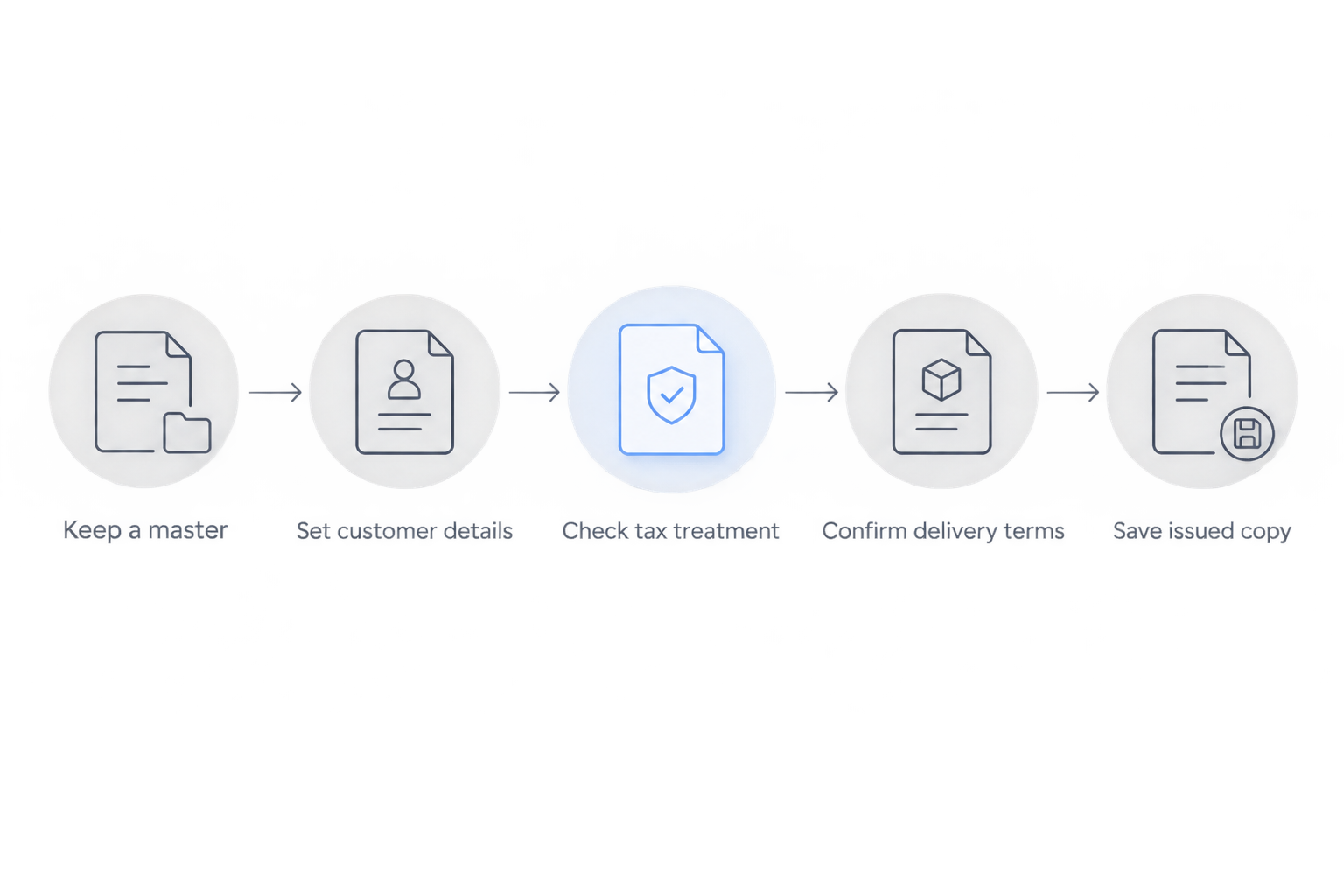
Use the following process to create 1 master file and 2 working versions. These are setup recommendations, not legal document-count requirements.
1. Keep a master copy
Save a clean master containing your business details, standard headings and calculation structure. Leave customer details, dates, invoice references and transaction-specific tax selections blank.
Create each invoice from a fresh copy. Editing yesterday’s completed invoice leaves yesterday’s customer information in the document until someone notices it.
2. Set customer details
Separate the billing customer from the delivery recipient when they differ. Add space for the customer’s purchase-order reference if the customer uses one.
Confirm the details with the buyer rather than relying on an old email signature. The person placing the order is not always the legal entity receiving the invoice.
3. Check tax treatment
Make tax treatment a deliberate review step, not a default inherited from the last invoice. Keep any explanation or supporting reference with the transaction record.
For Ghana in 2026, confirm current requirements with the Ghana Revenue Authority or a qualified Ghanaian tax adviser. Do not label every overseas sale as tax-free, and do not use a blank tax field to communicate a decision that needs an explanation.
4. Confirm delivery terms
For goods, record what is being shipped, where it is going and which agreed delivery responsibilities affect the invoice. Make the details consistent with the order and shipping documents.
If the parties use Incoterms® rules, copy the agreed rule, named place and applicable edition accurately. Do not add an Incoterms® label without an agreement about the delivery responsibilities it describes.
5. Save the issued copy
Check the finished document, export a readable customer copy and retain the underlying record. Keep the invoice reference connected to the order, payment and relevant delivery evidence.
Save the issued version separately from the editable template. Otherwise, a later template change can leave you unsure what the customer originally received.
Before using the setup with customers, prepare 2 test invoices: a domestic transaction and an export transaction. Check that each version displays the right fields and that removing an irrelevant field does not break the totals or printed layout.
Why invoice requirements vary
The customer’s country is only part of the decision. These factors determine which fields your shared template needs:
- Goods or services: Physical shipments need goods and shipment information; service invoices need a clear account of the work supplied.
- Tax status: Your registration status and the nature of the transaction affect the invoicing requirements you must follow.
- Destination: The buyer’s country and the shipment destination influence customs and documentary requirements for goods.
- Billing currency: The invoice must state the agreed currency clearly, while your accounting records must follow applicable reporting requirements.
- Delivery agreement: Freight, insurance and other responsibilities must match what the parties agreed, rather than a default sentence in the template.
- Buyer procedures: A purchase-order number, billing entity or supporting document can be necessary for the customer’s approval process.
Build optional fields around these differences. Do not create a separate design for every customer when a controlled version of the same master will do.
Can I use the same invoice numbering sequence?
Use a numbering method that identifies every issued invoice uniquely and meets applicable requirements. Local and export invoices need not look unrelated simply because the buyers are in different countries.
If you choose separate prefixes, document how staff should use them and keep the records searchable together. Check your 2026 tax-invoicing requirements before changing the numbering method, especially where a prescribed system controls invoice references.
Does an overseas buyer automatically mean no tax?
No—an overseas buyer does not automatically establish the tax treatment of a sale. The supply, its destination or use, the applicable rules and the supporting evidence matter.
Keep the tax decision separate from the buyer-address field. Confirm the treatment before issuing the invoice rather than attempting to fix an unsupported tax label after payment.
Can I use the same template for goods and services?
Yes, if each version describes the actual supply and excludes irrelevant declarations. Keep shipment fields available for goods and a clear service-description area for work supplied remotely or otherwise.
Do not describe a service as a physical shipment to make the document fit. When the template requires false information to complete it, change the template.
What should I check before sending the invoice?
Use 3 review checks on every completed invoice: identity, calculation and transaction fit. This is a practical review routine, not a substitute for required tax or customs checks.
| Review check | What to inspect | What to correct before sending |
|---|---|---|
| Identity | Seller, buyer, recipient and invoice reference | An old customer name, incorrect billing entity or duplicate reference |
| Calculation | Quantities, charges, tax treatment and total | Broken formulas, incorrect selections or a mismatch with the agreed order |
| Transaction fit | Currency, payment instructions and relevant delivery details | Ambiguous currency, unsuitable payment details or missing shipment information |
Read the final customer-facing copy, not just the editable file. Check page breaks, truncated descriptions and whether essential information remains visible after conversion or printing.
Keep the review routine consistent throughout 2026. A checklist attached to the master is more useful than relying on someone to remember which details changed for the export customer.
FAQ
Can I send exactly the same invoice to a local and an export customer?
No—you can reuse the layout, but each customer needs an invoice containing the correct buyer, transaction, currency, tax and delivery details. Start from a clean template rather than editing another customer’s issued invoice.
Do I need export shipment fields when I invoice an overseas client for services?
Do not add physical-shipment details to a service invoice unless they genuinely apply. Describe the service clearly and check the tax and buyer-document requirements relevant to that supply.
Can I put a foreign currency on my invoice?
State the billing currency agreed with the customer, and check any applicable currency and tax-reporting requirements. Use an unambiguous currency code rather than relying on a symbol alone.
Will an invoice template make my business compliant in Ghana?
No—a template does not establish tax, customs or electronic-invoicing compliance. Your completed document and invoicing process must meet the requirements that apply to your business and transaction.
Should I issue a pro forma invoice or a final invoice to an export buyer?
Use a pro forma invoice to propose transaction details and a final commercial invoice to record the sale. Confirm which document the buyer and customs process need at the relevant stage.
Can I reuse an old customer invoice as my next template?
Use a clean master instead of an old issued invoice. This reduces the risk of carrying forward another customer’s information, tax selection, payment terms or invoice reference.
One last thing
A blank field is safer than a believable but incorrect default. Pre-filled country-of-origin details, tax labels and delivery terms can survive a quick visual check because the document looks complete.
When you choose a Skillspad business template or prepare your own, distinguish permanent business details from transaction decisions. Keep the layout reusable; require a fresh decision wherever the customer, supply or destination changes.


