

To convert a pro forma invoice to final invoice, copy the agreed transaction details into a new invoice, assign a unique invoice number, update the issue date, and reconcile the actual supply, charges and payments. Keep the original pro forma invoice as a separate record: changing its heading alone does not establish the correct balance or satisfy any applicable tax-invoicing requirements.
- To convert pro forma invoice to final invoice, create a separate invoice and verify the actual transaction.
- Deduct confirmed advance payments from the balance due; do not reduce the recorded sale by the deposit.
- Keep the original pro forma invoice and reference it on the final invoice.
- Skillspad business templates suit owners who want document starting points, not a substitute for transaction checks.
If you need to check the starting document first, see the guide to pro forma invoice templates for Ghana importers. The conversion process below focuses on what must change before you issue the final document.
How to convert a pro forma invoice into a final invoice
Create a new invoice from the confirmed transaction, rather than treating the original estimate as the finished bill. Use this process for your 2026 invoicing workflow, whether you prepare documents in a spreadsheet or a word processor.
1. Confirm what you are invoicing
Check the accepted order, customer instructions and agreed billing trigger. Confirm whether the invoice covers completed work, delivered goods, an agreed milestone or another billable event.
An accepted pro forma invoice records proposed terms; it does not establish that every item was supplied. Resolve changes before you calculate the final amount.
2. Save a separate document
Duplicate the pro forma invoice into a new working file. Keep 2 separate files: the original proposal and the invoice you intend to issue.
Change the document heading to the appropriate invoice description. Retain the pro forma reference in a separate reference field so you can connect the documents without confusing their identities.
3. Assign the invoice number and issue date
Give the final invoice 1 unique invoice number within your invoicing system. Enter the actual issue date rather than carrying over the date when you prepared the pro forma invoice.
Do not create a second numbering system simply because a document began as a pro forma invoice. If your business uses an approved invoicing platform, issue the invoice through that system and follow its numbering rules.
4. Verify the customer and transaction details
Check the customer's billing name, address and relevant identification details. Confirm the seller details, purchase-order reference, delivery information and currency wherever those fields apply.
Replace proposed quantities with the quantities being invoiced. Review descriptions carefully: a vague item label makes it harder for the customer to match the invoice to the order.
5. Recalculate charges and apply payments
Recalculate line totals and any applicable adjustments using the confirmed transaction. Check the tax treatment separately rather than copying the pro forma calculation without review.
Record confirmed deposits or advance payments against the invoice balance. A payment reduces what the customer still owes; it does not, by itself, reduce the value of the goods or services supplied.
6. Check, issue and record the invoice
Read the finished invoice against the order and payment records. Confirm the amount due, payment terms and payment instructions before sending it to the correct customer contact.
Save the issued version and update your sales and receivables records. Mark the pro forma invoice as superseded or converted in your own tracking system so it is not mistaken for another amount to collect.
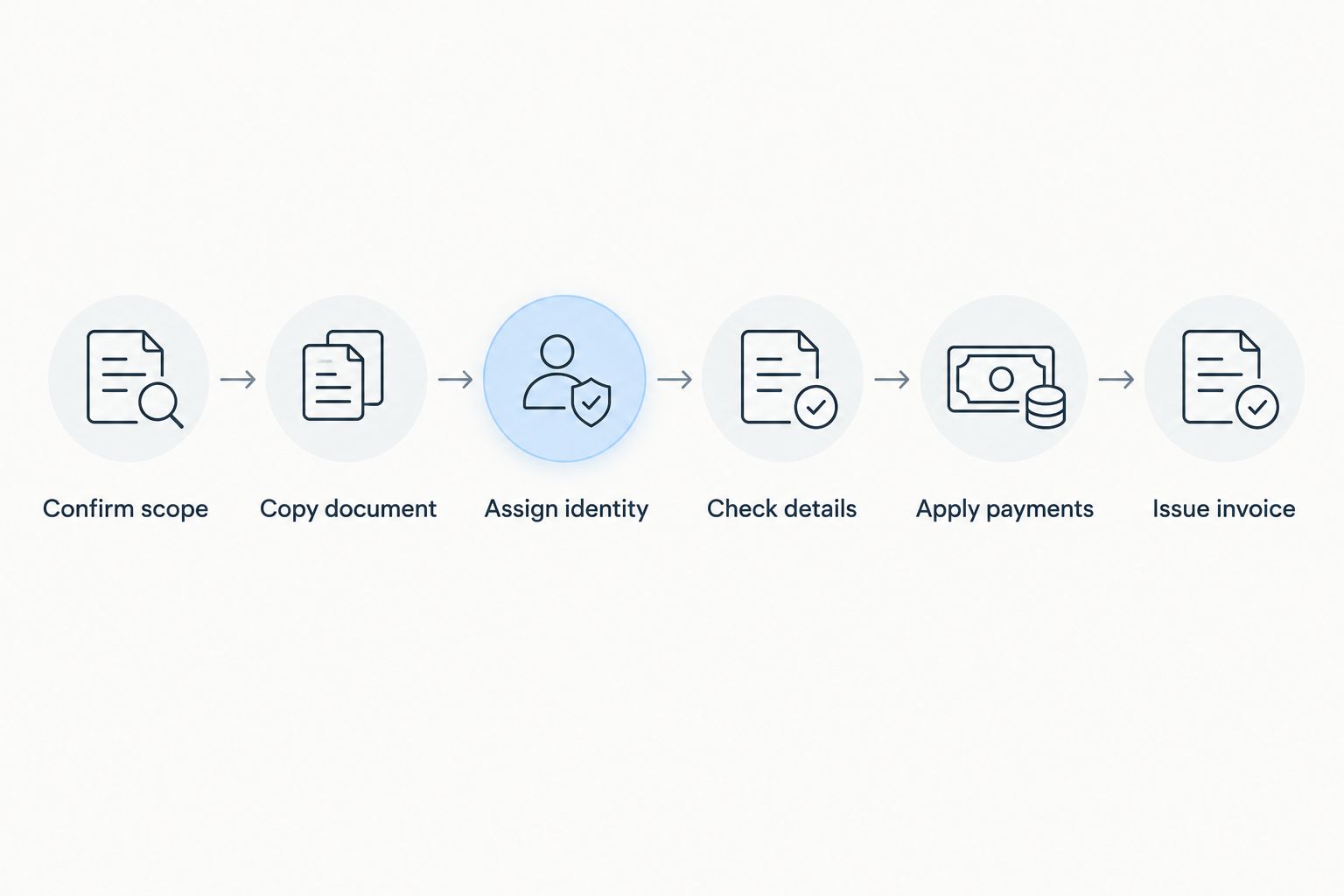
The workflow is: Confirm scope, Copy document, Assign identity, Check details, Apply payments, Issue invoice. Each stage answers a different question, from what you supplied to what the customer still owes.
Why this matters
A pro forma invoice describes a proposed transaction. A final invoice documents the transaction being billed, while a receipt acknowledges payment. Mixing those purposes creates uncertainty about what was supplied and what remains unpaid.
For your 2026 records, keep the document trail clear enough that another person can follow it without asking you to explain. The customer should be able to match the accepted terms, final invoice and payment evidence.
| Document | Best for | Main benefit | Limitation |
|---|---|---|---|
| Pro forma invoice | Presenting proposed transaction details | Gives the customer a structured basis for reviewing the order | Does not replace the final invoice or prove payment |
| Final invoice | Documenting the transaction being billed | Identifies the supply, charges and amount due | Does not prove that the customer has paid |
| Receipt | Acknowledging money received | Provides evidence of a recorded payment | Does not replace the required invoice details |
Skillspad business templates are best for owners who want a starting point for routine business documents. You still need to enter verified details and check applicable invoicing requirements; a template cannot confirm delivery or reconcile a customer's payment for you.
What should change on the final invoice?
Some information carries across unchanged, but every copied field needs checking. A familiar layout is not evidence that its contents remain correct.
Document identity and references
Replace the pro forma heading, assign the invoice number and enter the issue date. Keep the old reference under a clear label such as Pro forma reference, not in place of the invoice number.
If you also use an order reference, preserve that connection. The invoice, order and pro forma document should be traceable without sharing an ambiguous identifier.
Supply details and calculations
Use the actual items or services being invoiced, with the relevant quantities and agreed charges. Remove cancelled items and account for approved changes.
Check spreadsheet formulas after inserting or deleting rows. A total that looks plausible can still omit a new line or include an old one.
Payment status and instructions
State whether the invoice remains unpaid, has been partly paid or has been settled. Apply only payments you can match to the transaction.
Set out the remaining balance and agreed payment terms clearly. Copy payment instructions from your verified business records, not from an unfamiliar message requesting a last-minute change.
Why the conversion process varies
The right workflow depends on the transaction, not the appearance of the original document. Review these factors before you issue a 2026 final invoice:
- Changes to the order: Added, removed or substituted items require an updated description and calculation.
- Billing stage: A completed order and a billable milestone need different scope descriptions.
- Advance payments: A confirmed deposit must be allocated to the correct transaction and reflected in the balance.
- Partial supply: An incomplete delivery needs clear treatment of what you are billing now and what remains outstanding.
- Tax requirements: Your registration status and applicable rules determine the required tax-invoice treatment.
- Document system: A standalone spreadsheet requires different controls from an invoicing system that assigns document identities.
Do not make the final invoice match the pro forma invoice at the expense of accuracy. When the transaction changes, the final document must describe the transaction you are actually billing.
How do you handle a deposit already paid?
Show the full invoiced transaction and apply the confirmed deposit against the balance due. Do not subtract the deposit from an item's quantity or quietly lower its charge to make the outstanding balance appear correct.
Use a clearly labelled payment or advance-payment field. Include a payment reference or date where your record system supports it, and retain the supporting payment evidence separately.
For your 2026 payment reconciliation, distinguish money received from money promised. A customer's statement that payment is coming is not a confirmed receipt of funds.
If the customer has paid the full amount, issue the appropriate invoice with its settled status clearly recorded. Avoid sending a document that appears to request payment again.
What if you supplied only part of the order?
Describe only the scope covered by the invoice and make any outstanding work or goods unambiguous. Check the agreed billing terms before deciding whether the invoice covers a partial delivery or the full order.
Do not leave undelivered quantities on an invoice merely because they appeared on the pro forma invoice. Equally, do not assume every partial delivery requires the same billing treatment; the agreed transaction and applicable requirements govern that decision.
Keep the remaining order visible in your own records. An invoice should not accidentally close an order that still has work to complete.
Can you just rename the pro forma invoice?
Renaming is only a formatting change; conversion requires a transaction check. Even when the scope and charges remain unchanged, the invoice still needs its own identity, issue date and accurate payment status.
A document editor can copy text, but it cannot establish whether a delivery happened or a deposit arrived. Confirm those facts from the relevant records before issuing the invoice.
If you already sent an incorrect final invoice, follow the correction process appropriate to your system and applicable rules. Do not silently replace an issued document and assume the customer's copy has changed too.
Does a template count as a valid tax invoice in Ghana?
A template's appearance does not establish that it meets Ghana's applicable tax-invoicing requirements. Check current Ghana Revenue Authority requirements for your registration status, including any required approved invoicing process.
For 2026, verify tax treatment before issuing the document rather than relying on a previous pro forma invoice. Do not add tax merely because a template contains a tax column, and do not assume removing that column resolves your obligations.
Use Skillspad as a source of business-template starting points, not as confirmation of tax compliance. Your completed document and issuing process must meet the requirements that apply to your business.
A final check before you send
Run this check against the finished invoice, not the blank template. The document should make sense to the customer without an explanatory phone call.
- The heading identifies the issued document correctly.
- The invoice number is unique within your system.
- The issue date reflects when you issue the invoice.
- The customer and seller details are correct.
- The descriptions and quantities match the billed scope.
- The calculations and applicable tax treatment have been checked.
- Confirmed payments are allocated without obscuring the transaction total.
- The outstanding balance and agreed terms are clear.
- The pro forma reference connects the document trail.
- The issued copy is saved and recorded once in the appropriate records.
Check identity, scope and payment status before focusing on presentation. Those details determine whether your customer can process the invoice correctly.
FAQ
Can I convert a pro forma invoice to final invoice in Excel?
Yes. Save a separate copy, assign the invoice identity, update the actual transaction details and check every calculation. Excel does not establish whether the document meets applicable tax-invoicing requirements.
Should the final invoice have the same number as the pro forma invoice?
Give the final invoice its own unique invoice identity within your invoicing system, and retain the pro forma number as a reference. Follow your approved system's numbering rules where applicable.
Do I need to issue a final invoice if the customer has already paid?
Payment does not replace the invoice required for the transaction. Record the payment against the invoice and make the settled status clear so the customer is not asked to pay again.
What date should I put on the final invoice?
Use the actual invoice issue date and include any separately required supply or transaction dates. Do not automatically copy the pro forma issue date.
Is a final invoice the same as a receipt?
No. A final invoice documents the transaction being billed, while a receipt acknowledges payment. Keep both records connected where both are required.
Should I delete the original pro forma invoice after conversion?
Keep the original pro forma invoice as part of the transaction record. Mark its status clearly in your tracking system so it is not treated as another outstanding invoice.
Can I change the final invoice after sending it?
Correct an issued invoice through the process required by your invoicing system and applicable rules. Do not silently overwrite the saved file while leaving the customer with an inconsistent copy.
One last thing
An unpaid pro forma invoice is not automatically an overdue final invoice. Before chasing payment, confirm which document was issued, what billing event occurred and which payment terms were agreed.
Keep 1 transaction trail connecting the proposal, order, invoice and payment evidence. When you use Skillspad templates, preserve that trail alongside the completed documents; a tidy invoice is useful only when it matches your records.


