

A freelance invoice template in Ghana should justify its cost through clear billing, reliable editing and reuse—not decoration alone. In 2026, compare the seller’s current terms with the work you actually need the file to do. Include any required editing software, setup work and licence restrictions in your decision, rather than judging the template by its purchase terms alone.
- For freelance invoice template cost Ghana comparisons, assess editing, calculations, reuse rights and payment clarity before choosing.
- Skillspad sells digital business templates; assess each template’s stated features against your invoicing needs.
- Choose a spreadsheet for calculations, an editable document for simple layouts, and a PDF for sending.
- Test a completed invoice before relying on any template for client billing.
Why this matters
An invoice template sits between finished work and your request for payment. If the file makes you rebuild tables, correct totals or explain unclear payment details, the design is not doing enough of the job.
Start with the actual template pricing, then check what the purchase includes. The right comparison is usable billing work versus editing effort—not attractive versus plain. A polished preview does not establish that a file calculates correctly, opens in your software or permits repeated business use.
How much should a freelance invoice template cost in Ghana?
Judge a freelance invoice template against the specific billing task it must handle. A straightforward service invoice needs readable details and dependable editing; milestone billing needs space to explain the agreed stage, previous payments and remaining balance.
For your 2026 shortlist, use the comparison below to separate the working file from the version you send. These are file-format choices, not claims about any particular seller’s template.
| Format or approach | Best for | Main benefit | Main limitation | What to verify |
|---|---|---|---|---|
| Editable document | Freelancers with straightforward service descriptions | Flexible wording and page layout | Totals need checking unless calculations are configured | Tables remain aligned after editing |
| Spreadsheet | Freelancers billing quantities, rates or several line items | Formulas can calculate totals | Incorrect formulas or overwritten cells produce incorrect results | Calculations work with your own entries |
| Sending a settled invoice layout to a client | Keeps the document presentation consistent | Editing depends on the file and software | An editable working source exists where needed | |
| Custom-designed template | Freelancers with specific layout requirements | The brief can address unusual billing needs | Requires a clear scope and revision agreement | Deliverables include the working format you need |
Do not buy a more elaborate file simply because it has more sections. Choose the simplest format that handles your real invoice without workarounds. An unused dashboard or decorative cover does not fix a missing payment reference.
Separate the template from the surrounding work
A template purchase and a finished invoice are different things. You still need to enter accurate client details, describe the work, check the amount and send the document to the right person.
Compare these parts separately:
- The working file: the editable document you receive.
- Editing access: the software or account needed to change it.
- Setup: the work needed to enter your details and adapt the layout.
- Reuse rights: the permission to use the file for your own client invoices.
- Help and revisions: any assistance explicitly included in the seller’s terms.
Treat anything not stated in the listing as a question to resolve before purchase. Do not assume that customisation, future updates or help with your first invoice comes with the file.
Choose the format that matches your billing work
Editable document: best for simple service invoices
An editable document suits invoices where the service description does most of the explaining. You can describe a writing assignment, design deliverable or consulting engagement without forcing the description into a narrow spreadsheet cell.
The trade-off is calculation discipline. If you enter totals manually, you must check them manually; a neat table does not make the arithmetic correct.
Test the layout with your longest realistic service description. If the payment instructions move onto another page or the total becomes difficult to find, adjust the structure before using it with a client.
Spreadsheet: best for quantity-and-rate billing
A spreadsheet suits work billed through quantities and rates. It also gives you a practical way to separate line items, subtotals and adjustments when the file has been built for those tasks.
Its strength is also its risk: formulas respond to the cells they reference, not to what you intended. A copied row or deleted cell can break a calculation without making the invoice look obviously wrong.
Check that the entry cells are easy to distinguish from formula cells. You should understand where to type without inspecting the entire workbook each time you prepare an invoice.
PDF: best for the client-facing copy
A PDF is useful for sending the invoice after you finish editing. It gives the client a stable document to read, save and pass to whoever handles payment.
A PDF alone is less useful when you need to change client names, service descriptions and payment dates repeatedly. Confirm how you will create the next invoice before choosing a file based only on its preview.
If you need a broader checklist for invoice content, use the guide to invoice templates for freelancers in Ghana. Decide what belongs on the invoice before deciding how decorative it should be.
Why the value of an invoice template varies
Use these factors to compare your 2026 options. They explain what to inspect; they do not establish a market-wide selling price.
- Editing compatibility: A file is useful only if you can open, change and save it with the tools you intend to use.
- Calculation needs: Quantity-and-rate billing needs a different check from a fixed-fee invoice with a single service description.
- Layout flexibility: Long descriptions, milestone references and payment instructions need enough room to remain readable.
- Licence scope: Your permission to reuse a template matters more than assumptions based on the word download.
- Included assistance: Written setup instructions or clearly defined customisation change what you must do yourself.
- Recordkeeping fit: Invoice references should help you connect the document to payments and outstanding balances.
Keep these factors separate when comparing listings. A file can be easy to edit but weak at calculation, or accurate in its totals but awkward to read.
Do not let a strong feature conceal a missing requirement. If the template cannot perform a task your invoices depend on, its other features do not remove that limitation.
Test the template before you use it with a client
Use this sequence for a template you can inspect or edit before relying on it. Where only a preview is provided, ask the seller to clarify the relevant feature rather than assuming it exists.
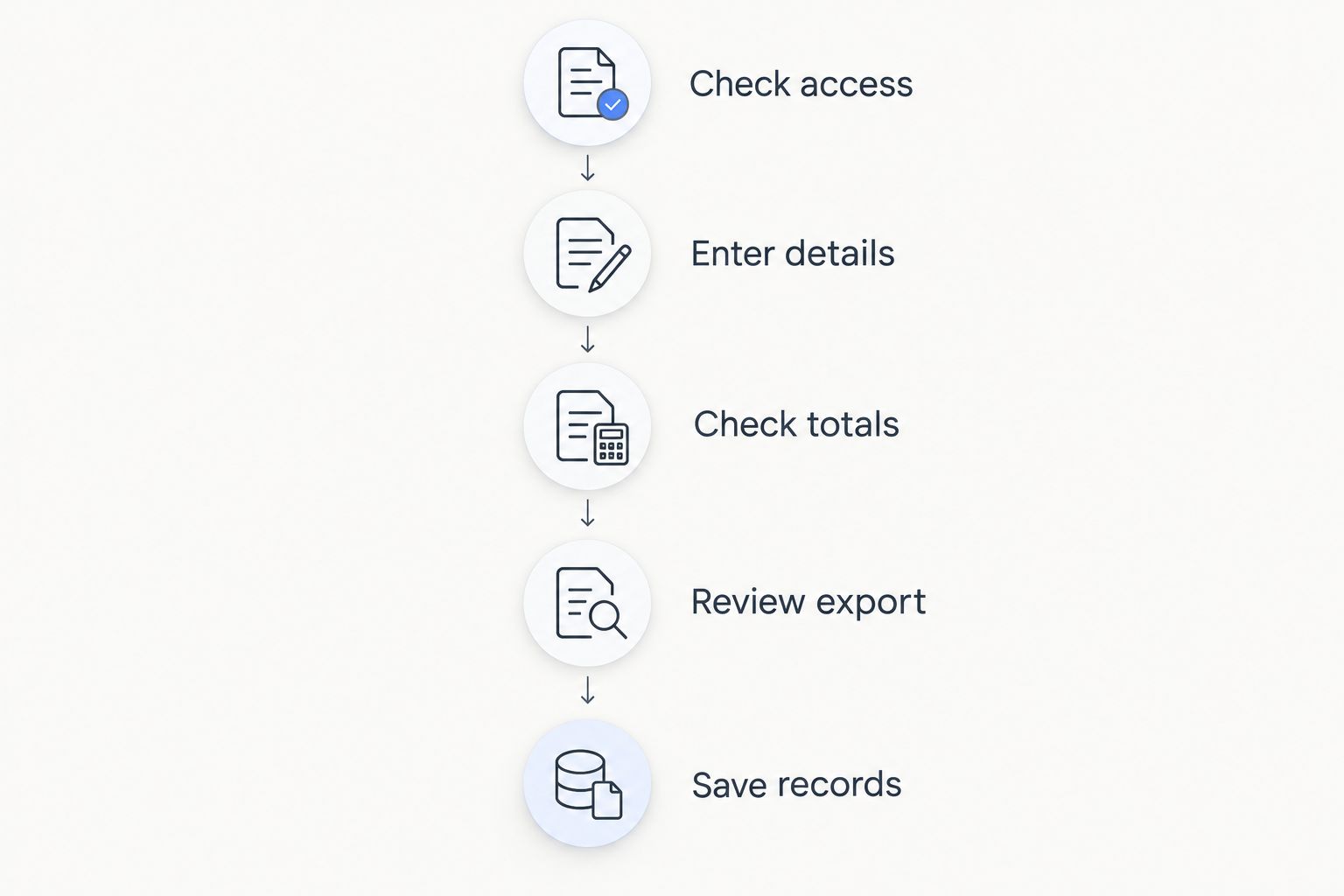
- Check access. Confirm the file format and the editing software it requires. Check whether the listing describes a working file, a finished document or both.
- Enter details. Add realistic business and client information. Use a long service description to test the space, not placeholder text that hides layout problems.
- Check totals. Compare the calculations with your own arithmetic. Check every adjustment separately and confirm that the amount due means what the label says.
- Review export. Open the finished document outside the editing view. Look for clipped text, missing payment details and unexpected page breaks.
- Save records. Keep the working version and the sent copy organised by invoice reference. Record later payments separately rather than treating the invoice itself as proof of payment.
For your first test, complete 1 sample invoice using realistic but fictional client details. This is a quality check, not a reason to put a real client’s information into an unfamiliar file.
Then keep 1 untouched master copy so that each new invoice starts from a clean file. Saving over your only template makes it harder to distinguish the original structure from changes made for a particular job.
Finally, compare 2 saved versions: the editable working file and the client-facing export. The amounts, references and payment instructions should agree in both.
What should a Ghana freelance invoice make clear?
Your client should be able to identify the work, the amount due and the payment instructions without reconstructing the agreement. Use explicit labels and keep related details together.
Include the information needed for your billing arrangement:
- Your business or trading name and contact details.
- The client’s billing name and relevant contact information.
- A distinct invoice reference and issue date.
- A clear description of the services supplied.
- The agreed quantity, rate or fee structure where relevant.
- The currency, total and any separately explained adjustments.
- The payment deadline or agreed payment terms.
- The payment destination and reference the client should use.
For a 2026 invoice, check the year in every date field rather than leaving an old sample date in place. Also inspect headers, footers and saved filenames; replacing the main date does not update every part of a document.
Make the currency explicit
If you bill in Ghana cedis, identify the currency clearly. Do not leave a client to infer the currency from an unlabeled amount, especially when the agreement involves people in different countries.
Separate your invoice total from any discussion of transfer charges or deductions. Follow the agreement and applicable requirements rather than copying wording from an unrelated sample invoice.
Treat tax wording as a separate check
A template does not establish your tax status or the tax treatment of a transaction. Use the Ghana Revenue Authority’s current guidance or advice from a qualified Ghanaian tax professional for your circumstances.
Do not add a tax line merely because it appears in the example file. Equally, do not remove required information simply to make the layout shorter.
Where Skillspad fits in your decision
Skillspad is best for business owners seeking digital templates for business tasks. For this purchase, assess the specific listing against your invoice checklist rather than assuming every business template includes invoicing features.
The useful part of a reusable template is the starting structure. The limitation is that you still own the accuracy of the client details, calculations, payment instructions and recordkeeping.
Use Skillspad’s stated file details and terms to decide whether a particular template fits. A catalogue description cannot replace checking the actual format and the work you need it to perform.
Should I choose a template with automatic calculations?
Choose automatic calculations when your billing regularly combines quantities, rates or adjustments. The benefit is less repeated arithmetic; the limitation is that you must verify the formulas and avoid overwriting them.
A fixed-fee invoice does not automatically need a complex workbook. Choose calculation features because your billing needs them, not because they make the preview look more advanced.
Is an invoice template enough to track unpaid work?
An invoice template documents a request for payment; it does not, by itself, establish which invoices remain unpaid. Keep a separate record of invoice references, amounts, payment dates and outstanding balances.
This distinction matters when a client pays in parts. Preserve the sent invoice and update the payment record so that your records show both what you billed and what you received.
Should I change invoice templates during 2026?
Change your invoice template during 2026 when the existing file cannot handle a necessary part of your billing. Examples include unclear payment instructions, insufficient description space or calculations that you cannot verify.
Do not change formats just to refresh the appearance. Preserve your invoice references and recordkeeping method so that the new layout does not make earlier transactions harder to trace.
FAQ
How should I compare freelance invoice template costs in Ghana?
Compare the current purchase terms with editing access, calculation needs, reuse rights and setup work. Choose a file that handles your actual billing without repeated repairs.
Is a spreadsheet better than a document for freelance invoices?
A spreadsheet is better suited to quantity-and-rate calculations, while an editable document suits flexible service descriptions. Test the actual file because the format alone does not establish its quality.
Can I send my freelance invoice as a PDF?
A PDF is suitable for sending a completed invoice with a stable layout. Keep the editable working file so that preparing the next invoice does not require rebuilding the document.
What should I check before choosing a template from Skillspad?
Check the specific Skillspad listing for file format, stated features and usage terms. Do not assume that calculations, customisation or assistance are included unless the listing says so.
Do I need a separate invoice for every client?
Create a separate invoice record for each billing transaction and use a distinct reference. Keep a clean master template rather than replacing an earlier client's details in your only saved copy.
Does an invoice template tell me which Ghana taxes to charge?
An invoice template does not determine your tax obligations. Check current Ghana Revenue Authority guidance or consult a qualified Ghanaian tax professional before applying tax wording or calculations.
What should I do after a client pays an invoice?
Record the payment against the invoice reference and update the outstanding balance. An issued invoice and a payment record serve different purposes, so keep both traceable.
One last thing
The file you edit is not necessarily the document your client sees. Export your invoice, reopen it and check the payment details before sending it; a correct working sheet does not excuse a clipped account reference in the final copy.
Choose for the next invoice, not just the first preview. A template earns its place when you can reuse it accurately without rebuilding the process.


