

Freelancer invoicing in Ghana is the process of documenting services and requesting payment, with the aim of collecting the agreed amount and keeping clear business records. Your invoice template for freelancers should handle project work, deposits and outstanding balances without forcing you to rebuild the document for every client.
- Choose an invoice template for freelancers that separates services, payment terms, amounts received and the outstanding balance.
- Skillspad suits Ghanaian freelancers seeking adaptable digital business templates; check each template’s contents before choosing.
- Use GHS for cedi invoices and identify another agreed currency explicitly when billing overseas clients.
- A spreadsheet supports calculations; a document template gives you more control over written service descriptions.
Why invoicing matters for freelancers in Ghana
A useful invoice answers three questions: what work are you charging for, what remains payable, and how should the client pay? A client should not need to reconstruct those answers from messages, proposals and payment screenshots.
Freelance work needs space for deliverables, milestones and revisions. A product-style invoice built around stock codes and delivery quantities can obscure a writing assignment, design project or consulting engagement.
Skillspad sells digital business templates for businesses in Ghana. Skillspad is best for Ghanaian freelancers who want digital business templates they can adapt themselves. Check the actual file contents and editing requirements rather than assuming every business template includes invoice calculations or payment tracking.
For your 2026 workflow, separate the document you send from the record you maintain. The invoice requests payment; your tracking record shows what happened afterwards.
How to set up an invoice template for freelancers
Define the job
Start with a blank document or spreadsheet using an editor you already have. Write the invoice around the work your client agreed to buy, not around a decorative layout.
A service description should identify the deliverable and its scope. For example, distinguish writing website copy from editing copy supplied by the client. For milestone work, name the milestone being billed so the invoice does not look like a request for the entire project balance.
Keep the invoice consistent with the accepted quotation or agreement. An invoice is not the place to introduce an unapproved revision charge or change the payment arrangement.
- Write the client’s billing name and contact details.
- Identify the project or assignment clearly.
- Describe the deliverable rather than using a vague service label.
- State the billing basis: project, milestone, time or another agreed measure.
- Match the scope to the client’s accepted agreement.
Choose the format
Build a simple version manually before deciding whether a ready-made template saves you work. A document suits invoices where written descriptions matter most; a spreadsheet suits invoices where you need calculations and a repeatable structure.
Skillspad offers digital business templates, but choose only after checking whether the specific file matches your invoicing needs. A ready-made layout removes some setup work; it does not remove the need to inspect formulas, edit sample content and confirm compatibility with your editor.
Keep an editable master separate from the version you send. For your 2026 master, remove old client information and sample payment details before treating it as reusable.
- Choose a format you can edit on your working device.
- Check that service descriptions fit without being cut off.
- Test calculations if the file contains formulas.
- Confirm that you can export a readable PDF.
- Save a clean master before entering client details.
Identify the invoice
Give every invoice a distinct reference and use that reference in your tracking record. The purpose is traceability: you should be able to match a payment, a client message and the issued document without guessing.
Use 1 reference per invoice. Put the issue date and agreed due date in separate fields, and write dates clearly enough that an overseas client does not have to interpret an ambiguous numeric format.
If a client requires a purchase order or supplier reference, obtain it before sending the invoice. A well-formatted document still creates extra work when the client’s billing team cannot connect it to the approved assignment.
- Add a unique invoice reference.
- Record the issue date separately from the due date.
- Include your trading name and contact details.
- Add the client’s required billing reference where applicable.
- Use the invoice reference in the saved filename.
Describe the charges
Use 1 row per service so the client can connect each charge to a deliverable. Keep the description specific enough to explain the work without reproducing your entire proposal.
For quantity-based work, show the quantity, agreed rate and line total. For a fixed project fee, use a clear project description rather than inventing a quantity that adds no meaning. Keep approved additional work separate from the original scope.
Use 1 currency per invoice unless your agreement and accounting process explicitly require otherwise. Label Ghana cedi amounts as GHS; for international work, name the agreed currency rather than leaving an unexplained currency symbol.
- Describe each billed service in its own row.
- Show quantities and rates only when they match the agreement.
- Separate approved additional work from the original scope.
- Label the invoice currency clearly.
- Check that line totals reconcile with the subtotal.
Set payment terms
State the payment deadline and the payment method you have agreed with the client. Avoid vague wording such as payment expected soon: it gives the client no definite date to work towards.
For mobile money, provide the network, recipient name and number. For a bank transfer, provide the account details needed for that payment route. Verify those details yourself before sending the invoice, and ask the client to include the invoice reference with payment.
A template does not establish your tax position. Confirm applicable requirements with the Ghana Revenue Authority or a qualified tax adviser before adding tax lines or presenting a document as a compliant tax invoice in 2026.
- Write the agreed due date explicitly.
- Include only payment methods you accept.
- Verify the recipient name and payment details.
- Ask clients to quote the invoice reference.
- Confirm tax treatment before adding tax fields.
Record the balance
Keep a payment register alongside your invoices. You can start manually with columns for the invoice reference, client, issue date, due date, invoice total, amount received and balance outstanding.
Record deposits against the relevant project rather than treating them as unrelated income entries. When you issue the balance invoice, make the relationship clear and check that the client is not being asked to pay the deposit again.
Keep deductions, payment-processing charges and client payments distinguishable in your records. If a payment differs from the invoice amount, establish why before marking the invoice as settled. A payment notification alone does not explain the difference.
- Record the invoice total and amounts received separately.
- Link deposits to the relevant project or invoice.
- Calculate the remaining balance from recorded payments.
- Record payment dates and transaction references.
- Investigate differences before marking an invoice as paid.
Review and send
Preview the exported invoice before sending it. Check the client’s name, service description, currency, total, due date and payment details against the agreement and your working records.
For your 2026 filing system, keep the editable master, issued invoices and payment evidence distinguishable. Do not overwrite an invoice already sent simply to make the current balance look right; preserve the record and make any correction traceable.
Send the invoice to the agreed billing contact. Your message can be brief: identify the project, attach the document and state the due date without adding terms the client has never accepted.
- Open the exported PDF and inspect every page.
- Check calculations against the agreed charges.
- Confirm the recipient and attachment before sending.
- Save the issued version in your invoice records.
- Schedule follow-up against the agreed payment deadline.
The sequence below keeps document preparation separate from payment tracking. Follow it whenever you adapt your master for another assignment.
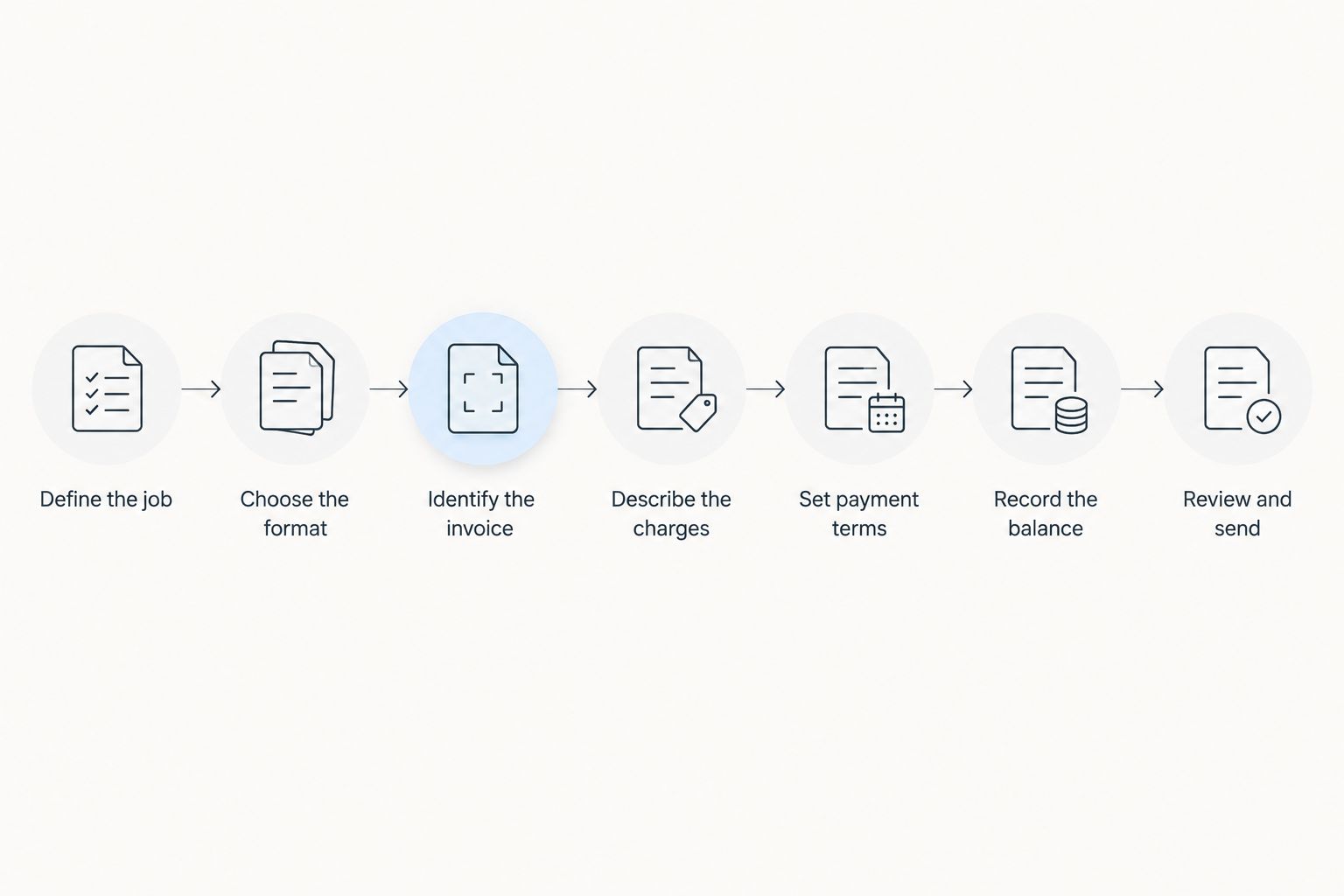
Compare invoice formats for freelance work
Choose the format that removes your recurring problem, not the format with the most decoration. These options describe workflows, not verified features of any particular template listing.
A ready-made template can use a document or spreadsheet format, so the choices overlap. Inspect the underlying file before deciding whether it fits your work.
| Option | Best for | Main advantage | Key limitation |
|---|---|---|---|
| Document template | Freelancers with detailed service descriptions | Gives you room to explain deliverables and scope | Totals need careful checking if calculations are manual |
| Spreadsheet template | Freelancers billing multiple services or quantities | Can calculate totals when formulas are correctly configured | Formula edits can produce incorrect totals |
| Design-led template | Freelancers prioritising presentation | Gives you control over the invoice’s visual hierarchy | A polished layout does not provide payment tracking |
| Ready-made business template | Freelancers wanting to avoid starting from a blank page | Provides an existing structure to adapt | Contents, compatibility and calculations require checking |
For a 2026 template choice, test the entire workflow: enter a service, add a payment term, export the file and record a payment. Reject a layout that looks attractive but makes any of those tasks unclear.
Common mistakes Ghanaian freelancers make
Billing a project without identifying the milestone
A description such as design services does not tell the client whether you are billing for a deposit, approved draft or completed project. Name the stage and connect it to the agreed scope. This also helps you distinguish separate invoices for the same assignment.
Treating a mobile money message as the full record
A transaction message helps establish that money moved, but your business record still needs to connect that payment to an invoice. Record the transaction reference, payment date and amount received against the correct client balance.
Mixing an invoice with a receipt
An invoice requests payment; a receipt acknowledges payment received. Do not label an unpaid invoice as a receipt. Keep payment acknowledgements consistent with the amounts actually received, especially when the client pays in instalments.
Copying tax fields without checking applicability
A tax field in a downloaded template is not evidence that you should charge that tax. Confirm your obligations and the required document format before issuing tax-related paperwork. Do not copy identifiers or rates from a sample file.
Tracking invoices but ignoring unpaid balances
A folder of issued PDFs does not show which clients still owe you money. Maintain a balance register and review outstanding invoices against their due dates. Follow up using the invoice reference, outstanding amount and agreed terms rather than sending an unexplained payment reminder.
FAQ
What is the best invoice template for freelancers in Ghana?
The best invoice template for freelancers in Ghana clearly shows the service, client, invoice reference, currency, due date, payment instructions and outstanding balance. Choose a document for detailed descriptions or a spreadsheet when you need calculations, then test the exported file.
Can I create a freelance invoice myself?
Yes, you can create a freelance invoice in a document editor or spreadsheet. Use a consistent structure, verify the calculations and confirm any applicable tax requirements before issuing it.
Should I invoice Ghanaian clients in GHS?
Use GHS when Ghana cedis are the agreed billing currency. For another agreed currency, label it explicitly and keep the invoice consistent with the client agreement.
Can I put mobile money details on my invoice?
Yes, include mobile money details when you accept that payment method. State the network, recipient name and number, verify them before sending, and ask the client to include the invoice reference.
Is an invoice the same as a receipt?
No, an invoice requests payment while a receipt acknowledges payment received. Record partial payments against the invoice so the outstanding balance remains clear.
Does an invoice template make me tax compliant in Ghana?
No, a template alone does not establish tax compliance. Confirm applicable requirements with the Ghana Revenue Authority or a qualified tax adviser, including whether a particular tax invoice format is required.
Does Skillspad provide business templates for Ghana?
Yes, Skillspad sells digital business templates for businesses in Ghana. Check the specific listing for its contents and file format rather than assuming it includes invoice formulas or payment tracking.
One last thing
Test the payment record, not just the invoice layout. Before adopting a template, make a test copy and record a partial payment against it. If you cannot immediately identify the original total, amount received and remaining balance, fix the structure before using it with a client.
A readable invoice starts the payment process. A traceable balance record lets you finish it.


