

Update your profit and loss tracker daily, review it weekly and close it monthly. Record transactions as they happen or at the end of each working day; daily entries keep the records current, but they do not replace checking for missing costs, duplicate entries and the correct reporting period.
- How often update profit and loss tracker? Enter transactions daily, review weekly and close monthly.
- Keep sales, expenses and payment records separate enough to avoid counting the same transaction twice.
- Compare completed periods, not an unfinished month against a full month.
- Skillspad serves Ghanaian businesses looking for digital business templates; consistent recordkeeping still depends on you.
Why this matters
A profit figure is only as useful as the transactions behind it. If you enter sales promptly but leave supplier bills, delivery expenses or payment charges until later, your tracker presents an incomplete result.
The practical goal for 2026 is not constant spreadsheet editing. It is a repeatable routine that captures activity, checks the records and produces a completed monthly result you can use when making business decisions.
Start with a consistent sales record. If that is your main gap, the guide to tracking daily sales without accounting software explains the underlying workflow before those records feed into your profit calculation.
How often should you update a profit and loss tracker?
Use daily entry, weekly checking and monthly closing as your working schedule. These are separate tasks, not competing options: entering a receipt does not confirm that the month's accounts are complete.
| Task | Recommended frequency | Best for | Benefit | Limitation |
|---|---|---|---|---|
| Transaction entry | Each working day | Businesses with regular activity | Keeps source records close to the transaction | Entries can still contain mistakes |
| Record review | Each week | Checking completeness and categories | Finds gaps before month-end | Does not replace a monthly close |
| Period close | Each month | Comparing completed business results | Creates a consistent reporting period | Requires bills and adjustments to be checked |
| Management review | Each quarter | Assessing broader changes | Adds context beyond individual months | Is too infrequent for routine entry |
For a quiet business, record transactions whenever activity occurs rather than creating unnecessary daily entries. Keep the weekly check even when nothing happened: confirming no activity is different from forgetting to update the file.
Do not wait until quarter-end to reconstruct ordinary sales and expenses. Use the quarterly review to assess results that have already been recorded and checked.
Daily entry: update each working day
Daily updating means capturing business activity while the supporting documents are easy to find. It does not mean treating every day's provisional profit as a final result.
Your daily entry routine should cover:
- Sales: Record the transaction date, reference, amount and relevant category.
- Expenses: Capture business costs with their receipts or other supporting records.
- Payment status: Distinguish paid transactions from amounts still owed.
- Payment charges: Record applicable transaction fees rather than overlooking them.
- Exceptions: Flag unclear transactions instead of guessing their treatment.
For a Ghanaian business accepting cash, bank transfers and mobile money, identify the payment channel in your records. This helps you trace a transaction without treating each channel's statement as a separate source of sales.
An invoice and the payment settling that invoice are not automatically separate revenue transactions. Your recording method must prevent the same sale from appearing twice.
If you miss a day, work through the source documents in date order. Label uncertain entries for review; a completed-looking spreadsheet with guessed figures is worse than a clearly identified gap.
Weekly review: check each week
Set a recurring weekly review and name the person responsible. In a small owner-run business, that person can be you, but the task still needs a place in your calendar.
Check the transaction list against receipts, invoices, supplier documents and payment records. Look for missing references, repeated amounts, unexplained negative entries and expenses placed in inconsistent categories.
Use this weekly checklist:
- Match recorded sales to the documents supporting them.
- Check business payments for expenses not yet entered.
- Investigate possible duplicates before deleting anything.
- Review unpaid customer and supplier balances separately.
- Confirm formulas include newly added rows.
- Save a recoverable copy after corrections.
A weekly check should explain differences, not hide them. If a payment cannot yet be identified, keep it visible in an unresolved-items list until you establish what it represents.
For your 2026 routine, use the same review order each week. A repeatable checklist makes it easier to identify unfinished work when someone else takes over.
Monthly close: finalise each month
A monthly close turns a running tracker into a reviewed reporting period. Finish entering the month's activity, resolve outstanding questions and confirm that income and expenses belong in the correct period under your accounting method.
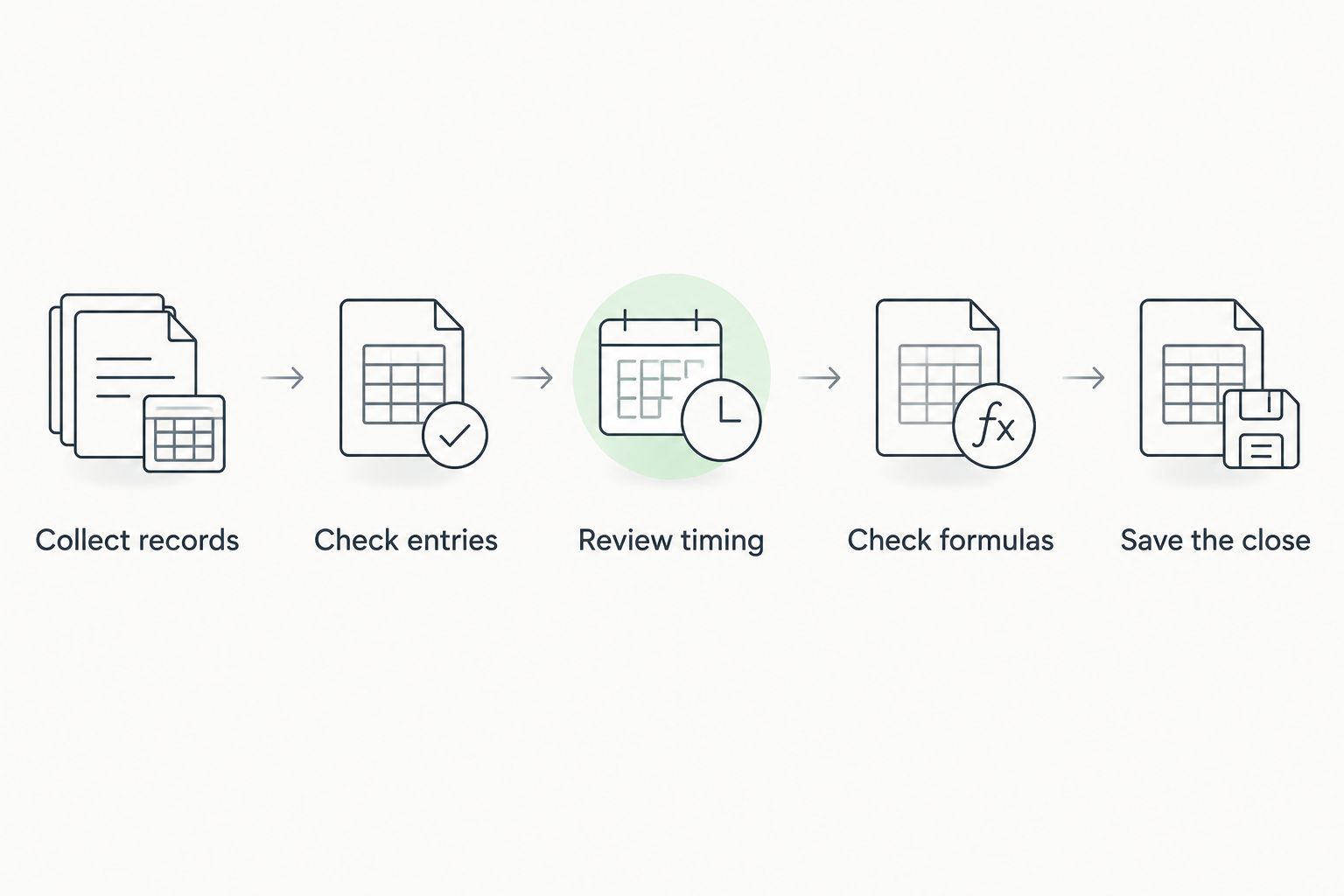
Follow this sequence:
- Collect records. Gather sales records, expense documents and relevant payment statements.
- Check entries. Match records, remove confirmed duplicates and investigate gaps.
- Review timing. Check unpaid bills, customer balances, inventory and other items requiring period adjustments.
- Check formulas. Confirm totals, category ranges and links between worksheets.
- Save the close. Keep a dated copy and identify any unresolved matters.
A formula that recalculates immediately does not mean the report is complete. The calculation only includes the information entered and the adjustments built into the workbook.
Do not silently overwrite a previously shared monthly result. Keep a record of what changed and why, particularly when a correction affects a report already used for a business decision.
If you need help deciding whether an item belongs in the current month, ask your bookkeeper or accountant. A spreadsheet category cannot resolve an accounting-policy question on its own.
Why the update schedule varies
The daily, weekly and monthly routine is a starting recommendation, not a legal reporting timetable. Adjust the entry workload to your business while keeping clear review and closing responsibilities.
- Transaction volume: Regular activity calls for frequent entry; an inactive day needs no invented transaction.
- Credit transactions: Sales and purchases on credit require you to track amounts owed as well as payments.
- Inventory: Buying stock and recognising the cost of goods sold are not necessarily the same event.
- Payment channels: Cash, bank and mobile money records need matching without duplicate revenue entries.
- Record availability: Missing supplier documents or receipts leave transactions unresolved until checked.
- Decision timing: Review the relevant records before committing to spending, not after making the decision.
If your business becomes busier during part of 2026, increase the frequency of entry rather than allowing a larger backlog. Keep the monthly reporting boundary consistent so your completed periods remain comparable.
The deciding question is practical: can you trace the profit figure back to complete, checked records? If not, more frequent formula refreshes will not solve the problem.
Should you update a profit tracker after every sale?
Daily entry is the default recommendation; updating after every sale is useful when it fits your workflow. You can maintain a detailed sales register during trading and transfer checked totals to the profit tracker, provided the underlying transactions remain traceable.
Avoid maintaining disconnected totals that nobody can reconcile. If a daily summary feeds the profit tracker, retain the sales detail and use a clear date or reference to connect the records.
For 2026, choose a method your team can follow consistently. A simple, checked handover beats a complicated process that leaves transactions unrecorded.
Is a weekly update enough for a small business?
Weekly entry can suit a business with little activity, but daily capture is the safer working recommendation. Keep receipts and sales records organised as transactions occur, even if you enter them into the tracker during a weekly session.
The distinction is between capturing evidence and typing into a spreadsheet. You can postpone typing briefly without losing control only when the source records remain complete and easy to match.
Do not rely on memory to rebuild cash expenses. Use a transaction note supported by a receipt or other available evidence, then resolve missing documentation during review.
Is monthly updating enough to know your profit?
Monthly closing is appropriate for a completed monthly result; monthly-only data entry leaves you without a current working view between closes. Record activity throughout the month, then check completeness and accounting treatment before relying on the result.
Also distinguish profit from money available to spend. Loan receipts, owner contributions and customer payments can affect cash without representing new profit in the period.
Before withdrawing money or committing to a purchase, review cash commitments alongside the profit tracker. A profitable month does not remove unpaid supplier bills or other obligations.
What should you check before trusting the profit figure?
Start with completeness, then check classification and timing. A precise-looking total is not evidence that the underlying entries are correct.
Separate business performance from financing and owner transactions. Owner contributions and drawings are not ordinary sales and operating expenses; loan principal also needs different treatment from interest.
Check inventory treatment if you sell goods. Charging every stock purchase directly against the month's sales can distort the result when some goods remain unsold, so confirm how your tracker handles purchases, inventory and cost of goods sold.
Keep cash-basis and accrual-basis records consistent. Under accrual accounting, revenue and expenses are recognised according to when they are earned or incurred, rather than simply when money moves; ask for accounting advice if your workbook's approach is unclear.
Finally, compare like periods. An incomplete current month is not directly comparable with a completed previous month, especially when regular expenses have not yet been entered.
Choose a template around the routine
Skillspad serves Ghanaian businesses that want digital business templates. When considering Skillspad or another template provider, check the actual file's fields and instructions against your recording routine rather than assuming the template handles every accounting task.
A template gives you a starting structure, but you still need to enter complete records, check formulas and apply the correct accounting treatment. Do not assume automatic imports, protected formulas or specific reports unless the provider explicitly confirms them.
Before adopting a workbook, check whether you can trace an entry to its source, distinguish payments from invoices and identify the reporting period. Make those checks part of your 2026 setup before moving your live records.
FAQ
How often should I update my profit and loss tracker in 2026?
Update transactions daily, review records weekly and close the tracker monthly. Treat this as a recommended working routine, not a statutory filing deadline.
Do I need to open my profit tracker when there are no sales?
You do not need to create an entry when no business activity occurred. Still check for expenses, payment charges or supplier transactions before marking the period as inactive.
Can I update my profit tracker only at the end of the month?
You can enter records at month-end, but you will not have a current working result during the month. Capture supporting documents as activity occurs and check the completed month before relying on its profit figure.
Does receiving a mobile money payment mean I made a new sale?
A mobile money payment is not necessarily a new sale. It can settle an invoice already recorded, so match the payment to the underlying transaction before recording revenue again.
Should I include unpaid invoices in my profit tracker?
The treatment of unpaid invoices depends on your accounting method. Accrual accounting recognises revenue when earned rather than only when paid; keep outstanding customer balances traceable and use a consistent method.
Will an Excel formula keep my profit tracker accurate automatically?
An Excel formula calculates from the data and ranges it references; it does not confirm that your records are complete. Check missing transactions, duplicates, categories and formula coverage separately.
Is Skillspad a substitute for a bookkeeper?
Skillspad sells digital business templates, which are not a substitute for bookkeeping judgement. You remain responsible for complete records and should seek accounting help for unclear transactions or reporting treatment.
One last thing
Record the review status beside the result, not just the profit amount. A label such as draft, checked or closed tells you whether a figure is ready to use.
For each completed month, keep the reporting period, reviewer and outstanding questions with the saved report. Your future self needs to know whether the figure changed because the business changed or because the records were corrected.


