

You can track debtors and creditors without a bookkeeper by keeping separate invoice lists for money owed to you and money you owe, recording payments against the correct invoices, and checking both lists against payment records. A spreadsheet handles the calculations, but you still need to enter transactions, investigate differences and follow up overdue balances. This guide explains the setup and checking routine for 2026.
- To track debtors and creditors without bookkeeper support, keep customer invoices separate from supplier bills.
- Match every payment to an invoice; a bank balance alone cannot show unpaid debts.
- Use due dates and ageing bands to prioritise collections and supplier payments.
- Skillspad sells digital business templates; a template does not replace checking records against payment evidence.
How do you track debtors and creditors without a bookkeeper?
Start with an invoice register, a payment log and a review routine. Keep customer debts separate from supplier debts, even when the same business appears in both lists. The debtors and creditors tracker guide is a useful companion when choosing a layout; the process below explains what your records need to do.
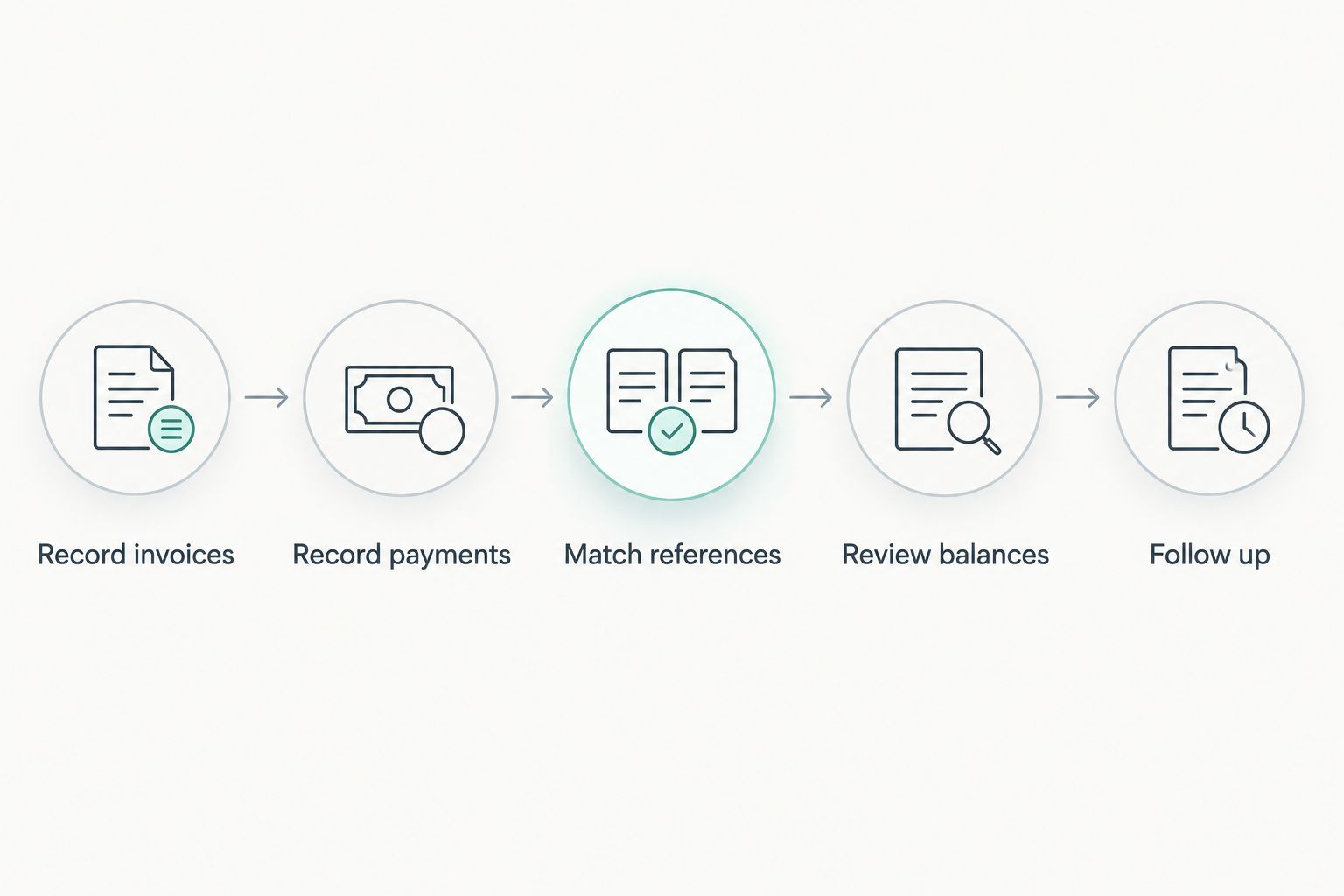
1. Record invoices
Create separate sheets named Debtors and Creditors. Debtors records credit sales to customers; Creditors records bills you owe suppliers. Enter an invoice when the transaction creates an amount owed, rather than waiting until money changes hands.
Use these column headings:
- Customer or supplier name
- Invoice reference
- Invoice date
- Due date
- Invoice amount
- Payments allocated
- Credit notes allocated
- Outstanding balance
- Status
- Follow-up notes
Give every invoice a distinct reference. If suppliers use overlapping invoice numbers, identify each bill using the supplier name and invoice reference together.
Keep the invoice date and due date separate. The invoice date records when the document was issued; the due date determines when payment becomes overdue. Use the agreed payment terms, not an assumed deadline.
2. Record payments
Keep a separate Payments sheet rather than repeatedly typing over an invoice's balance. Record the payment date, payer or recipient, amount, payment method, transaction reference and invoice reference.
For a Ghanaian business accepting cash, bank transfers and mobile money, record the method consistently. A mobile money message supports a payment entry, but you still need to identify which customer and invoice it belongs to.
When a payment covers several invoices, split its allocation across those invoices and retain the same transaction reference. The allocations must add up to the actual payment.
Do not enter the entire payment against every invoice it covers. That would reduce your outstanding balances more than the money received or paid warrants.
3. Match references
Connect each payment entry to its invoice using the invoice reference. Match supplier payments to supplier bills in the same way. Names alone are unreliable because one customer or supplier can have several unpaid invoices.
For each invoice, calculate:
Outstanding balance = invoice amount − allocated payments − allocated credit notes.
In Excel or Google Sheets, SUMIFS can total payment allocations that match an invoice reference. Use a separate calculation for credit notes, then subtract both totals from the invoice amount.
Keep customer receipts and supplier payments distinguishable in the payment log. Otherwise, a matching reference could pull the wrong transaction into your calculation.
Test the calculation with a fully unpaid invoice, a partly paid invoice and a settled invoice before relying on the tracker.
4. Review balances
Compare your payment log with bank statements, mobile money statements and cash records. Tick off matching entries and investigate anything missing, duplicated or allocated to the wrong invoice.
Reconciliation means explaining the differences, not editing a balance until it looks right. A payment recorded by the customer but absent from your statement needs investigation before you mark the invoice as settled.
For creditors, compare your list with supplier statements where available. Ask about missing credit notes, unfamiliar charges and payments the supplier has not allocated.
Do not force an unexplained difference to zero. Keep a note of the issue, the evidence requested and the person responsible for resolving it. An unresolved balance is more useful than a falsely settled account.
5. Follow up
Filter debtors by due date and outstanding balance. Send a reminder that identifies the invoice, the remaining amount and the agreed due date. Ask for a payment date or clarification of any dispute.
For creditors, review upcoming due dates before deciding which payments to make. A supplier balance is not automatically overdue simply because it remains unpaid.
Record every follow-up beside the relevant invoice: contact date, response, promised payment date and next action. If a customer promises payment, keep the balance outstanding until you verify receipt.
Use the same routine throughout 2026 so that another person can understand the records without reconstructing conversations from memory.
Why this matters
An invoice total, a cash balance and a profit figure answer different questions. An unpaid customer invoice is not money available to pay a supplier, and paying a supplier does not tell you whether every customer has paid.
Keeping debtors and creditors separate gives you a clearer view of collection work and upcoming obligations. Do not subtract total creditors from total debtors and treat the result as spendable cash. Payment timing, disputes and other business expenses still matter.
For your 2026 records, the aim is traceability: every balance should connect to an invoice, and every reduction should connect to a payment, credit note or documented adjustment.
Which tracking method should you use?
Best for an owner maintaining straightforward records: a spreadsheet with a separate payment log. It lets you calculate balances and filter due dates, but it depends on accurate entries and protected formulas.
Choose the method you can maintain consistently, not the one with the most features.
| Method | Best for | Main advantage | Main limitation |
|---|---|---|---|
| Paper ledger | An owner keeping handwritten records | Entries remain readable without opening a file | Totals, searches and overdue checks are manual |
| Spreadsheet | An owner who wants calculated balances and filters | Invoice records and payment allocations can be checked together | Deleted formulas and inconsistent references cause errors |
| Accounting software | A business seeking connected accounting records | Can connect invoicing and ledger functions, depending on the product | Setup and accurate transaction classification still require attention |
A paper ledger works only if you keep the supporting documents and update totals correctly. Software does not remove those responsibilities; it changes how you perform them.
Skillspad is for business owners seeking digital business templates, not outsourced bookkeeping. The benefit of a Skillspad business template is a starting structure; the limitation is that you remain responsible for entering and checking your own records. Confirm what a particular template includes before choosing it.
How do you identify overdue customer payments?
Use an ageing report that groups outstanding invoices by how long they have passed their due dates. Common reporting bands include 1–30 days overdue, 31–60 days overdue, 61–90 days overdue and over 90 days overdue. Keep invoices that are not yet due in a separate group.
These bands organise your review; they do not create new payment terms. An invoice becomes overdue according to its agreed due date, not when it enters a particular reporting band.
For a 2026 review, use the review date consistently across the report. If your spreadsheet uses TODAY(), the ageing changes when the file recalculates; save a dated copy when you need a record of an earlier review.
For each overdue invoice, identify the next action:
- Payment not confirmed: check the relevant payment records.
- Customer disputes the invoice: record the disputed issue and supporting documents.
- Payment promised: record the promised date without marking the invoice paid.
- Payment received: allocate it and recalculate the outstanding balance.
Prioritise action using both the overdue status and what you know about the invoice. Age alone does not explain a dispute or an unallocated payment.
Why does the work involved vary?
The tracking routine stays the same, but these factors change how much checking you need:
- Invoice volume: more invoices mean more entries and references to maintain.
- Part payments: each instalment needs an allocation, not a replacement invoice total.
- Payment channels: cash, bank and mobile money records need separate checks against their evidence.
- Credit notes and returns: reductions need documentation so they are not confused with payments.
- Disputed balances: a disagreement needs a recorded next action, not an unexplained adjustment.
- People editing records: shared access requires clear responsibility for entries and corrections.
If the records become difficult to reconcile, simplify the entry process before adding more worksheets. Unclear references remain unclear even in a larger file.
How should you handle part payments and credit notes?
Keep the original invoice amount unchanged and record each payment separately. A part payment reduces the outstanding balance; it does not change what the original invoice showed.
A credit note is different from a receipt. It documents a reduction to an invoiced amount, such as an agreed correction or return, while a receipt records payment. Give each its own reference and link it to the relevant invoice.
If you receive money before you can identify the invoice, record it as unallocated rather than guessing. Once the customer confirms the allocation, update the payment record and retain the explanation.
For an overpayment, show the excess separately as customer credit or an amount to resolve. Do not quietly apply it to an unrelated customer's debt.
What should you check before trusting the spreadsheet?
Check the structure before importing all your 2026 transactions. A tidy-looking sheet can still contain an incorrect formula.
- Confirm that blank rows do not produce false overdue warnings.
- Check that settled invoices show no remaining balance.
- Confirm that payment totals exclude unrelated invoice references.
- Keep formula columns separate from columns you type into.
- Restrict editing access to people who need it.
- Keep backups and retain the invoices, receipts and statements behind the entries.
Protecting a worksheet helps prevent accidental edits; it does not prove that the records are correct. Continue checking calculated balances against supporting documents.
When you need financial statements, tax treatment, write-offs or help resolving unexplained differences, seek qualified accounting advice. A debt tracker is a control record, not a complete replacement for accounting judgement.
FAQ
Can I track debtors and creditors without bookkeeper support?
Yes, you can track debtors and creditors without bookkeeper support using separate invoice registers and a payment log. Match payments to invoices and check the records against statements, receipts and other payment evidence.
What is the difference between a debtor and a creditor?
A debtor owes your business money, while a creditor is someone your business owes. In a trade tracker, keep unpaid customer invoices separate from unpaid supplier bills.
Can I use Excel to track customer debts?
Yes, Excel can calculate customer balances and organise invoices by due date. Keep a payment log so part payments remain traceable instead of typing over the remaining balance.
How do I record mobile money payments against invoices?
Record the mobile money transaction reference, payment date, amount and invoice allocation. Match the entry to your statement or transaction evidence before treating the invoice as paid.
When does an unpaid invoice become overdue?
An unpaid invoice becomes overdue when its agreed due date has passed. Reporting bands such as 1–30 days overdue organise follow-up but do not change the payment agreement.
Can I mark an invoice paid when a customer sends a screenshot?
Do not mark an invoice paid solely because a customer sends a screenshot. Confirm receipt in your own payment records, then allocate the confirmed payment to the correct invoice.
Does a debtor balance count as cash available to spend?
No, a debtor balance is money owed to your business, not confirmed cash available to spend. Check actual available funds and upcoming obligations before authorising payments.
One last thing
A payment can reach your account while the invoice still appears unpaid. That happens when you record the receipt but do not allocate it to the invoice. Before chasing a customer, check unallocated receipts as well as the overdue list; the missing step might be in your records, not the customer's payment.


