

To turn a quotation into an invoice automatically, use an approved quotation as the source record, map its customer and line-item details into an invoice, and generate a separate invoice number and issue date. In 2026, the essential safeguard is unchanged: conversion must preserve the agreed terms without treating a quotation, a draft invoice or a payment as the same event.
- To turn quotation into invoice automatically, transfer approved details into a separate invoice record rather than overwriting the quotation.
- Excel and Google Sheets formulas can populate invoice fields; sending and duplicate prevention need separate controls.
- Keep invoice numbers, issue dates and payment status separate from quotation references.
- Skillspad sells business templates; check each template’s stated functions before expecting quotation-to-invoice automation.
Why this matters
Automatic conversion removes repeated typing, but it also repeats errors unless you control the source. An incorrect customer name or outdated quantity can pass directly from a quotation into the invoice you send.
Automate the transfer, not the decision to bill. Start with the accepted version of the quotation, then check whether the agreed billing milestone has been reached. If your source document needs clearer fields, review the quotation templates for small businesses in Ghana before connecting it to an invoice.
How do you turn a quotation into an invoice automatically?
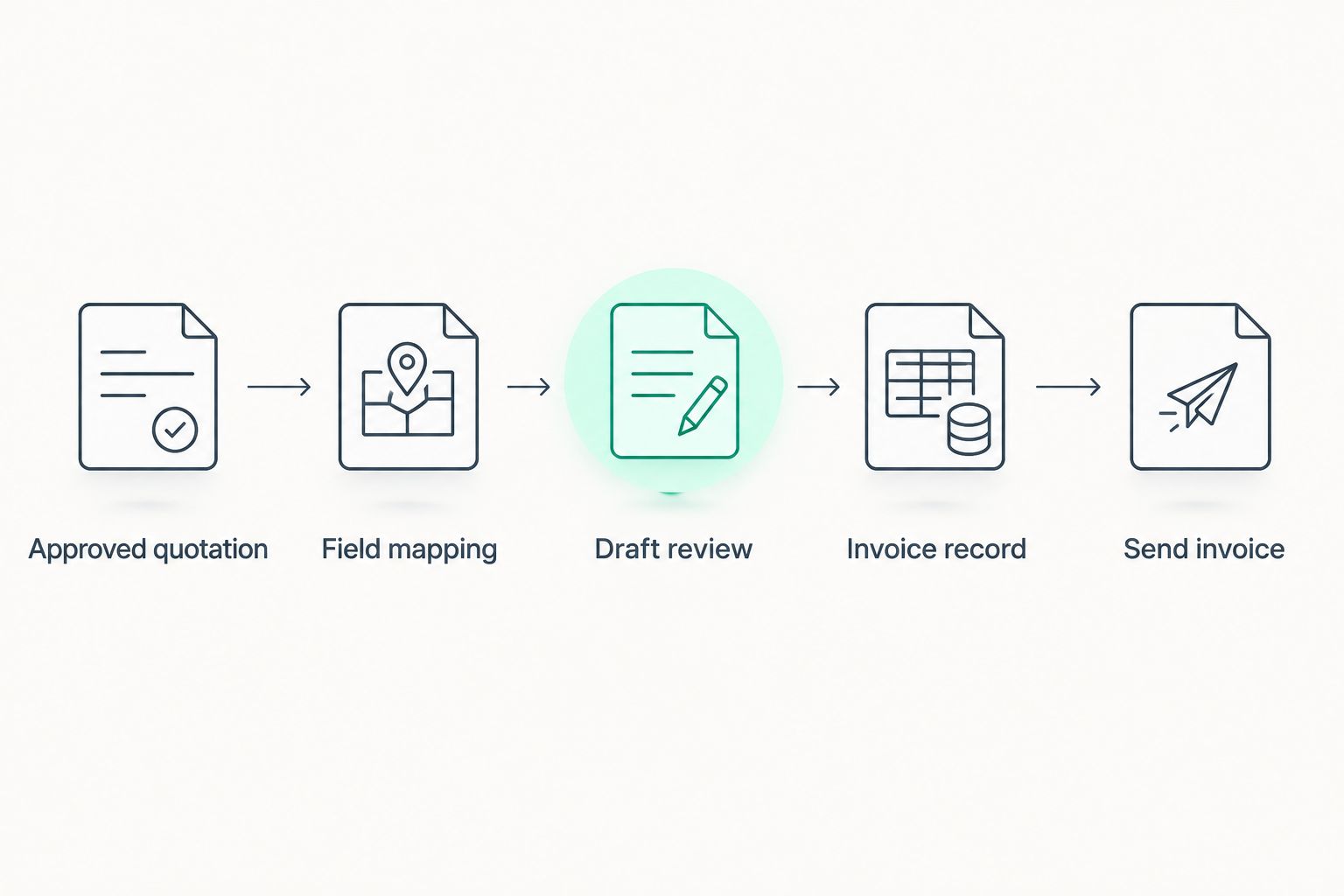
Build a workflow that reads an approved quotation, creates an invoice draft and records the connection between them. Choose the method according to how much you need to automate, not how attractive the finished document looks.
| Method | Best for | What it handles | Main limitation |
|---|---|---|---|
| Linked spreadsheet | Businesses comfortable checking invoice drafts | Formulas populate invoice fields from quotation data | Formulas alone do not provide a complete issuing workflow |
| Scripted spreadsheet | Businesses with someone responsible for maintaining the workflow | A script can copy approved data, generate a document and update a register | Permissions, errors and duplicate requests need explicit handling |
| Invoicing application with conversion | Businesses wanting quotation and invoice records together | Conversion follows the application’s supported workflow | You must verify approval, partial billing and export behaviour before choosing it |
1. Structure the quotation data
Give each quotation a stable reference. Store the customer details separately from the individual items so that the workflow can identify both the buyer and everything being billed.
Use consistent fields for the quotation reference, customer name, billing details, item description, quantity, unit amount, agreed adjustments and currency. Include applicable tax information only after confirming the correct treatment for your business and transaction.
A quotation with 3 line items should transfer those same 3 line items unless the customer has approved a change. Do not let the invoice pull descriptions from a newer catalogue while using quantities from the accepted quotation.
2. Record approval against the correct version
Add an approval status and retain evidence of what the customer accepted. The approval should identify the quotation version, not merely the customer or project.
A useful internal rule is to require an explicit approved status before conversion. Opening a document, receiving an enquiry or sending a quotation should not trigger billing by itself.
3. Map quotation fields to invoice fields
Write the mapping before building formulas or a script. This separates information you should copy from information the invoice must create independently.
| Quotation field | Invoice destination | Treatment |
|---|---|---|
| Quotation reference | Source quotation reference | Retain for traceability |
| Customer and billing details | Invoice customer details | Copy from the approved record |
| Item descriptions and quantities | Invoice line items | Copy the approved scope being billed |
| Agreed amounts and currency | Invoice calculation fields | Preserve the accepted terms |
| Quotation date | Supporting source record | Do not substitute for the invoice issue date |
| Approval status | Conversion eligibility check | Use as a gate, not as payment evidence |
| No invoice number yet | Invoice number | Generate through the invoice register |
An invoice needs its own identity. Keep the source quotation reference visible, but do not simply rename the quotation file and assume you have created a controlled invoice record.
4. Generate a draft and review exceptions
Populate the invoice layout from the mapped data. Keep the result as a draft until the customer details, scope, calculations and billing trigger have passed review.
For your 2026 workflow, explicitly check changed quantities, partial deliveries, deposits and cancelled items. These situations need a billing decision; they should not inherit the full quotation automatically.
5. Finalise a separate invoice record
Assign the invoice number through a controlled register and record the issue date. Save the issued details as a fixed record rather than leaving the document dependent on a quotation that can still change.
For a full conversion, use the operating rule 1 approved quotation, 1 full invoice. Partial billing needs a separate rule that tracks what has already been invoiced and what remains.
6. Send the invoice and record the outcome
Send the finalised invoice through your chosen customer channel, then record the sending result. Keep payment status separate: generating or sending an invoice does not mean the customer has paid.
If delivery fails, retry sending the same issued invoice rather than creating another invoice. The document identity should survive a failed email, interrupted connection or repeated button press.
Linked spreadsheet: best for controlled draft preparation
A linked spreadsheet works when you want to select a quotation reference and populate an invoice layout without retyping the accepted details. Excel or Google Sheets can retrieve matching customer fields and line items from structured source data.
Keep quotation data, invoice presentation and the invoice register in distinct tables or sheets. The layout displays the document; the register records what you actually issued.
The benefit is visibility: you can inspect source rows and formulas. The limitation is that a live invoice sheet can change when its source changes, so the displayed result is not automatically a permanent issued record.
Use a linked spreadsheet for draft preparation, then preserve the issued version. Before adopting any 2026 template, check whether it merely calculates totals or also supports a controlled conversion process.
Scripted spreadsheet: best for repeatable document generation
A script can read the approved quotation, populate the invoice layout, save an output document and update the register. Define those actions explicitly rather than assuming that a document-generation button handles every control.
The workflow should check whether the quotation already has a linked invoice before creating another. For full conversion, a repeated request should return the existing invoice or stop with a clear message.
The benefit is fewer manual handoffs. The drawback is maintenance: somebody must manage access permissions, investigate failures and update the script when the source fields change.
Choose a scripted workflow only when someone owns its upkeep. A script that silently fails creates a different problem from manual typing, not a finished billing process.
Invoicing application: best for connected billing records
An invoicing application is an option when you want quotations, invoices and payment records within the same system. Verify that quotation conversion is an actual supported function rather than assuming every invoicing application includes it.
Test whether conversion preserves the approved details, creates a separate invoice identity and retains the source reference. Check how the application handles revisions and partial billing before entering live customer records.
The benefit is keeping related billing records together. The limitation is dependence on the application’s workflow: its approval process, document fields and export behaviour must fit how you operate.
Choose the application by testing your billing process, not by inspecting a sample invoice alone. Include a cancelled quotation and a failed send in that test.
Why quotation-to-invoice automation varies
The right workflow depends on the transaction and the controls you need. These factors determine what can transfer directly and what needs a decision:
- Source structure: Consistent fields support reliable mapping; scattered text requires interpretation.
- Approval evidence: Conversion needs the accepted quotation version, not whichever file was edited most recently.
- Billing trigger: Acceptance, delivery and an agreed milestone are distinct events; use the event specified by your terms.
- Partial billing: A deposit or staged invoice must not silently become a full conversion.
- Tax treatment: Copying a quotation does not establish that its tax treatment is correct for the invoice.
- Record ownership: Shared editing requires controls over who can approve, issue, revise and send documents.
For a Ghanaian business setting up this process in 2026, confirm applicable invoicing and tax requirements with the Ghana Revenue Authority or your accountant. A spreadsheet layout is not evidence that your billing process satisfies those requirements.
Can Excel turn a quotation into an invoice automatically?
Excel can populate invoice fields from quotation data using formulas, and a separately configured script or macro can handle additional workflow actions. Formulas alone do not establish approval, preserve an issued record or prevent duplicate billing.
Protect calculation cells and test the workbook with representative transactions before using it for customers. Keep a recoverable copy before changing formulas or automation.
Does accepting a quotation mean you should send an invoice immediately?
Accepting a quotation does not, by itself, determine the invoice date. Follow the agreed billing trigger, whether that is acceptance, a deposit request, delivery or another milestone.
Keep approval status separate from readiness to invoice. This prevents an accepted order from being billed before the agreed point.
What happens when the customer changes an approved quotation?
A change to an approved quotation needs a recorded revision or other documented agreement before you use the changed details for billing. Do not let edits to the source overwrite an invoice that has already been issued.
If an issued invoice needs correction, use a documented correction process appropriate to your accounting and tax obligations. Preserve the connection between the original record and its correction.
Check a template before relying on automation
Skillspad is best suited to businesses looking for business templates, not buyers assuming a full invoicing application is included. Skillspad business templates are relevant when you need reusable business documents; quotation conversion still depends on the functions stated for the specific template.
Before choosing a Skillspad business template, check its file format, editable fields and stated automation features. A polished invoice layout and an automated quotation-to-invoice workflow are different deliverables.
Ask whether the template supports multiple line items, separate invoice numbering, a saved issued copy and a source quotation reference. If a function is not described, do not build your billing process around an assumption that it exists.
FAQ
What's the safest way to turn a quotation into an invoice automatically?
Use an approved quotation as the source, generate a separate invoice draft and review it before issuing. Retain the source reference and check for an existing invoice before creating another.
Can Google Sheets create an invoice from a quotation?
Google Sheets can populate an invoice layout from structured quotation data using formulas. Document generation, sending and duplicate checks require a separately configured workflow.
Can I use the quotation number as the invoice number?
Use a separate invoice numbering process and retain the quotation number as a source reference. This keeps quotation tracking distinct from the register of issued invoices.
Will an automatic invoice update when I edit the quotation?
A live formula-linked invoice can change when its source changes. Preserve the issued invoice as a fixed record so later quotation edits do not alter what you sent.
Can I invoice only part of an accepted quotation?
You can structure a workflow for partial billing when it matches the agreed terms. Record the items or portion invoiced and the remaining scope to prevent full conversion from billing the same work again.
Does an invoice prove that the customer has paid?
An invoice does not prove payment. Track payments separately and connect each confirmed payment to the relevant invoice.
How do I stop the same quotation from creating duplicate invoices?
Check the invoice register for an existing conversion before generating another full invoice. Record the source quotation reference on the invoice and the resulting invoice reference against the quotation.
One last thing
The most revealing test is not whether your workflow creates an invoice. It is what happens when you run the same conversion again.
For your 2026 setup, submit 2 conversion requests for the same fully billed quotation. The second request should identify the existing invoice rather than create another; then change the quotation and confirm that the issued invoice remains unchanged.


