

Keep wholesale and retail prices in one controlled master file, then publish separate customer-facing lists with clear units, order conditions and effective dates. State whether tax and delivery are included, and keep internal costs, margins and private customer terms out of both versions.
- To format a price list for wholesale and retail customers, use separate buyer views from one master file.
- Retail lists need clear selling units; wholesale lists also need pack sizes, minimum orders and eligibility rules.
- Skillspad sells business templates for Ghanaian businesses; assess any price list template against your actual ordering process.
- For your 2026 price list, show the effective date and currency beside clearly labelled amounts.
How do you format a price list for wholesale and retail customers?
Build 1 master workbook and 2 customer-facing versions. Keep the product identifiers consistent across them, but show each audience only the information needed to place an order.
Use the comparison below to choose your layout. If you want a starting structure rather than a blank document, review the guide to price list templates for small businesses in Ghana against these requirements.
| Format | Best for | What to show | Main advantage | Main limitation |
|---|---|---|---|---|
| Retail list | Customers buying individual items | Product, variant, selling unit, retail amount, tax treatment and ordering instructions | Keeps the buying decision simple | Does not explain trade eligibility or bulk-order conditions |
| Wholesale list | Resellers and qualifying bulk buyers | Product, pack size, wholesale unit basis, minimum order and applicable terms | Makes order conditions explicit | Needs more explanation when packs and quantity tiers differ |
| Internal master | Staff maintaining product and pricing records | Product identifiers, both selling rates, costs and approval details | Keeps changes in one controlled source | Must not be distributed as the customer document |
Build the layout in this order
- Identify the audience. Label the document Retail Price List or Wholesale Price List before adding product rows.
- Add document details. Include your business name, contact method, currency and effective date.
- Create the product table. Put identifiers and descriptions before the amount columns.
- Explain the conditions. Define selling units, minimum orders, tax treatment and delivery charges.
- Check the export. Open the customer file and inspect its headings, page breaks and contents before sending it.
Keep these steps separate from product styling. A buyer needs to understand what an amount covers before decorative elements matter.
Why this matters
A price without a selling unit is an incomplete instruction. If a customer reads a carton amount as a single-item amount, the layout has failed even when the arithmetic is correct.
Wholesale documents also need to explain qualification. A trade amount shown without its minimum-order condition leaves the buyer unable to tell whether it applies to their purchase.
For your 2026 documents, make the audience and effective date visible on the opening page. Repeat the audience label on later pages so an individual screenshot does not lose its context.
Retail format: make individual purchases easy to understand
Put the product name, distinguishing variant and selling unit beside the retail amount. Keep closely related products together so customers can compare like with like.
Use descriptive column headings rather than abbreviations that only staff understand. A heading such as Unit tells the reader less than Selling unit when your catalogue contains individual items, packs and sets.
Your retail table should answer these questions:
- Which item? Use the product name and a stable product code where you have one.
- Which version? Identify the size, colour, material or other relevant variant.
- What does the amount cover? Specify each, pair, pack, carton or another actual selling unit.
- What else applies? State the tax treatment and whether delivery is charged separately.
- How do I order? Give the contact method and explain which product details to send.
Best for individual buyers: a short, clearly labelled retail table. Its strength is simplicity; its limitation is that it cannot also explain complex wholesale conditions without becoming harder to scan.
Do not put trade-only notes in tiny print beneath the retail table. Keep those notes in the wholesale document where they belong.
Wholesale format: make qualification and pack sizes explicit
A wholesale list must connect each amount to its order conditions. Put the pack size, selling basis and minimum quantity close enough that the buyer can read them together.
Distinguish the minimum quantity for a product from any minimum requirement for the whole order. Those conditions answer different questions, so give them separate labels when both apply.
Use these fields where they match your actual process:
- Pack size: The contents of the pack or carton being sold.
- Selling basis: Whether the quoted amount applies per item, pack or carton.
- Minimum quantity: The quantity required for that product's wholesale terms.
- Quantity tier: The order band associated with a particular rate.
- Buyer eligibility: The conditions a customer must meet to use the wholesale list.
- Payment terms: The terms that apply to the intended customer group.
Best for trade buyers: a wholesale table with conditions beside the relevant product. Its advantage is clarity at ordering time; its limitation is extra width, especially when products have different quantity bands.
For the 2026 wholesale version, use tier labels consistently throughout the document. Do not switch between pack quantities and individual-item quantities without explicitly identifying the unit.
Why the right price list format varies
The layout depends on your selling process, not just the number of products. Use these factors to decide what belongs in the main table and what belongs in a separate note.
- Customer audience: Retail buyers and wholesale buyers need different ordering information.
- Selling units: A mixed catalogue needs explicit unit labels on every relevant row.
- Quantity conditions: Different minimums or order bands need room beside the affected products.
- Product variants: Sizes, colours and other distinctions need enough space to prevent substitution errors.
- Distribution method: A phone-readable document and a printed sheet need different width and page-break checks.
- Confidentiality: Private trade terms and internal margins must stay outside public customer files.
Avoid solving every difference by adding another column. When a column applies to only a small part of the catalogue, a clearly labelled category section can be easier to read.
How should you arrange the master spreadsheet?
Separate the master workbook into 3 working sections: Product details, Selling rules and Customer exports. This is a suggested organisation, not a requirement to create separate files.
Keep product descriptions and identifiers in Product details. Store the retail and wholesale logic in Selling rules, then use Customer exports to prepare only the fields each audience should receive.
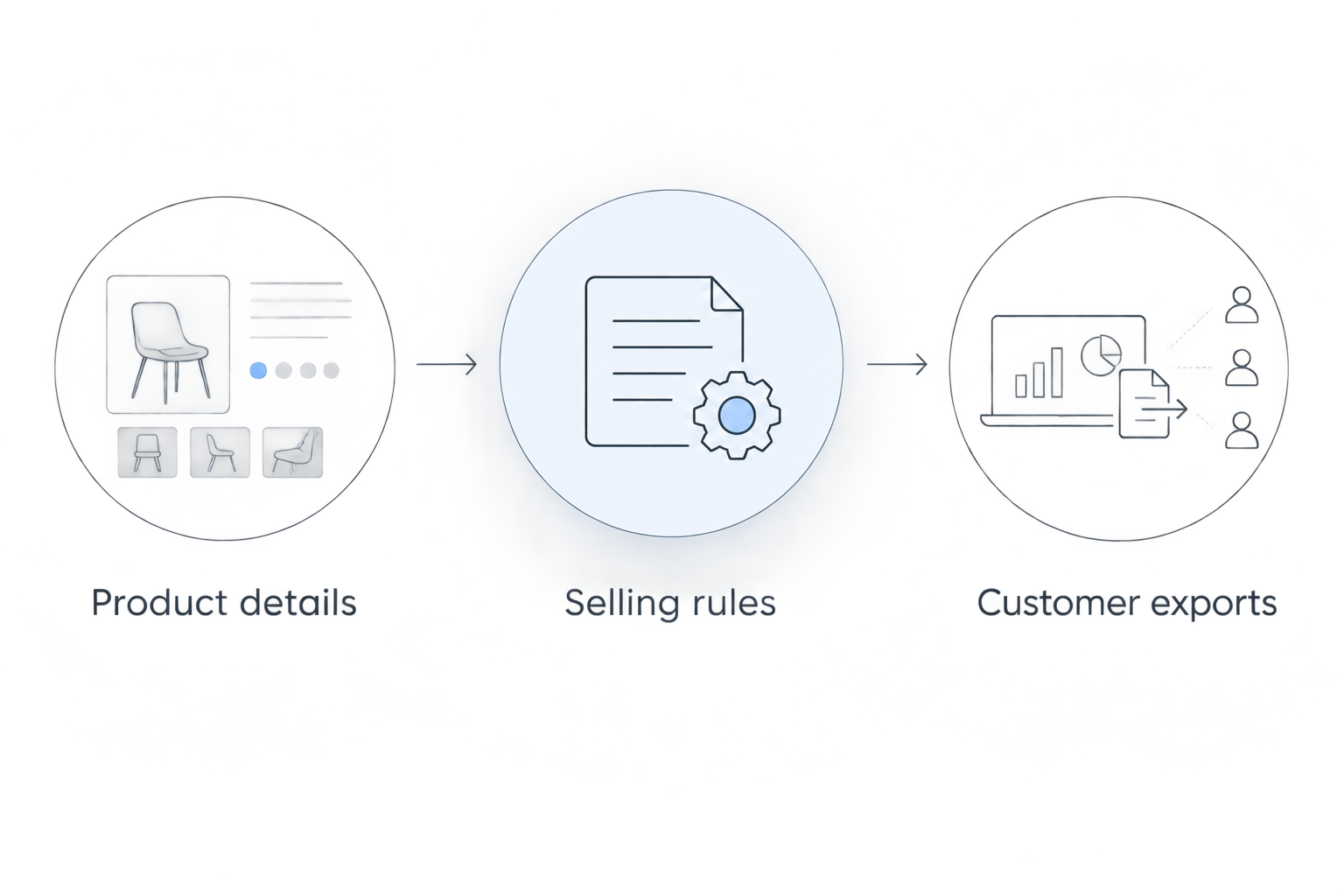
Use a stable product code to connect the sections. Product names change more easily than identifiers, particularly when staff shorten descriptions or correct spelling.
Keep internal cost and margin calculations away from the export area. Hiding a worksheet is not the same as removing its contents from a file you send to a customer.
If you use formulas to populate customer views, test the exported result after changing a source record. Do not assume a correctly formatted worksheet guarantees a complete or current customer document.
How do you make a price list readable on a phone?
Start with a narrow table and keep essential information together. Put the product description, selling unit and applicable amount within the same readable view rather than spreading them across distant columns.
Use category headings to break up a long catalogue. Keep each heading with the products it introduces, and repeat table headings when the document continues onto another page.
Before distributing your 2026 list, perform 3 export checks:
- Phone check: Open the actual exported file on a phone and inspect product names, units and conditions.
- Page check: Inspect every page for cropped columns, split rows and headings stranded above unrelated content.
- Privacy check: Confirm the file contains only the intended audience's information.
Do not shrink the entire sheet until it technically fits on a page. If the text becomes difficult to read, split the content by product category or simplify the columns instead.
What should the header and footer say?
The header should identify the business, customer group, currency and effective date. Put the list title before the product table so readers do not have to infer which version they received.
For a Ghana-facing document, label Ghana cedi amounts clearly with GHS or GH₵. If the document includes another currency, label it separately rather than relying on an unexplained symbol.
Use the footer for supporting conditions, not essential product information. Tax treatment, delivery arrangements and ordering instructions need enough prominence to be read before the customer places an order.
Give each 2026 export a clear revision label. Keep a separate archive of superseded files, and replace the current customer-facing copy wherever you distribute it.
An effective date identifies a version; it does not replace an expiry date. If your terms require a validity period, state that period explicitly using your actual business policy.
When should you use a reusable template?
Use a template when you repeatedly rebuild the same headings, product tables and ordering notes. Choose the structure around your workflow rather than changing your selling rules to fit a decorative layout.
Skillspad business templates are best for Ghanaian businesses seeking reusable business documents. For this task, assess the available options by whether the file supports your product units, customer groups and export needs.
A template gives you a starting structure; it does not determine your margins, approve your payment terms or keep distributed copies current. You still own the checks before publication.
Explore Skillspad for business templates, then check the specific file details before choosing. Do not assume that every template includes formulas, separate customer views or automatic updates.
Should wholesale and retail prices appear on the same list?
Use 2 customer-facing versions when the audiences have different terms. This keeps each document focused and prevents private trade information from appearing in a retail copy.
A combined list is appropriate only when you deliberately want every recipient to see both sets of terms. In that case, label the columns clearly and place wholesale eligibility beside the wholesale information, not in a distant note.
Should I send a spreadsheet or a PDF?
Keep 1 editable master workbook for maintenance and use a PDF for a fixed customer-facing layout. A PDF preserves the intended page arrangement, but you still need to check that the exported text is readable and complete.
Send an editable spreadsheet only when the recipient needs to enter information or work with the data. Remove confidential content before sharing; do not rely on hidden columns or tabs to conceal it.
FAQ
What's the best way to format a price list for wholesale and retail customers?
Use one controlled master file and separate wholesale and retail customer views. Label the selling unit, currency, effective date and applicable conditions clearly in each version.
Can I put wholesale and retail information in the same spreadsheet?
Yes, you can maintain wholesale and retail information in the same internal spreadsheet. Export separate customer documents when the audiences should not see the same terms.
What should I include in a wholesale price list?
Include product identifiers, pack sizes, selling units, minimum quantities and the conditions for wholesale eligibility. State tax treatment and delivery arrangements without making buyers infer them.
How do I show the currency on a price list in Ghana?
Label Ghana cedi amounts with GHS or GH₵ and use that notation consistently. Identify any other currency separately so the amount cannot be mistaken for a cedi amount.
Do I need to include tax and delivery information?
State whether the listed amounts include applicable tax and whether delivery is charged separately. Use your actual business arrangements rather than copying another seller's terms.
How often should I update my 2026 price list?
Update your 2026 price list whenever an amount, selling unit or ordering condition changes. Give the replacement a clear effective date and remove superseded copies from current distribution.
Can Skillspad business templates help me create a price list?
Skillspad sells digital templates for businesses in Ghana. Check the specific template details for the fields, editing format and customer views your price list requires.
One last thing
Check the filename as carefully as the table. A correct retail document sent with a wholesale filename creates uncertainty before the customer reads its contents.
Use filenames that identify the audience and match the effective date inside the document. Then open the exact attachment you are about to send, rather than checking a different copy in your working folder.


