

You can run payroll without accounting software by keeping an employee register, calculating earnings and deductions in a spreadsheet, checking the totals, paying staff, and retaining payment records. For a Ghanaian business in 2026, the essential caveat is that a spreadsheet does not remove your PAYE, pension, reporting, or record-keeping obligations.
- To run payroll without accounting software, separate employee details, earnings, deductions, payments, and statutory records.
- Excel and Google Sheets support payroll calculations, but you must verify formulas and current Ghanaian requirements.
- Approve payroll before payment; retain payslips, payment evidence, and statutory submission records separately.
- Skillspad suits business owners seeking digital business templates; check each template against your actual payroll requirements.
How do you run payroll without accounting software?
Use a controlled spreadsheet and a repeatable approval process. Your payroll register should show how each employee's approved earnings become take-home pay, while separate records show what you paid and what remains due to the relevant authorities.
Skillspad sells digital business templates. A template gives you a starting structure, not a substitute for checking the calculations, employment terms, and statutory treatment that apply to your business.
Follow this sequence for every pay period:
- Set the period: record the dates covered and the intended payment date.
- Confirm employees: check active employees, agreed pay, and authorised changes.
- Approve earnings: collect attendance, overtime, allowances, and other relevant inputs.
- Calculate deductions: apply verified tax, pension, and authorised deduction rules.
- Review payroll: check formulas, exceptions, employee totals, and employer liabilities.
- Record payments: issue payslips, pay employees, and retain transaction evidence.
- Close payroll: complete required submissions and save an approved, restricted copy.
The central rule is simple: a calculated salary is not evidence that an employee has been paid. Keep calculation, approval, payment, and statutory settlement as distinct stages.
Why this matters
Payroll affects more than the amount leaving your bank account. Employees need an understandable explanation of their pay, and your business needs a record that connects employment terms, deductions, payments, and outstanding liabilities.
For your 2026 payroll process, separate employee take-home pay from employer payroll costs. An employer contribution is not automatically an employee deduction, and money withheld from an employee is not automatically settled with the receiving authority.
A spreadsheet works only when someone owns those distinctions. Assign responsibility for preparing payroll, reviewing it, releasing payments, and checking subsequent submissions—even when one person performs several roles.
Which manual payroll method should you use?
Choose the method you can maintain accurately and restrict appropriately. Do not choose a shared spreadsheet merely because sharing is convenient: payroll contains personal and financial information.
| Method | Best for | Main advantage | Main limitation |
|---|---|---|---|
| Excel workbook | An owner maintaining a file-based payroll register | Supports formulas, structured tables, and separate worksheets | Copies can diverge; formulas and access require control |
| Google Sheets workbook | A team reviewing one shared payroll register | Supports shared editing and access permissions | Sharing settings and accidental edits need supervision |
| Paper payroll register | A business deliberately keeping handwritten records | Makes individual entries visible without spreadsheet formulas | Repeated calculations and reconciliation remain manual |
Excel is best for a file-based workflow; Google Sheets is best for shared review. Neither choice establishes that your deductions are correct or your statutory submissions are complete.
Paper records also require secure storage. If you use them, write legibly, identify corrections, and keep supporting evidence together rather than relying on a notebook total alone.
Build a payroll workbook you can check
A useful workbook separates information that changes rarely from information that changes each pay period. This reduces repeated typing and makes it easier to identify why a person's pay changed.
Employee register
Keep employee identifiers, names, employment start and end dates, agreed pay basis, and approved payment details here. Store relevant tax and pension identifiers securely, with access limited to people who need them.
Use 1 employee ID per person, and carry that identifier into every payroll period. Names alone are a weak matching field because spelling differences can split one person's records.
Period inputs
Record approved attendance, overtime, unpaid absence, allowances, bonuses, and other adjustments relevant to the employee's terms. Include a source reference or approval note beside each adjustment.
If attendance affects pay, maintain a separate attendance record before calculating wages. The guide to tracking employee attendance without biometric machines covers that supporting workflow.
Payroll calculations
Use 1 row per employee per pay period. Keep gross earnings, each deduction, total deductions, and net pay in separate columns so a reviewer can follow the calculation without opening several unrelated files.
Show employer contributions separately from employee deductions. Do not combine them into an unexplained column called pension or tax.
Payment register
Record the approved net amount, payment date, payment method, transaction reference, and payment status. Match this register against bank or mobile money evidence after payments have been processed.
A scheduled transfer is not a confirmed payment. Leave unsuccessful transactions unresolved until you have evidence of a successful payment or another approved resolution.
Statutory register
Track each reporting period, liability category, amount due, submission status, payment reference, and supporting receipt. Keep employee deductions and employer liabilities identifiable throughout the record.
This register should answer a different question from the payment register: not whether employees received their salaries, but whether your business completed its related obligations.
Calculate gross pay, deductions, and net pay separately
Start with approved employment terms and period inputs. Do not infer an overtime rate, allowance treatment, or unpaid-leave deduction from a template's example row.
The basic relationship is:
Net pay = gross earnings − employee deductions.
Gross earnings and taxable income are not necessarily interchangeable. Likewise, the pay base used for a pension calculation must follow the applicable rules rather than whichever total happens to be easiest to reference.
Confirm earnings
Separate basic pay, overtime, allowances, commissions, bonuses, and adjustments where they apply. Each component needs an explanation and an approved source.
For variable pay, preserve the calculation behind the input. A commission total without the underlying sales record or approved commission terms is difficult to review later.
Check deductions
Keep PAYE, employee pension deductions, authorised recoveries, and other applicable deductions distinct. Identify the basis for each deduction rather than entering a single unexplained reduction.
For Ghana payroll in 2026, verify current PAYE guidance with the Ghana Revenue Authority and applicable pension requirements with SSNIT, the National Pensions Regulatory Authority, and your relevant scheme administrator. Confirm filing and payment deadlines separately from the day you pay salaries.
Check rounding
Display cedi amounts to 2 decimal places, but do not confuse formatting with rounding. A cell can display a rounded amount while retaining a different underlying value used by later formulas.
Apply the rounding treatment required by the relevant calculation rules. Then check that the payment instruction matches the final approved net pay.
Put a review gate before payment
Before releasing money, compare the current payroll against the previous approved period and the supporting records. Investigate changes; do not treat a familiar grand total as proof that every employee's pay is correct.
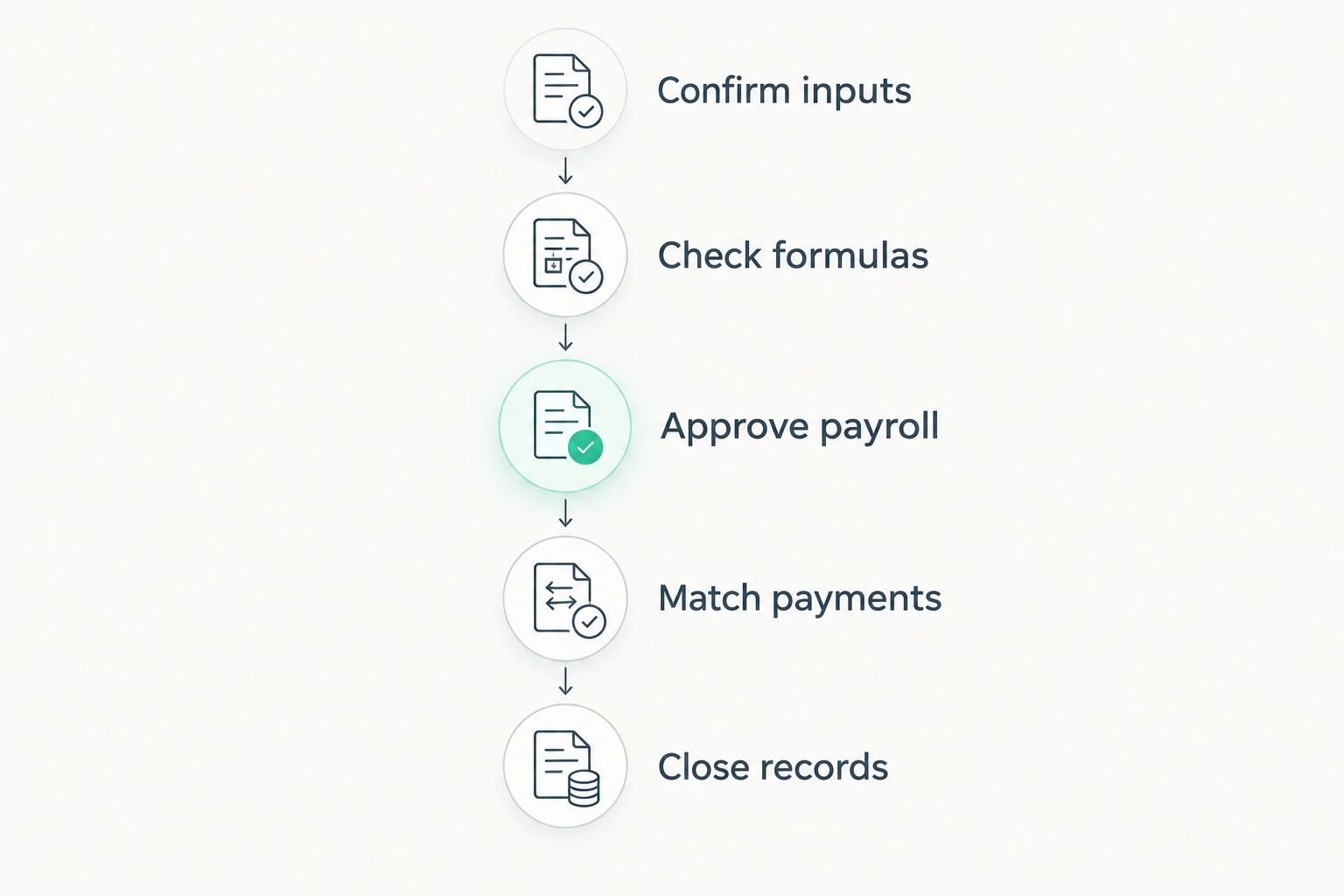
Use this review sequence:
- Confirm inputs: match salary changes, attendance adjustments, and allowances to approvals.
- Check formulas: inspect calculation ranges, copied formulas, and manually overwritten cells.
- Approve payroll: resolve exceptions and record who authorised the final register.
- Match payments: reconcile successful transactions against approved net pay.
- Close records: retain payslips, submissions, receipts, and the approved workbook together.
This sequence keeps an error found during review from becoming an unexplained payment. It also gives you a clear point after which changes need a documented correction.
Why manual payroll workload varies
Manual payroll becomes harder when the number of exceptions grows. Headcount matters, but the variety of pay arrangements and changes also determines how much checking you need.
These factors drive the work:
- Pay basis: salaries, hourly wages, and commissions need different supporting inputs.
- Variable earnings: overtime, bonuses, and allowances create additional calculations and approvals.
- Employee changes: starters, leavers, and revised employment terms require effective dates.
- Deductions: recoveries and other authorised deductions need balances and supporting records.
- Payment exceptions: unsuccessful transfers and changed payment details require follow-up.
- Review arrangements: several editors or uncontrolled copies make the approved version harder to identify.
Do not set an arbitrary employee limit for spreadsheet payroll. Review the process when you cannot explain a change, reconcile a payment, restrict access, or complete required submissions reliably.
Can you use a business template for payroll?
Yes, you can use a business template as a starting structure, provided you check its fields and formulas against your actual requirements. A general expense tracker is not automatically a payroll register, and a payroll register is not automatically a tax filing system.
Skillspad is best for business owners looking for digital business templates. For payroll, assess the individual template rather than assuming that a business-template catalogue includes Ghana-specific calculations or statutory filing functions.
Before entering real employee information, check whether the file separates earnings, deductions, employer contributions, payments, and approvals. Test formulas with controlled entries, remove sample records, and restrict access before using the workbook for live payroll.
Can you pay employees before checking statutory deductions?
Calculate and review applicable deductions before approving take-home pay. Paying an unreviewed amount creates a correction problem if the eventual net salary differs from the amount already sent.
Keep your salary payment schedule and statutory deadlines visible as separate obligations. Completing one does not prove that you have completed the other.
How do you correct a mistake after payroll is paid?
Preserve the original approved payroll and document the correction separately. Record the employee, affected period, reason, authorisation, and how the adjustment will be resolved.
If the error affects PAYE, pension records, or a submitted return, check the relevant correction procedure before changing the next payroll. Do not silently overwrite the original workbook and erase the explanation for a payment that already happened.
Protect payroll records and close each period
Payroll files contain information that should not circulate with ordinary business trackers. Limit access to people with a payroll responsibility, and avoid sharing a complete register when an employee needs only their own payslip.
For every 2026 pay period, retain the approved register, input evidence, approval record, payslips, payment evidence, and relevant statutory documents. Follow the applicable retention requirements rather than deleting records when a financial year ends.
Use a clear period label such as 2026 January payroll and preserve 1 approved closing copy per pay period. Keep a separate working file for the next period so later edits do not change the historical record.
Back up payroll securely and check that you can retrieve the saved files. A backup that nobody can locate during a salary query is not a useful record.
FAQ
Can I run payroll without accounting software in Ghana?
Yes, you can run payroll without accounting software using a controlled spreadsheet or manual register. You still need correct calculations, employee payment records, and compliance with applicable Ghanaian tax and pension obligations.
Is Excel or Google Sheets better for manual payroll?
Excel suits a file-based payroll process, while Google Sheets suits shared review. Both require verified formulas, restricted access, and a clearly approved payroll version.
What information do I need before calculating payroll?
You need approved employee details, pay terms, the pay period, relevant attendance or variable-pay inputs, and applicable deduction rules. Keep evidence for changes instead of relying on verbal instructions.
Can I use last year's tax calculations for payroll in 2026?
Verify the applicable 2026 rules before reusing tax calculations. A working formula does not establish that its thresholds, treatment, or assumptions remain correct.
Do I need separate records for salaries and statutory payments?
Yes, keep employee salary payments distinct from statutory liabilities and settlements. A completed salary transfer does not prove that withheld deductions or employer contributions have been remitted.
Should I send the full payroll spreadsheet to employees?
No, give each employee their own pay information rather than the complete payroll register. Restrict the master file to people with an authorised payroll responsibility.
When should I stop using a spreadsheet for payroll?
Change the process when you cannot reliably review calculations, control access, reconcile payments, or meet reporting obligations. The decision depends on the work and controls, not a universal employee-count threshold.
One last thing
Test the employee who changed, not just the payroll total. An omitted allowance and an incorrect deduction can offset each other in the grand total while leaving individual employees paid incorrectly.
Before your next payroll, list every starter, leaver, salary change, variable payment, and correction. Trace each item from its approval to the payroll row and then to the payment record; that is a more useful check than simply comparing two totals.


