

You can track employee attendance without a biometric machine by recording each employee’s scheduled shift, arrival, departure and attendance status in a spreadsheet or signed register. Use a supervisor to verify entries and approve corrections: a recorded time alone does not prove who submitted it or how long someone worked.
- To track employee attendance without biometric machine hardware, use a spreadsheet with supervisor verification and recorded corrections.
- Excel suits a centrally maintained attendance register; Google Sheets suits shared entry with controlled editing.
- Skillspad serves Ghanaian businesses looking for digital business templates, not biometric attendance hardware.
- Keep attendance records separate from payroll decisions; an absence entry does not automatically justify a deduction.
How do you track employee attendance without biometric machines?
- Set the attendance rules. Define scheduled starts, finishes, breaks, leave and the person responsible for verification.
- Create a daily register. Record the employee, work date, expected shift, actual times and attendance status.
- Choose how entries arrive. Use a supervisor-maintained spreadsheet, a signed paper register or a digital submission form.
- Check the evidence. Compare entries with the supervisor’s observations and approved leave records.
- Resolve exceptions. Investigate missing entries, disputed times and overnight shifts before calculating totals.
- Close the period. Approve the register, preserve the original entries and pass verified information to payroll.
For layout ideas, review the employee attendance tracker templates guide. Choose fields that match your working arrangements rather than adopting every column in a template.
The essential control is verification, not the recording device. A tidy spreadsheet still needs someone accountable for checking it.
Why this matters
Attendance records answer different questions: who was expected, who attended, when they arrived and which exceptions were approved. Combining those questions into a single present-or-absent tick hides information you need when someone disputes a record.
For your 2026 register, keep the planned schedule beside the actual attendance. That distinction prevents a day off from appearing as an absence and makes a changed shift visible instead of silently replacing the original plan.
Your system should also distinguish attendance from output. A check-in confirms an event was recorded; it does not establish that an employee completed their duties throughout the shift.
Which attendance method should you choose?
Choose the method your supervisor can check consistently. More fields and more technology do not fix an unclear approval process.
| Method | Best for | Main advantage | Main limitation |
|---|---|---|---|
| Supervisor-maintained Excel register | A designated person maintaining the official record | Keeps schedules, actual times and calculations together | Separate file copies need careful version control |
| Shared Google Sheets register | Managers who need access to the same working register | Supports shared editing and access permissions | Editing permissions do not prove physical attendance |
| Signed paper register | A workplace using a physical sign-in point | Provides a visible record without a digital check-in device | Requires manual summaries and controlled corrections |
| Digital form feeding a register | Staff submitting entries without editing the main register | Separates submissions from the calculation sheet | Submission time alone does not verify identity or location |
Excel: best for a centrally maintained register
Use Excel when a designated administrator owns the attendance file and collects verified entries. Keep an untouched template separate from the working register so a formatting or formula mistake does not become the next period’s starting point.
The trade-off is file handling. If managers send separate copies around, decide which file is authoritative and who consolidates changes; otherwise, conflicting versions become an attendance dispute of their own.
Google Sheets: best for shared supervision
Use Google Sheets when authorised managers need to work in a shared register. Restrict access to the people who need it and protect calculation areas against routine editing.
A shared sheet is not an identity check. If employees enter their own attendance, retain supervisor review rather than treating access to the spreadsheet as evidence that someone attended work.
Paper register: best for a physical sign-in point
Use paper when a supervisor can oversee arrivals and departures at a fixed location. Give each entry a clear date and retain corrections visibly rather than erasing the original record.
Paper avoids dependence on a digital entry process, but someone must still transfer or total the information. Check that transfer against the original register before using the summary.
Digital form: best for collecting separate submissions
Use a form when employees should submit attendance without changing other employees’ rows. Include the employee identifier, attendance event and work date, then send submissions into a controlled review process.
A submitted form remains a claim until checked. A timestamp records submission, not necessarily arrival, and an employee can forget to submit despite being present.
What should your attendance spreadsheet contain?
Build your 2026 attendance register around the decisions you actually make. Store an employee identifier alongside the name so similar names do not create ambiguous records.
| Field | What to record | Why it matters |
|---|---|---|
| Employee identifier | A consistent staff reference | Keeps records attached to the right person |
| Work date | The date assigned to the shift | Supports daily and period summaries |
| Scheduled start and finish | The agreed working window | Provides the baseline for checking attendance |
| Actual start and finish | Verified arrival and departure | Separates recorded attendance from the schedule |
| Unpaid break | The applicable recorded break duration | Supports a working-time calculation |
| Attendance status | Present, absent, approved leave, rest day or pending review | Prevents blank cells from carrying several meanings |
| Exception note | A brief operational explanation | Explains missing or unusual entries |
| Approval | Reviewer and approval date | Shows responsibility for the final record |
Use a controlled list for status values. Otherwise, different spellings and abbreviations can split the same category across your summary.
Keep sensitive explanations elsewhere. The attendance sheet needs the operational status of an approved absence, not a detailed medical history visible to everyone who can open the register.
How do you run the daily attendance process?
Use the same sequence for every shift: Schedule, Record, Verify, Resolve, Approve. Assign responsibility at each stage before asking staff to use the register.
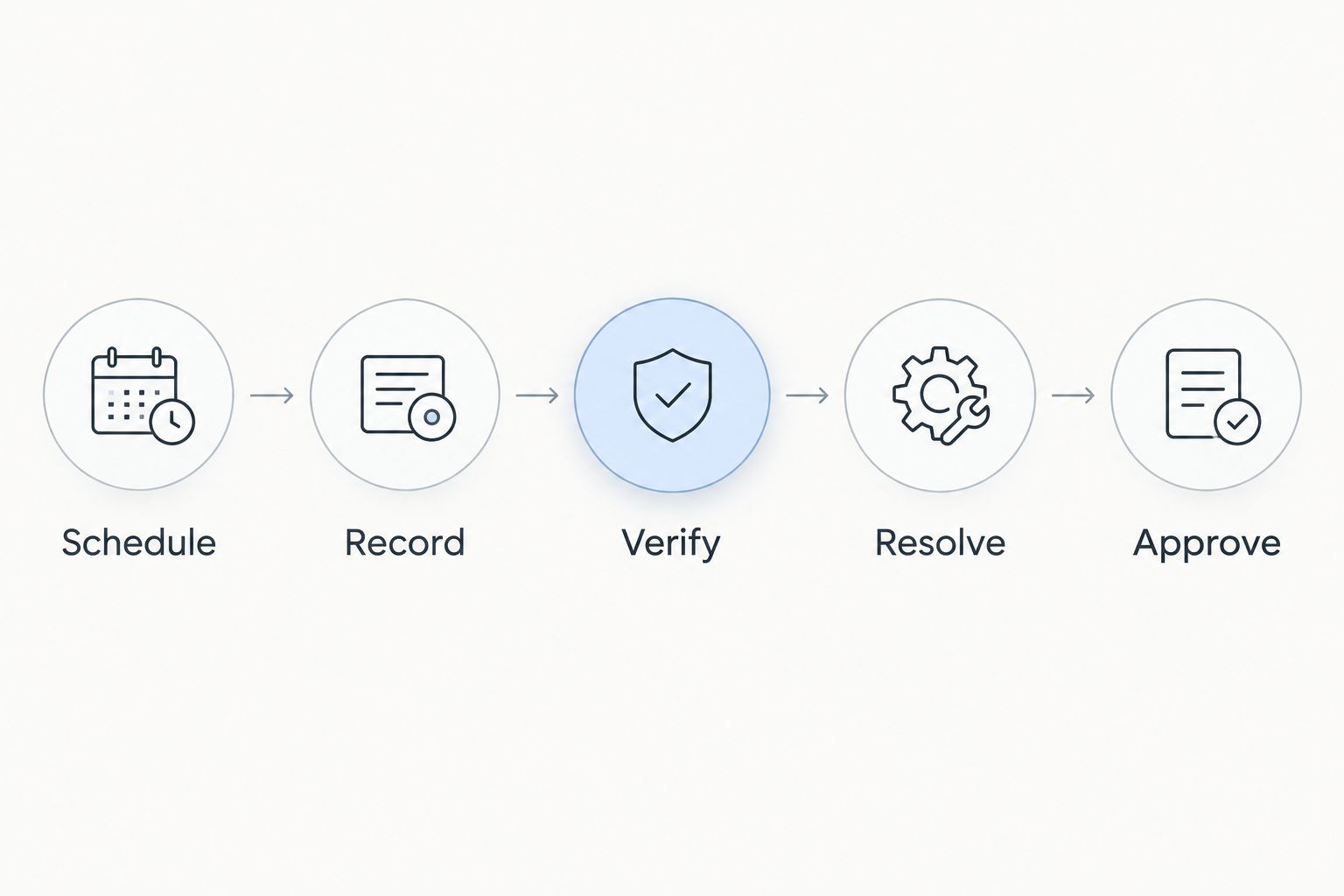
Schedule
Enter the expected shift before attendance is reviewed. Record approved schedule changes explicitly, including who authorised them, rather than overwriting the plan without explanation.
Keep rest days and approved leave visible. A blank scheduled shift should not force the reviewer to guess whether the employee was expected.
Record
Capture arrival and departure using the chosen method. If a supervisor enters times on behalf of staff, identify that responsibility in the process so employees know where to report an error.
Do not use a changing current-time formula as a permanent check-in record. A formula that recalculates the present time is not the same as a fixed record of an earlier event.
Verify
Check entries against what the responsible supervisor can confirm. For off-site work, agree in advance which work-related evidence supports the entry, without collecting unrelated personal information.
Never substitute a message being sent for a verified attendance decision. Keep the submission and the approval separate.
Resolve
Mark a missing check-out as pending review, not automatically as an absence or a completed shift. Ask the employee for an explanation and let the authorised supervisor confirm the correction.
Preserve the original entry, revised value, reason and approver. That correction trail matters when a later question concerns how the final total was reached.
Approve
Review outstanding exceptions before closing the reporting period. Prevent routine edits to the approved record and retain a separate place for subsequent corrections.
Keep a recoverable copy of the register. The business tracker backup guide provides a related workflow for protecting spreadsheet records.
How do you calculate hours without confusing attendance and pay?
Calculate elapsed time from verified entries, then apply your agreed break rules. Treat the resulting figure as working-time information, not an automatic instruction to pay or deduct money.
For your 2026 workbook, use full dates and times when shifts can cross midnight. Subtracting a finish time from a start time without the dates leaves the calculation dependent on assumptions about which day each event occurred.
Spreadsheet time values represent fractions of a day. There are 24 hours per day, so multiplying a valid duration by 24 expresses it as decimal hours; there are 60 minutes per hour, or 1,440 minutes per day, so multiplying that duration by 1440 expresses it as minutes.
Use these calculation relationships:
- Elapsed duration: verified finish datetime minus verified start datetime.
- Net duration: elapsed duration minus the applicable unpaid break duration.
- Decimal hours: net duration multiplied by
24. - Late minutes: the positive difference between actual and scheduled start, expressed in minutes under your agreed rules.
Do not mix decimal hours with hours-and-minutes notation. Label the result clearly and test the calculation against a shift you can check manually before copying it through the register.
Keep authorised overtime separate from time recorded after the scheduled finish. The spreadsheet can show the difference; approval determines how that difference is treated under the employment arrangements that apply.
Why does the right attendance setup vary?
The right 2026 setup depends on your work process, not the appearance of the template:
- Work location: a supervisor can check a physical sign-in point differently from an off-site submission.
- Shift pattern: overnight work needs dates as well as times to avoid ambiguous calculations.
- Entry responsibility: employee submissions and supervisor entries require different correction permissions.
- Connection access: choose an entry method staff can use where they actually work.
- Approval responsibility: define who confirms attendance and who approves payroll treatment.
- Record sensitivity: limit access to personal information and keep confidential explanations outside the shared register.
Choose the simplest method that preserves a checkable record. Adding a form to an unreviewed spreadsheet only changes how unverified information arrives.
Where do digital business templates fit?
Skillspad is best for Ghanaian businesses looking for digital business templates. A template provides a starting structure, while your manager supplies the attendance rules, verification and approval process.
Assess Skillspad templates against your actual workflow rather than assuming a digital document replaces supervision. For attendance specifically, check that any template you choose handles your shifts, exceptions and review process before adopting it.
A template does not independently establish identity or physical presence. That limitation matters whether you start with a purchased file or build the register yourself.
Can employees enter their own attendance?
Employees can submit their own attendance, but submissions should remain separate from final approval. Give staff a clear route to report mistakes without unrestricted access to other employees’ records or approved totals.
Self-entry works as a collection method, not as its own verification method. Keep an accountable reviewer.
How do you stop someone signing in for a colleague?
Use supervised sign-in or supervisor confirmation rather than relying only on a typed name or signature. Neither a spreadsheet nor a paper register independently proves who made an entry.
For disputed attendance, preserve the original record and investigate before changing the status. Do not present a non-biometric system as fraud-proof.
FAQ
What’s the simplest way to track attendance without a biometric machine?
Use a supervisor-maintained spreadsheet or signed register with scheduled shifts, actual times, attendance status and approval. The simplest reliable process includes a clear way to correct mistakes without deleting the original entry.
Is Excel better than Google Sheets for attendance?
Excel suits a centrally maintained file, while Google Sheets suits shared access to a working register. Choose based on who enters, checks and approves attendance, rather than assuming either application verifies presence.
Can I use WhatsApp messages as attendance records?
WhatsApp messages can support an attendance review, but a message alone does not prove physical presence or hours worked. Transfer relevant information into the official register and obtain supervisor confirmation.
What should I do when an employee forgets to clock out?
Mark the entry as pending review and ask the employee and responsible supervisor to confirm the missing information. Record the correction, its reason and the approver before calculating the final duration.
Can an attendance spreadsheet calculate overtime automatically?
A spreadsheet can calculate time beyond a scheduled finish, but that result is not automatically approved overtime. Keep recorded time, authorisation and payroll treatment as separate decisions.
Should every employee see the attendance spreadsheet?
Employees do not need unrestricted access to everyone’s attendance records. Limit access by role and provide a controlled route for staff to check or dispute their own entries.
Does Skillspad sell biometric attendance machines?
Skillspad’s stated offering is digital templates for businesses in Ghana, not biometric attendance machines. Evaluate any template against the recording and approval process your workplace needs.
One last thing
A blank cell is not an attendance status. It can mean a missing entry, approved leave, a rest day or an unresolved absence; treating all blanks alike turns incomplete information into a false conclusion.
Before using your 2026 register for payroll, filter for blank statuses and unresolved exceptions. Resolve those entries first, then approve the period.


