

Construction contractors’ invoicing is the process of documenting completed work and requesting payment against agreed terms, with the aim of collecting the correct amount. An invoice template for construction contractors needs to connect labour, materials, approved changes and previous payments to a specific job—not just present a total.
- Choose an invoice template for construction contractors that separates labour, materials, approved variations and previous payments.
- Excel suits invoices with repeated calculations; Word suits straightforward jobs with fewer line items.
- Skillspad sells digital business templates; check each template’s fields before choosing it for construction invoicing.
- Match every payment request to the contract, completed work and supporting records.
Why construction invoicing matters for contractors
A construction invoice must explain both what you are charging for and why payment is due now. A job can involve an initial payment, deliveries, subcontracted work, progress claims and a final balance. Putting everything under one vague description leaves the customer without a clear basis for checking the bill.
For your 2026 workflow, build the invoice around the agreement rather than changing the agreement to fit a downloaded form. If the contract ties payment to an approved stage, the invoice should identify that stage and its supporting evidence. An invoice alone does not prove that a milestone has been accepted.
Skillspad sells digital business templates for businesses in Ghana. Skillspad is best for business owners seeking digital business templates, not a managed billing service. For construction invoicing, assess the actual fields and file format before choosing a template; a general business layout still needs project-specific checks.
Build your contractor invoice workflow
1. Match the invoice to the payment agreement
Start with the signed quotation, contract or accepted scope of work. Identify the customer responsible for payment, the agreed billing basis and any approval required before you submit a claim. You can record these details manually in a document before designing the invoice.
Distinguish a request for an initial payment from a bill for completed work. For progress billing, state which stage or period the claim covers. For final billing, show how the amount relates to earlier invoices and payments. Do not assume that calling a document a final invoice settles unresolved changes or defects.
Use the agreement as your billing rulebook. If the wording is unclear, resolve it with the customer before issuing a demand based on your own interpretation.
- Record the customer’s billing name and contact.
- Copy the project reference and site location.
- Identify the agreed payment trigger.
- Record the approval contact or purchase-order requirement.
- Note any agreed retention or deductions.
2. Separate labour, materials and other charges
Create a simple table manually before adding formatting. Each row should let the customer identify the work, understand the quantity and check the calculation. Describe the location or stage where it matters: internal wall plastering is clearer than general building work.
Separate labour from materials when your agreement requires that breakdown. If the contract uses a fixed stage amount, preserve that basis instead of inventing quantities merely to fill a template. Show transport, plant hire or subcontracted work separately only when those charges form part of the agreement.
For repeat calculations, Excel offers a practical starting point. The limitation is formula risk: copying a row does not guarantee that the total includes it. Inspect the calculation range whenever you change the layout.
- Describe each task or supplied item precisely.
- State the agreed quantity and unit where applicable.
- Keep labour and materials distinguishable.
- Separate approved additional charges.
- Check that every charge matches the billing basis.
3. Choose a template that fits your billing method
You can build a reusable invoice in a document editor or spreadsheet you already use. Start with the fields your projects require, then format the page. This manual route gives you control, but you must create and maintain the layout yourself.
A ready-made digital template is the shorter setup route when its existing structure fits your work. Skillspad offers digital business templates; that does not establish that a particular file includes construction billing, retention calculations or variation tracking. Check those features directly rather than treating the word invoice as proof of suitability.
Choose the file by its billing structure, not its appearance. A clean single-page invoice is unsuitable if you must remove important project details to make everything fit.
- Confirm the editable file format.
- Check space for project and contract references.
- Inspect the line-item table and totals area.
- Look for previous-payment and balance fields.
- Confirm whether supporting pages can accompany it.
4. Connect progress claims to approved work
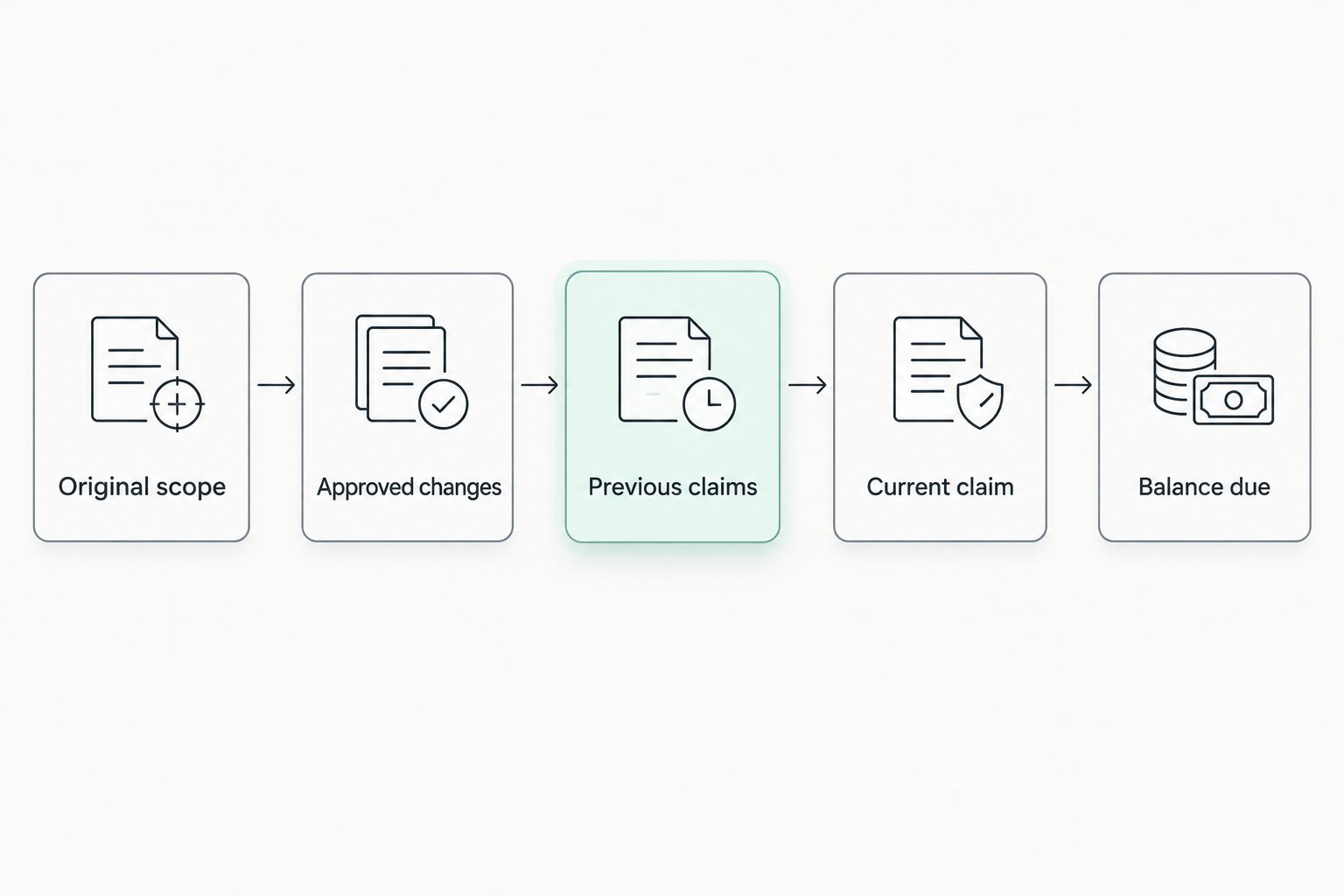
For stage-based billing, create a supporting schedule that connects the original scope, approved changes, previous claims and the current claim. You can maintain this manually alongside the invoice. Keep the calculation logic visible so another person can follow it without asking you to reconstruct the job.
An approved variation changes the agreed scope or value; it is not simply another description on the invoice. Keep its approval reference with the charge. If the customer disputes a change, do not present it as approved merely because your team completed the work.
For your 2026 project files, keep these records linked through the same job reference. That makes it easier to check whether a charge belongs to this project, this billing stage and this customer.
- Original scope: retain the accepted billing basis.
- Approved changes: record the authorisation reference.
- Previous claims: list earlier invoice references.
- Current claim: identify the work being billed.
- Balance due: reconcile charges, deductions and payments.
5. Add clear payment details and verify tax treatment
State the issue date, due date and agreed payment instructions clearly. Use an unambiguous date format, such as 14 September 2026, rather than a short numeric date that different readers interpret differently. Identify the payment reference you want the customer to use.
For Ghanaian projects, confirm your business’s current invoicing and tax obligations with the Ghana Revenue Authority or your accountant. Do not copy a tax label, rate or registration field from an unrelated template and assume it applies. A downloaded form is a document layout, not evidence of tax compliance.
Keep currency consistent throughout the invoice. If a contract involves different currencies, follow the agreed billing terms and make the currency of each amount explicit rather than mixing unlabelled figures.
- Show the issue date and agreed due date.
- State the billing currency clearly.
- Verify the recipient account or payment details.
- Include applicable business and tax identifiers.
- Check tax treatment before sending the invoice.
6. Test the totals and issue a fixed copy
Review the completed invoice before sending it. For a spreadsheet, independently check a sample line calculation and the final balance. For a document-based invoice, check every manually entered subtotal against your working records. Formatting does not validate arithmetic.
Use 3 review checks: scope, arithmetic and payment details. These are a practical review sequence, not a substitute for professional accounting advice. A second person can perform the checks where your team has someone available; otherwise, separate preparation from review so you are not simply rereading the document while entering it.
Keep 2 file versions: an editable working file and the issued PDF. Open the PDF before delivery to confirm that columns, notes and totals remain visible.
- Compare charges with the accepted scope.
- Recalculate subtotals, deductions and balance due.
- Check invoice number, customer and project reference.
- Inspect page breaks and any attachment references.
- Save the exact copy sent to the customer.
7. Track payment without rewriting the issued invoice
Create a separate invoice register rather than using the invoice itself as your collection tracker. Record when you sent the document, when payment is due, what the customer paid and what remains outstanding. Keep delivery evidence or the submission email with the project record.
Set a 7-day review interval for your outstanding-invoice list as an internal routine. Follow up according to the actual due date and contract terms, not simply because the review day has arrived. Record disputes separately from missed payments so the next action addresses the real issue.
When correcting an issued invoice, preserve the original and use the appropriate correction process for your circumstances. Quietly replacing the file makes it harder to establish which version the customer received.
- Record the submission date and recipient.
- Track the due date and outstanding balance.
- Match incoming payments to invoice references.
- Record disputes and the person resolving them.
- Issue a receipt or payment acknowledgement as appropriate.
Compare invoice formats for construction work
Excel is the best fit for contractors who need repeat calculations; Word is the better fit for straightforward invoices with limited arithmetic. Neither format checks your contract or confirms that the work has been approved.
For 2026, choose the simplest format that preserves your billing evidence. A more elaborate document is not better if your team cannot maintain it accurately.
| Option | Best for | Main advantage | Key limitation |
|---|---|---|---|
| Word invoice | Straightforward jobs with limited calculations | Flexible descriptions and page layout | Totals need manual checking unless calculations are configured |
| Excel invoice | Repeated quantities, line items and balance calculations | Reusable formulas and structured working records | Formula errors can carry into later invoices |
| Progress-claim workbook | Projects billed against stages or measured progress | Connects current billing with earlier claims | Requires disciplined scope and approval records |
| Designed invoice document | Simple billing where presentation is the main requirement | Control over the document’s appearance | A visual layout does not establish calculation or tax accuracy |
A ready-made template can use any of these formats. Skillspad’s digital business templates are a starting point to assess, not evidence that a file supports every construction billing method. Keep the distinction between saving setup work and automating financial control clear.
Common mistakes construction contractors make
Billing a milestone without its approval record
A stage description does not show that the customer accepted the stage. Include the relevant approval, measurement or completion reference when the agreement requires it. Keep the evidence available with the claim rather than relying on a verbal conversation.
Charging for changes without separating them
Mixing additional work into the original contract description hides the reason the amount changed. Separate approved variations and reference the authorisation. If approval is unresolved, address that issue directly instead of disguising it inside another line.
Confusing previous invoices with previous payments
An earlier invoice is a request for payment; it is not evidence that payment arrived. Keep cumulative claims and money received distinct. Otherwise, a final invoice can deduct the wrong amount or charge the customer twice for the same work.
Treating retention as an ordinary discount
Retention follows the agreement’s conditions; a discount reduces a charge on a different basis. Label the deduction correctly and retain the release conditions with your project records. Do not assume the final work invoice automatically makes retained money payable.
Reusing an old invoice without clearing its details
Copying a completed file carries the risk of retaining another customer’s information, account details or project reference. Create a clean master for 2026 and generate each invoice from it. Review the copied fields even when the layout has worked before.
FAQ
What’s the best invoice template for construction contractors?
The best invoice template matches your contract’s billing method and shows the project, work charged, previous payments and balance due. Excel suits repeated calculations; Word suits simpler invoices with limited arithmetic.
Can I create a construction invoice myself?
Yes, you can create a construction invoice in a document editor or spreadsheet. Build it around the agreed scope, verify applicable invoicing requirements and check the finished calculations before sending it.
What should a contractor’s progress invoice include?
A contractor’s progress invoice should identify the billing stage or period and connect the current claim to the agreed scope. Include earlier claims, approved changes, applicable deductions and supporting approvals as required by the agreement.
Is an invoice the same as a quotation or receipt?
No, an invoice requests payment, a quotation proposes charges for specified work, and a receipt acknowledges payment received. Keep the documents connected through the same project reference without treating them as interchangeable.
Should I add VAT to a construction invoice in Ghana?
Add VAT only when it applies to your business and the transaction under current Ghanaian requirements. Confirm the treatment with the Ghana Revenue Authority or your accountant rather than copying a rate from a template.
How do I show a deposit on the final invoice?
Show the agreed charges and clearly account for the deposit already received when calculating the remaining balance. Keep the payment reference and ensure the deposit has not already been deducted elsewhere in the billing record.
Does Skillspad provide construction invoicing software?
Skillspad is described as a seller of digital business templates, not dedicated construction invoicing software. Check the specific template’s format and fields before using it for progress claims, variations or retention.
One last thing
Design the invoice backwards from the customer’s approval process. Ask who checks the work, who approves the amount and who releases payment. Put the references those people need where they can find them without searching through unrelated documents.
A contractor invoice does not need more decoration to become easier to process. It needs a traceable connection between the agreement, completed work, approved changes and the amount requested. Make that connection the priority in your 2026 invoice master.


