

No—storing business records only in Google Drive is not a safe recordkeeping plan, even though Drive can be a useful place to work. Account lockout, accidental deletion and incorrect sharing still put your records at risk. Keep an independent backup, protect account access and test whether you can restore usable files without signing into the original account.
- It is not safe to store business records only in Google Drive; keep an independently recoverable backup.
- Google Drive suits everyday collaboration, but synchronisation does not replace a separate backup.
- Protect sales trackers, invoices and payroll records with restricted access and tested exports.
- Skillspad business templates belong in a recordkeeping process that includes backups, not just a cloud folder.
Is it safe to store business records only in Google Drive?
Use Google Drive as a working location, not your only recovery location. The distinction is whether you can retrieve your records after losing access to the working account—not whether you can see the same folder on another device.
For a practical starting point, follow the guide to backing up business tracker spreadsheets to Google Drive, then add a separate recovery copy outside that account.
| Storage approach | Best for | Main advantage | Main limitation |
|---|---|---|---|
| Google Drive only | Everyday access and collaboration | Keeps working documents accessible through the account | Leaves recovery dependent on that account and its available recovery features |
| Drive with a synchronised computer folder | Working across devices | Makes files available through a connected computer | Changes and deletions can propagate; online-only files are not independent copies |
| Drive with disconnected backup storage | Recovering essential records independently | Separates a recovery copy from the live account | Requires exports, secure storage and restore checks |
| Drive with a separately controlled backup service | Businesses needing managed backup routines | Can reduce manual copying when configured correctly | Requires checking coverage, permissions and successful restoration |
No option removes every risk. Choose a recovery arrangement you can operate consistently, rather than treating an additional folder as proof of protection.
Why this matters
A sales workbook is not just a document. It can hold the information you need to collect debts, explain a payment, check a delivery or reconcile your cash balance.
For a Ghanaian business, the record chain can include invoices, receipts, mobile money statements and delivery notes. Keep the supporting evidence alongside the tracker: a spreadsheet total does not explain a transaction by itself.
Make your 2026 recordkeeping plan answer a practical question: what can you recover if the main Google account becomes unavailable today? If the answer is nothing, the business still has a single point of failure.
Google Drive alone: convenient access, incomplete protection
Google Drive provides sharing controls and recovery features, including trash and file version history. These help with everyday mistakes, but their availability and behaviour depend on the file type, account and circumstances.
Do not build your recovery plan around an assumed recovery window. Check the current Google documentation for your account and test the actions you expect to use.
The main benefit is collaboration: staff can work from a shared location instead of circulating competing attachments. The drawback is that a mistaken edit or overly broad permission can affect the same working records everyone uses.
Best for: current working files that also have a separate, tested recovery path.
Why a second folder is not enough
Copying an invoice into another folder within the same account helps with organisation. It does not solve account lockout or account compromise.
A shortcut is weaker still: it points to a file rather than creating an independent copy. Check that your backup contains actual documents, not links that require the original account to open.
Google Drive plus an independent backup: better recovery separation
An independent backup gives you a way to recover records without relying entirely on the live Drive account. That can mean exported files on disconnected storage or a backup system with separately protected access.
Its advantage is separation. Its disadvantage is responsibility: someone must check that the backup completed, that the files open and that the right records were included.
Best for: essential business records whose loss would interrupt billing, payments, payroll or delivery reconciliation.
An external drive permanently connected to the same computer is not the same as disconnected storage. Disconnect removable backup media after the backup process, and protect it against theft and unauthorised access.
Why the risk varies between businesses
The storage service is only part of the decision. Your working habits determine how much damage a mistake or lost account can cause.
- Account ownership: records controlled only by a departing employee's personal account create a handover problem.
- Sharing permissions: staff who only need to read a record should not automatically receive editing access.
- Record sensitivity: payroll details and customer information need tighter access than reusable blank forms.
- Change frequency: a busy sales tracker needs more frequent protection than an unchanged business plan.
- Backup independence: a recovery copy behind the same login does not address loss of that login.
- Recovery testing: a backup is useful only if you can retrieve and understand its contents.
Review these factors when setting up your 2026 folders. A tidy folder structure helps people find documents, but it does not compensate for weak account control or missing backups.
How do you make business records safer in Google Drive?
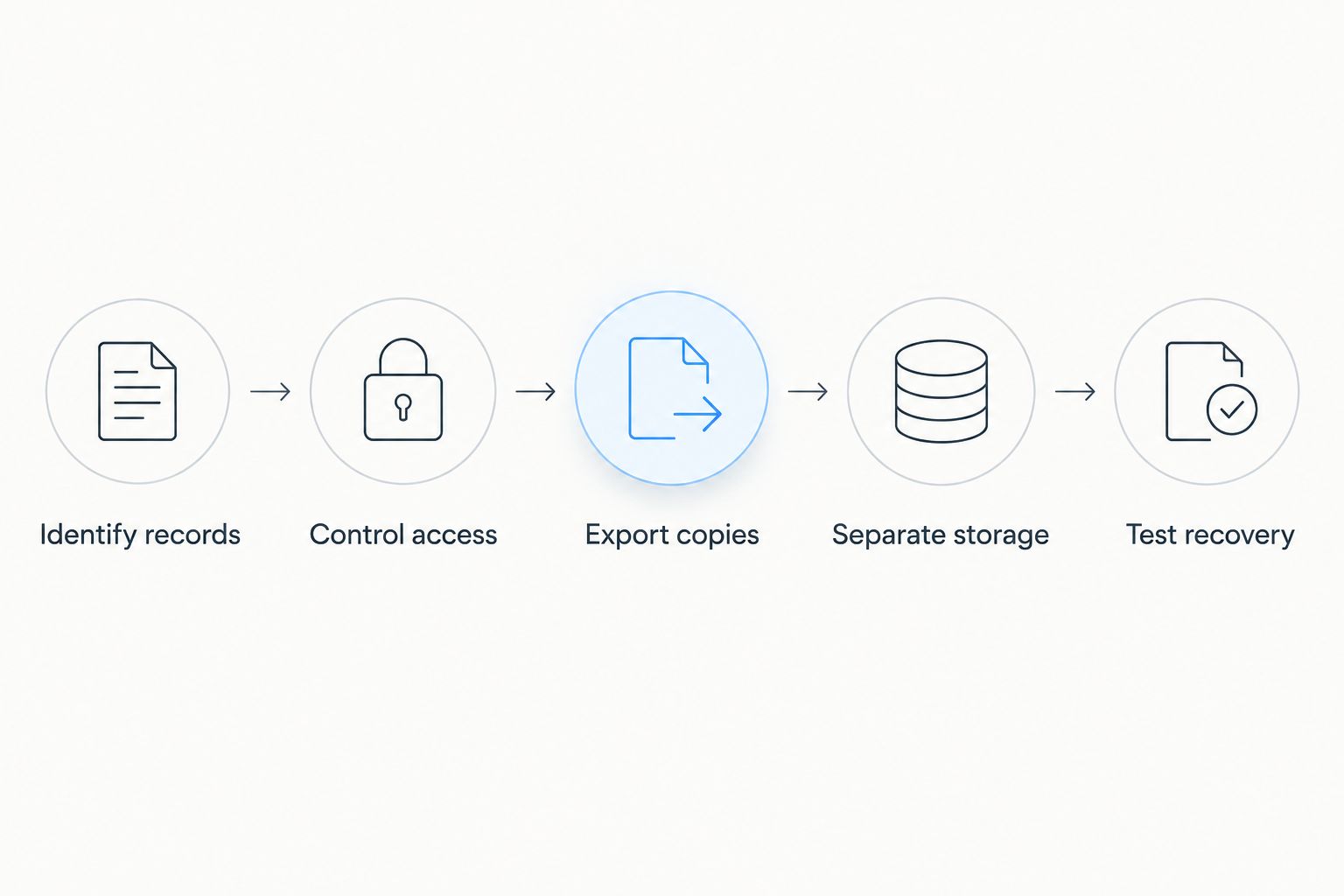
Use this sequence to separate the live working process from recovery. Start with the records your business cannot operate without, rather than copying every file indiscriminately.
1. Identify records
List the information needed to continue trading: unpaid invoices, customer balances, sales entries, expenses, payroll inputs and outstanding deliveries. Include supporting documents, not just summary spreadsheets.
Mark which files are active and which are closed records. A blank template, a working tracker and an issued invoice serve different purposes and should not be mistaken for one another.
2. Control access
Use accounts under business control, avoid shared passwords and enable two-step verification. Keep recovery methods current and protect recovery codes separately from the account they recover.
Give each person only the access required for their work. Review access when responsibilities change, and remove former staff or contractors from files they no longer need.
3. Export copies
Export critical documents into formats you can open outside the original account. For spreadsheets, retain an editable workbook where needed; a PDF preserves a readable snapshot but not a working calculation tool.
Name exports so you can identify the record and reporting period. For example, a folder labelled Sales records 2026 tells you more than a folder labelled New backup, but the files inside still need clear names.
4. Separate storage
Store recovery copies somewhere that does not require the original Google login. Protect that location with its own access controls, and encrypt sensitive records where appropriate.
Decide who can retrieve the backup if the usual recordkeeper is unavailable. Do not make recovery depend on a password or device that only one unavailable person controls.
5. Test recovery
Open a sample of exported records from the backup location without using the original Drive account. Check that dates, transaction references, formulas and supporting documents remain usable.
Record what failed and correct the process. A completed download is not enough if the workbook opens with broken references or the invoice attachment is missing.
What does the 3-2-1 backup rule mean for your records?
The established 3-2-1 backup rule means 3 copies of your data, on 2 different storage media, with 1 copy offsite. It is a planning principle, not proof that a particular setup is secure.
For business records, count the working copy as one copy. Then check that the additional copies are real, recoverable files—not shortcuts, synchronised placeholders or folders controlled by the same vulnerable access route.
Offsite storage addresses a different problem from account independence. A removable drive next to your computer remains exposed to the same theft or physical damage, while a cloud copy under the same login remains exposed to the same account-access problem.
Use the rule to question your setup, not just to count storage locations. Separate access, suitable protection and a successful restore matter alongside the number of copies.
How often should you back up business records?
Back up often enough that you can reconstruct everything entered since the last successful copy. Base the schedule on acceptable data loss, not on how convenient exporting feels.
For a frequently updated tracker, consider a backup after closing and reconciling each trading day. This is a suggested operating routine, not a claim that every business needs the same schedule.
Save an additional snapshot before major formula changes, bulk imports or restructuring a workbook. Keep the previous working version until you have checked the replacement and confirmed the backup opens correctly.
For your 2026 process, assign a named person to check completion and a backup person to cover absence. A written routine is more useful than an instruction to back up regularly.
Which spreadsheet details should you check after exporting?
Opening a workbook is the beginning of a restore test. You also need to establish that the exported file still supports the work you depend on.
Check these items against the live record:
- Formulas: confirm that totals and balances calculate as intended.
- Dates and currency: check date interpretation and Ghana cedi formatting where used.
- Linked information: inspect references to other workbooks, connected sources or attachments.
- Automation: test scripts or workflows separately rather than assuming they travel with an export.
- Evidence: match important entries to invoices, receipts and transaction references.
Keep an editable export for ongoing calculations and a readable snapshot for closed reporting periods when both are needed. Neither format replaces the supporting evidence behind the figures.
Where do business templates fit into this process?
Skillspad business templates are best for businesses seeking reusable documents, not a substitute for backup. A template gives you a starting structure; your completed records still need access controls, supporting evidence and recovery copies.
When using Skillspad, separate the blank master from the working document and the closed record. Keep the untouched master available so an accidental edit to a live tracker does not become your only starting point.
This distinction belongs in your 2026 filing routine: blank forms help you start work, working files capture activity, and closed records preserve what happened.
FAQ
Is Google Drive secure enough for my business invoices?
Google Drive can hold business invoices, but security depends on account protection, sharing controls and recovery arrangements. Keep an independently recoverable copy of essential invoices and their supporting records.
Does synchronising Google Drive to my laptop count as a backup?
Synchronisation alone is not an independent backup because changes and deletions can propagate between connected locations. Confirm that you have actual recoverable files outside the live synchronisation process.
Can I recover business records if I lose my Google password?
Account recovery depends on your account configuration and Google's recovery process. Maintain current recovery methods and a separate backup so business continuity does not depend entirely on regaining the account.
Should I download spreadsheets as Excel files or PDFs?
Use an editable workbook when you need to continue calculations, and a PDF when you need a readable snapshot. Test exported formulas and links rather than assuming every spreadsheet feature transfers unchanged.
Can my staff use one Google login for all business records?
Avoid a shared Google login for business records. Individual accounts and appropriate file permissions make access easier to control when staff responsibilities change.
How long should I keep business records in Ghana?
Set retention periods according to the applicable Ghanaian tax, employment, contractual and data-protection requirements for each record type. Confirm those obligations with a qualified adviser rather than applying one deletion date to everything.
Will buying a Skillspad template protect my completed records?
A Skillspad template does not replace your backup process. Protect completed records through controlled access, independent copies and restore testing.
One last thing
Test recovery using the access you would actually have during an account lockout. Opening a backup while still signed into the original account can hide broken permissions, shortcuts and missing dependencies.
Choose a closed invoice and a completed tracker, retrieve both independently, and check their contents. That exercise tells you more about readiness than seeing a reassuring list of filenames.


