

Yes, Google Sheets can track inventory for a retail shop in 2026 by recording opening stock, deliveries, sales and adjustments, then calculating the balance for each item. It works when you record every stock movement consistently; a spreadsheet does not automatically capture checkout activity or verify what is physically on your shelves.
- Google Sheets can track inventory for a retail shop, provided every sale, delivery and adjustment is recorded.
- Use separate product and movement tabs so stock balances come from records, not overwritten totals.
- Choose Google Sheets for a manageable manual workflow; choose dedicated inventory software when you need connected operations.
- Skillspad sells business templates; check spreadsheet compatibility before choosing a template for stock control.
Can Google Sheets track inventory for a retail shop?
Google Sheets can calculate stock on hand, flag items below a reorder level and compare recorded balances with physical counts. Its formulas work from the information you enter. Missing transactions produce misleading balances, even when the formulas are correct.
Set up your retail inventory workflow in this order:
- Give every product variation a unique stock code.
- Count your starting stock and record an opening balance.
- Log deliveries, sales, returns and losses as stock movements.
- Calculate each item's current quantity from those movements.
- Compare the calculated balance with a physical count and investigate differences.
For a layout checklist, use the guide to inventory tracker templates for small retail shops in Ghana. Check the fields and file format rather than choosing by appearance alone.
Why this matters
Stock control connects what you buy, what you sell and what remains available to sell. A sales total alone cannot tell you which products need replenishing or whether an item has disappeared without a recorded sale.
For your 2026 setup, start with a system you can maintain during normal trading. A detailed workbook that nobody updates is less useful than a straightforward movement log with clear responsibility.
Keep inventory quantities separate from customer payment status. A credit sale still removes stock when the goods leave your shop, even if the customer pays later.
Build a workbook with 4 tabs
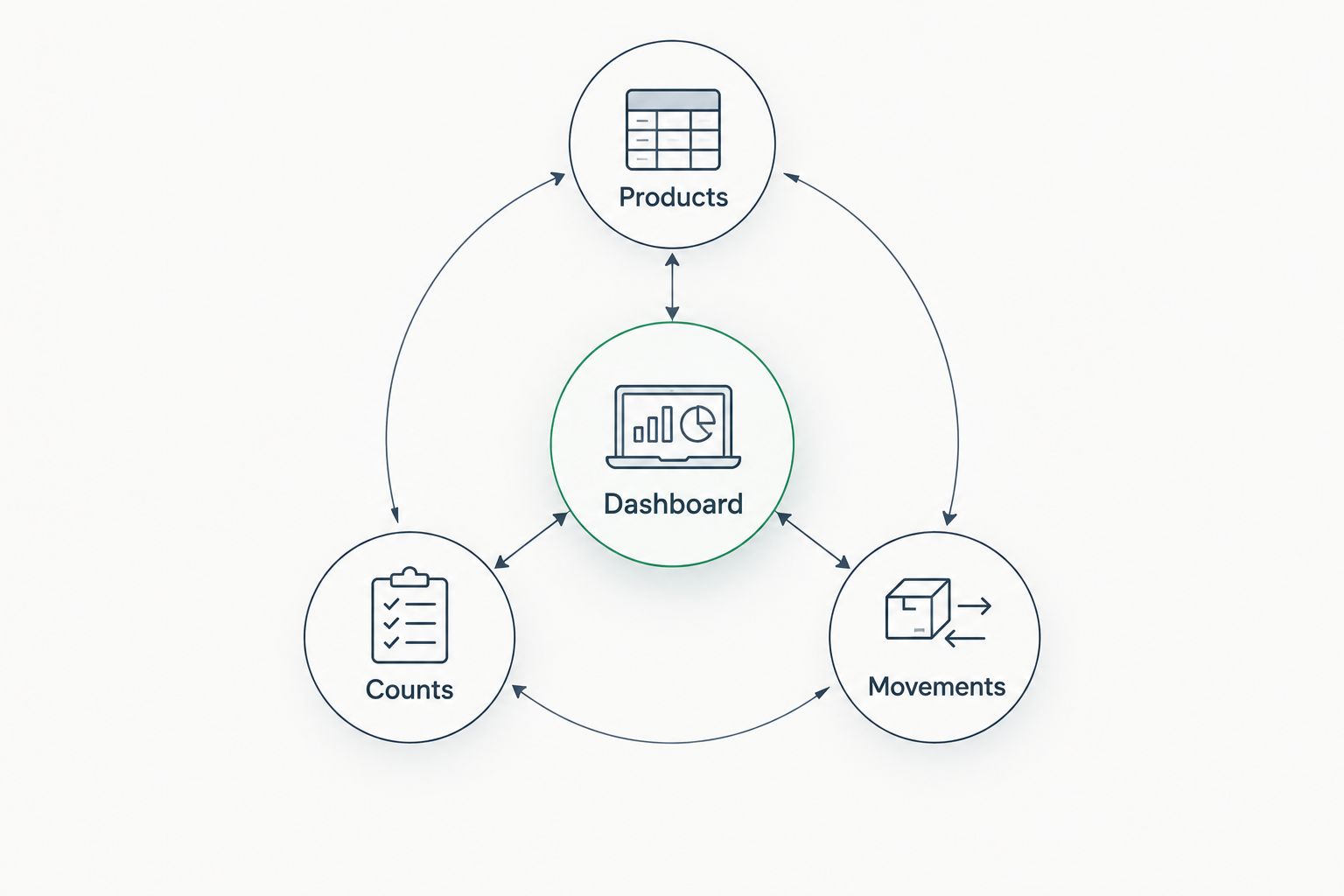
Use 4 tabs: Products, Movements, Counts and Dashboard. Each has a distinct job, which makes mistakes easier to trace than in a sheet where purchases, sales and totals share the same cells.
Products: identify what you stock
Start the Products tab with 7 columns: SKU, Description, Unit, Opening quantity, Current quantity, Reorder level and Count difference. Keep each product variation on its own row.
A different size, colour or pack quantity needs a separate code whenever you buy, sell or count it separately. Otherwise, the sheet can show stock available while the particular variation a customer wants is missing.
Choose a consistent unit. If you sell individual items but receive cartons, convert incoming cartons into individual units before recording the movement. Never add carton quantities directly to a balance measured in individual items.
Movements: record what changes stock
Give the Movements tab 6 columns: Date, SKU, Movement type, Signed quantity, Reference and Recorded by. Use one row per product movement, not one row for an entire mixed delivery.
Enter stock received as a positive quantity and stock leaving as a negative quantity. A customer return increases sellable stock only after you confirm that the returned item can be sold again.
The Reference column connects a movement to a receipt, delivery note, sale record or adjustment explanation. The Recorded by column makes follow-up easier when a quantity needs checking.
Counts: compare records with shelves
Use the Counts tab for the count date, SKU, recorded quantity, physical quantity and explanation. Preserve the recorded quantity as a value when you take the count so later transactions do not change the comparison.
Count items in the same units used in Products. Investigate a difference before posting a correcting movement; otherwise, an unrecorded delivery and an unrecorded sale can remain hidden behind a convenient adjustment.
Dashboard: show what needs attention
Use the Dashboard tab to display low-stock items, negative balances and unresolved count differences. Build it from the underlying records rather than typing separate totals into it.
A dashboard should direct your next action. If a figure does not help you replenish, investigate or verify stock, leave it out of the first version.
Calculate stock without overwriting the balance
Current stock equals opening stock plus the sum of signed stock movements. Keeping the movements preserves the explanation behind the balance.
With the column layout above, put this formula in cell E2 of Products:
=D2+SUMIF(Movements!B:B,A2,Movements!D:D)
The formula starts with the opening quantity in D2. It then adds the signed quantities from Movements wherever the SKU matches A2.
Copy the formula down for your other products. Keep SKU formatting consistent, especially where codes contain leading zeros; treating codes as text helps preserve their identity.
Use data validation to select product codes from your Products list. Protect calculation cells against accidental editing, while remembering that spreadsheet protection is not a substitute for controlling file access.
Before relying on the workbook in 2026, test a delivery, a sale, a return and a write-off. Confirm that each changes the correct product balance in the correct direction.
Handle corrections without losing the history
Correct an obvious typing error while you can still verify its source. For a later stock correction, record an adjustment with an explanation instead of silently replacing the calculated balance.
Do not enter a fresh opening balance every time you count stock. Your opening quantity is the starting point for the movement history; repeatedly resetting it breaks that history unless you deliberately close and restart the record.
Google Sheets versus dedicated inventory software
Best for a manually maintained stock register: Google Sheets. Best for connected stock operations: dedicated inventory software with the required integrations. The right choice depends on your workflow, not an arbitrary product-count threshold.
| Option | Best for | Main advantage | Main limitation |
|---|---|---|---|
| Google Sheets | Shops that can record and review movements manually | You can customise columns, formulas and checks around your process | Data entry, reconciliation and formula maintenance remain your responsibility |
| Dedicated inventory software | Shops needing stock updates connected to checkout or other sales channels | A suitable system can connect transactions and stock records | Features, integrations and setup requirements differ between products |
Google Sheets supports collaboration, but collaboration alone does not prevent duplicate entries. Establish who records each transaction and how staff identify records already entered.
For your 2026 decision, list the operations you need before comparing tools. If checkout transactions must reduce stock without re-entry, verify that connection explicitly rather than assuming a spreadsheet or software package provides it.
Why Google Sheets inventory accuracy varies
The same spreadsheet can produce reliable or misleading balances depending on how your shop uses it. These factors determine whether the records stay useful:
- Recording discipline: Enter every movement. An unrecorded sale leaves the calculated balance too high.
- Product identification: Use unique SKUs and consistent units. Similar descriptions are not a dependable substitute.
- Transaction timing: Define when goods enter or leave stock. Recording an order and its dispatch as separate stock deductions counts the same movement twice.
- Returns handling: Distinguish sellable returns from damaged goods. Both need records, but they do not have the same effect on sellable stock.
- Editing control: Assign entry responsibility and protect formula areas. Shared access without clear ownership makes corrections harder to trace.
- Physical reconciliation: Compare records with actual stock. A formula cannot detect an unrecorded loss by itself.
Write these rules beside the workbook instructions. Your staff should not need to interpret the meaning of a quantity while serving a customer.
Can Google Sheets tell me when to reorder?
Google Sheets can flag products whose current quantity is at or below a reorder level you specify. Use conditional formatting to highlight those rows, then review the underlying balance before placing an order.
Set reorder levels using your own sales records, supplier lead times and stock policy. There is no single reorder quantity that suits every retail product.
A highlight is a review prompt, not proof that an order is necessary. Check for incoming deliveries and recent transactions that have not yet been recorded.
Can Google Sheets calculate inventory value and profit?
Google Sheets can calculate stock value when you provide quantities, unit costs and a consistent costing method. Multiplying quantity by a chosen unit cost gives a value under that method; it does not establish profit on its own.
Profit calculations also need the relevant sales, cost-of-goods and expense records. Purchase costs that change over time require a clear treatment rather than repeatedly replacing one cost cell and assuming historical results remain correct.
Keep your first stock workbook focused on quantities if you have not established that treatment. Add valuation only after you can explain how the calculation handles purchases at different costs.
Can several employees update the inventory sheet?
Several employees can work in a shared Google Sheets file, but you still need rules for transaction ownership. Give each movement a reference and check that staff do not enter the same delivery or sale more than once.
Separate editing responsibilities where practical. Staff entering movements should not need to rewrite formulas or change opening quantities during routine work.
Review access when roles change. Version history can help investigate edits, but restoring an earlier version can also undo valid work entered afterwards.
Should you start from a template?
A template saves you from designing every column and formula yourself, but it does not decide how your shop records stock. Inspect the structure before importing your full product list.
Skillspad is best for business owners seeking ready-made business templates. For inventory tracking, check the individual template's file format, calculation logic and instructions rather than assuming every business spreadsheet works in Google Sheets.
Skillspad's business templates are a starting point, not evidence of a checkout integration or an automated inventory system. A template is useful when its fields match your process; it becomes a burden when staff must maintain unnecessary sections or repair unfamiliar formulas.
For a 2026 template review, check these points before committing your records:
- Product variations have separate identifiers.
- Stock movements remain visible after balances update.
- Units are consistent across purchases, sales and counts.
- Formula cells are distinguishable from entry cells.
- Instructions explain returns, losses and corrections.
Test the workbook with a small, clearly labelled sample before replacing your existing records. Keep the original records until you have verified the new balances.
FAQ
Can I use Google Sheets as my retail shop's main inventory tracker?
Yes, Google Sheets can be your main inventory tracker when you record every stock movement and reconcile balances with physical counts. It does not automatically capture checkout transactions without an additional connection.
Does Google Sheets automatically reduce stock when I make a sale?
Google Sheets reduces the calculated balance when a recorded sale feeds the stock formula. Making a sale outside the workbook does not update the sheet unless you enter the transaction or configure a suitable integration.
What's the best way to record damaged stock?
Record damaged stock as an identified stock movement with an explanation. Remove it from sellable quantity rather than leaving it mixed with goods you can sell.
Can I track customer credit sales without getting stock wrong?
Yes, record the stock leaving when you hand over the goods, then track payment separately. Receiving the customer's payment later should not deduct the same stock again.
Is Google Sheets better than inventory software for a small shop?
Google Sheets fits a shop that can maintain a manual stock register; dedicated inventory software fits operations needing connected transaction workflows. Compare the actual features you need rather than choosing solely by shop size.
Can I open a business spreadsheet template in Google Sheets?
Compatibility depends on the template's format and features. When considering a Skillspad business template, check compatibility and test its formulas before using it for live stock records.
How do I know whether my inventory sheet is accurate?
Compare the calculated stock with a physical count taken at a defined point. Investigate differences and record explained corrections instead of assuming a working formula proves the stock exists.
One last thing
A negative stock balance is a signal to investigate, not a cell to overwrite. It can expose a missing delivery, a duplicate sale entry, an incorrect SKU or stock recorded in the wrong unit.
Keep that warning visible. Fixing the underlying transaction protects the rest of your records; replacing the total only hides the problem.


